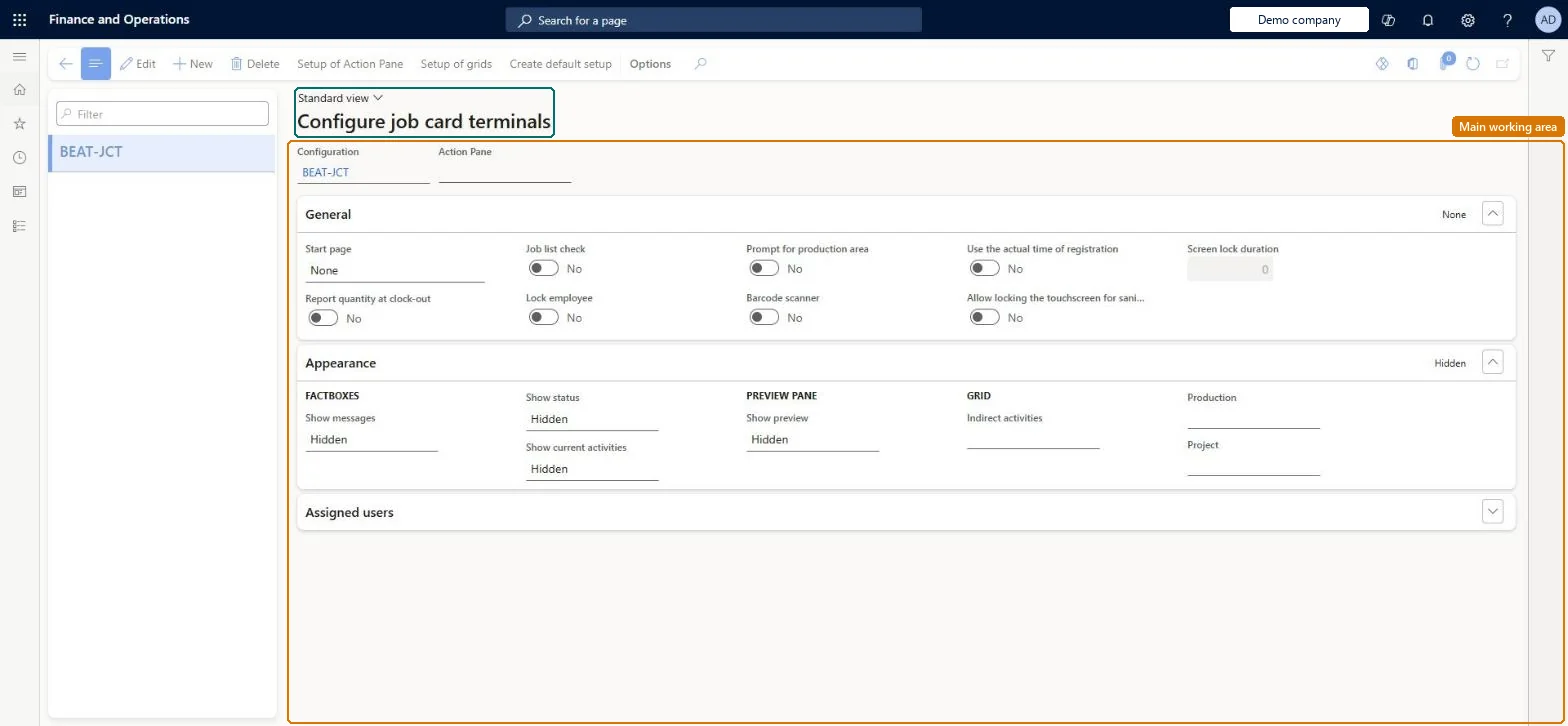
A setup page where you define configurations for the job card terminal, the older registration screen for shop floor workers, including its Action Pane buttons and the grid fields workers see; the terminal is deprecated in favour of the production floor execution interface.
Deprecated in Supply Chain Management 10.0.41. Microsoft stops supporting the job card terminal about one year after version 10.0.41 and might remove it. Use the production floor execution interface instead. Microsoft Learn
PAGE GUIDEWhat the page does and how to use it8 sections. Choose a role to highlight what matters to you.
Everyone
1What it is and why
What it is
A setup page where you define configurations for the job card terminal, the older registration screen for shop floor workers, including its Action Pane buttons and the grid fields workers see; the terminal is deprecated in favour of the production floor execution interface.
What you do here
Use this page only if you still run job card terminals: create a configuration, set up its Action Pane and grids and its sign-in and feedback options, and then assign the configuration to time registration workers.
Example
For example, Lock employee is selected only for a terminal used by a single worker, because it stops other workers from registering on that terminal.
The page in Dynamics 365. page title tab to open what to set or check
About the examples: Examples and screenshots in this guide use BEAT, a demo company in a Dynamics 365 test environment. Use your own company's codes and values instead of copying them.
Setup steps on this page
Configure job card terminals
Use this page only if you still run job card terminals: create a configuration, set up its Action Pane and grids and its sign-in and feedback options, and then assign the configuration to time registration workers.
Steps from Microsoft
Go to Production control > Setup > Manufacturing execution > Configure job card terminals.
Select New and enter a name in the Configuration field.
In the Action Pane field, select an Action Pane configuration (use Setup of Action Pane to change the buttons).
On the General FastTab, set Start page, Feedback input method (Grid or Wizard), Report quantity at clock-out, Job list check and Lock employee.
Assign the configuration to each worker on the Time registration FastTab of the worker record.
Don't build new job card terminal configurations; set up the production floor execution interface instead and keep terminal configurations only until workers have movedLearn lists the job card terminal as deprecated in 10.0.41, replaced by the production floor execution interface, and no longer supported about a year after that release.
Spending design effort on Action Pane and grid setups for terminals. The terminal might be removed from the product, so the work has to be redone on the production floor execution interface.
Reversible: Terminal configurations only shape the registration screen; changing or removing them doesn't change registrations already made. Microsoft Learn
If you change it later
The job card terminal is deprecated from version 10.0.41 and may be removed about a year later, so new configuration effort should go to the production floor execution interface instead. Microsoft Learn
Technical architect
6Technical
Menu item
JmgRegistrationSetupPCChecked in Dynamics 365
Form
JmgRegistrationSetupChecked in Dynamics 365
Table
JmgRegistrationSetupShown as “REGISTRATION SETUP” in Record infoChecked in Dynamics 365
Data entities
JmgJobCardTerminalConfigurationEntityJob card terminal configurations Microsoft data model JmgJobCardDeviceConfigurationEntityJob card device configurations Microsoft data model
Who can open it
PrivilegesMaintain registration form configurations JmgRegistrationSetupMaintainView registration form configurations JmgRegistrationSetupViewDutiesInquire into manufacturing execution policies JmgManufacturingExecutionPoliciesInquirEnable manufacturing execution process JmgManufacturingExecutionProcessEnableEnable time and attendance process JmgTimeAttendanceProcessEnable2 security rolesPayroll administrator HcmPayrollAdministratorProduction manager ProdProductionManagerChecked in Dynamics 365
Roles to set it up and use it
To set it up or change itProduction manager ProdProductionManagerPayroll administrator HcmPayrollAdministratorGive people one of these roles. On this system, 2 roles can open this page.Checked in Dynamics 365
Actions on the page
(Action Pane without tabs): Setup of Action Pane, Setup of grids, Create default setupChecked in Dynamics 365
JmgJobCardTerminalConfigurationEntity (Job card terminal configurations): loaded for each company, in Microsoft's default template 410 - Production control.JmgJobCardDeviceConfigurationEntity (Job card device configurations): loaded for each company, in Microsoft's default template 410 - Production control.Load order: Microsoft's default template 410 - Production control loads Job card terminal configurations at execution unit 1, level 410, sequence 60. Lower levels load first, and entities at the same level load in sequence order.Load first: the default templates at lower levels (System setup to Transportation management)Microsoft Learn