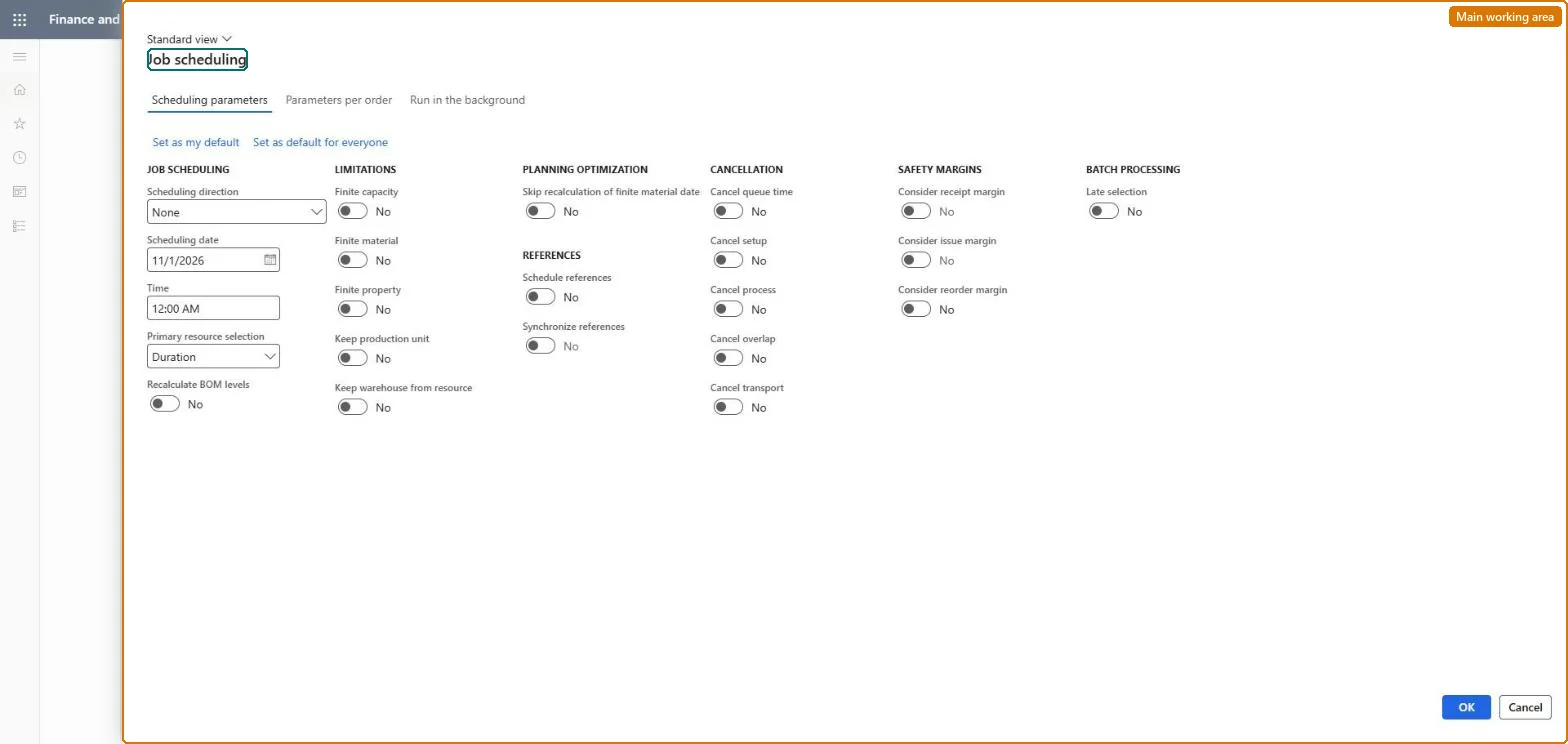
A periodic batch page that runs job scheduling, the detailed form of scheduling that splits each production operation into individual jobs and gives each job a start time, an end time and a resource.
Schedule production using Job scheduling in Dynamics 365 Supply Chain Management
Menu item
action:ProdSchedulingJob
Show what matters for
PAGE GUIDEWhat the page does and how to use it7 sections. Choose a role to highlight what matters to you.
Everyone
1What it is and why
What it is
A periodic batch page that runs job scheduling, the detailed form of scheduling that splits each production operation into individual jobs and gives each job a start time, an end time and a resource.
What you do here
Use this page to schedule the jobs of one or many production orders in one run, choosing the scheduling direction and date and whether capacity and materials are treated as finite. It can run once or on a recurring batch schedule.
Example
For example, a planner can schedule all not-yet-started production orders for a site backward from their delivery dates in one run.
The page in Dynamics 365. page title tab to open what to set or check
About the examples: Examples and screenshots in this guide use BEAT, a demo company in a Dynamics 365 test environment. Use your own company's codes and values instead of copying them.
When to run it
When to run it
After operations scheduling, or on its own, when production orders need a detailed short-term schedule on specific resources.
How often
Whenever orders must be planned at job level for the coming days; as a recurring batch with Late selection if new orders arrive continuously.
Batch settings
Set it up as a recurring batch job with Late selection so each run schedules the orders that exist at that moment.
What the output shows
Jobs per operation with start time, end time and resource, and capacity reservations on those resources. Jobs pushed far into the future under finite capacity point to overloaded resources; no transport or queue jobs means the operation has no such time set.
Go to Production control > Periodic tasks > Scheduling > Job scheduling.
Select the production orders whose jobs should be scheduled.
In Scheduling direction, choose forward to start as early as possible or backward to finish on the target date, and enter the Scheduling date.
Set Finite capacity so scheduled load can't exceed what a resource has free, Finite material so jobs wait until components are available, and Finite property if operations require resource properties.
Select Schedule references so subproductions are scheduled together with the main production, and use Late selection when the job recurs so new orders are picked up each run.
Review the result in the Gantt chart or on the order: each operation is split into jobs with start and end times and an assigned resource.
Yes, by resetting status: Reset the order from Scheduled to Estimated to delete the jobs and capacity reservations, or run job scheduling again. Microsoft Learn
If you change it later
Running job scheduling again moves job start and end times and capacity reservations; with finite capacity the scheduled load cannot exceed what the resource has available, so jobs may be pushed later. Microsoft Learn
Technical architect
5Technical
Menu item
action:ProdSchedulingJobChecked in Dynamics 365
Form
ProdScheduleChecked in Dynamics 365
Roles to set it up and use it
To use itProduction supervisor ProdProductionSupervisorProduction manager ProdProductionManagerProduction planner ReqProductionPlannerGive people one of these roles. On this system, 3 roles can run this page.Checked in Dynamics 365