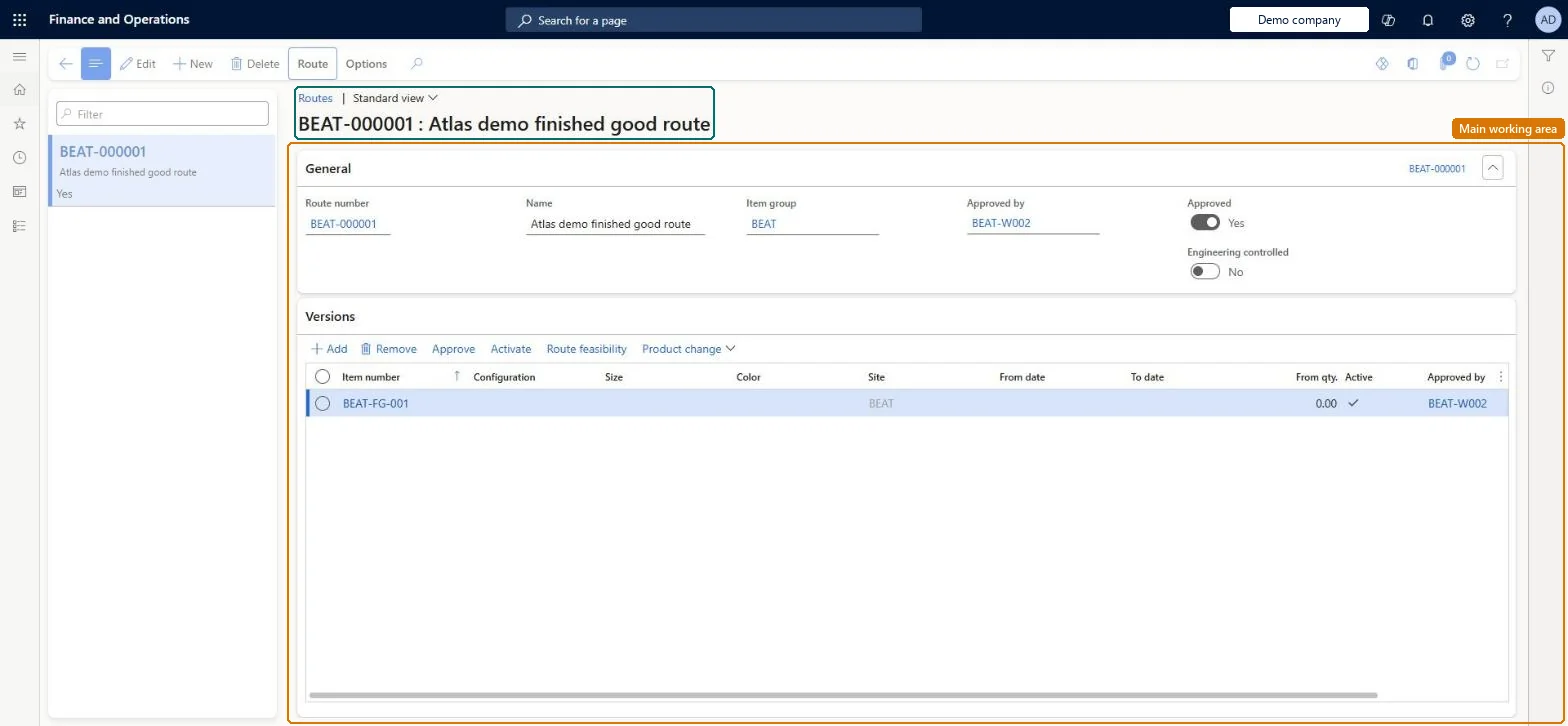
A list of the routes that define the order of operations, resources and times needed to produce products, with their route versions and approval status.
Production manager, Production supervisor, Production planner and 2 more roles
Business process
Create routes for discrete or process manufacturing in Dynamics 365 Supply Chain Management
Menu item
RouteTable
Main table
RouteTable
Data entity
RouteHeaderEntity
Show what matters for
PAGE GUIDEWhat the page does and how to use it7 sections. Choose a role to highlight what matters to you.
Everyone
1What it is and why
What it is
A list of the routes that define the order of operations, resources and times needed to produce products, with their route versions and approval status.
What you do here
Use this page to create, approve and maintain routes and their versions, and to open a route's operation relations to check which setup and run times apply to which products.
Example
For example, a production engineer opens a route from this list to see all operation relations that apply to it before adding a new route version for a second site.
The page in Dynamics 365. page title tab to open what to set or check
About the examples: Examples and screenshots in this guide use BEAT, a demo company in a Dynamics 365 test environment. Use your own company's codes and values instead of copying them.
How to use it
Go to Production control > Operations > All routes.
Select the route in the list pane, or use the Filter field to find it.
On the General FastTab, read the Route number, Name, Item group and Approved by fields and the Approved and Engineering controlled settings.
On the Versions FastTab, select Add to link the route to an item with a site, dates and a from quantity, then Approve and Activate the version.
Use Route feasibility and Product change on the Versions FastTab, and the Route tab on the Action Pane, to check or change the route.
Select New to create a route, or Edit to change the selected one.
Source: Checked in Dynamics 365
Fields on the page
Field
What it means
Table column
Route number
The identifier of the route, entered or taken from a number sequence.Microsoft Learn
RouteId
Item group
Optional grouping that limits which items are offered when you attach versions.Microsoft Learn
ItemGroupId
Approved
Whether the route has been approved; it must be before use.Microsoft Learn
Unapproving a route unapproves all its versions, and only one route version can be active for a given set of constraints; conflicting activations are rejected. Microsoft Learn
Technical architect
5Technical
Menu item
RouteTableChecked in Dynamics 365
Form
RouteTableChecked in Dynamics 365
Table
RouteTableShown as “ROUTES” in Record infoChecked in Dynamics 365
To set it up or change itProcess engineer RouteProcessEngineerTo use itProduction supervisor ProdProductionSupervisorProduction manager ProdProductionManagerProduction planner ReqProductionPlannerProcess engineering manager RouteProcessEngineeringManagerGive people one of these roles. On this system, 5 roles can open this page.Checked in Dynamics 365
RouteHeaderEntity (Route headers): loaded for each company, in Microsoft's default template 410 - Production control.Load order: Microsoft's default template 410 - Production control loads Route headers at execution unit 1, level 410, sequence 30. Lower levels load first, and entities at the same level load in sequence order.Load first: the default templates at lower levels (System setup to Transportation management)Microsoft Learn