BeyondERP.Newsletter
Menu

Inquiry page · Production control

Job list

An inquiry that lists all scheduled production jobs with their job type, production order, resource, scheduled dates and job status.

Used by
Machine operator, Shop supervisor, Production manager and 3 more roles
Business process
Schedule production using Job scheduling in Dynamics 365 Supply Chain Management
Menu item
ProdRouteJobOverviewDetails
Main table
ProdRouteJob
Data entity
ProdProductionOrderRouteJobEntity
Show what matters for
PAGE GUIDEWhat the page does and how to use it7 sections. Choose a role to highlight what matters to you.
Everyone

1What it is and why

What it isAn inquiry that lists all scheduled production jobs with their job type, production order, resource, scheduled dates and job status.
What you do hereUse this page to review the status of all production jobs across orders, and to open the related production, route, materials and job details.
ExampleFor example, a planner filters the job list to find jobs that are Waiting because the previous job has not finished.
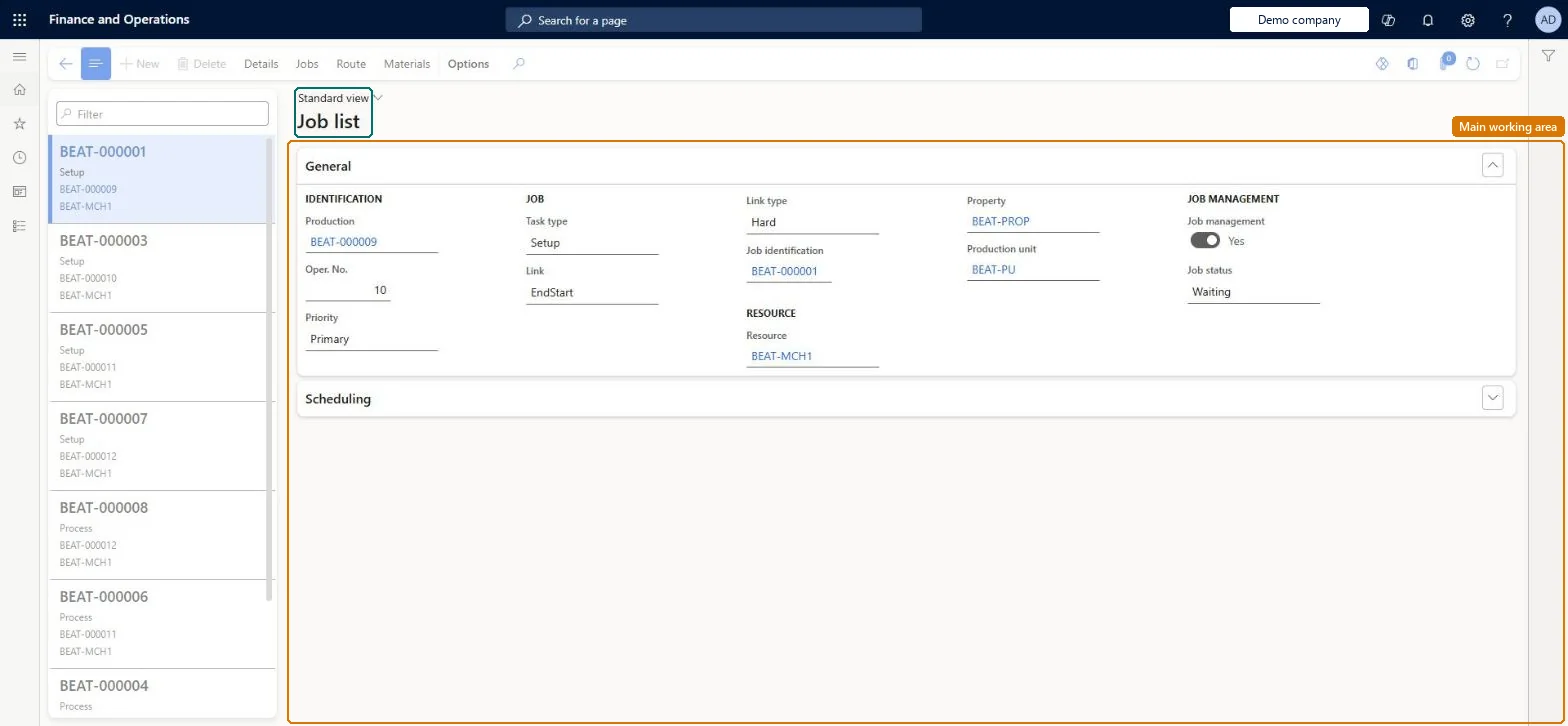
Job list page in Dynamics 365
The page in Dynamics 365. page title tab to open what to set or check
Functional consultant · Solution architect

2Where it fits

End user · Functional consultant

3How to do it

About the examples: Examples and screenshots in this guide use BEAT, a demo company in a Dynamics 365 test environment. Use your own company's codes and values instead of copying them.

How to use it

  1. Go to Production control > Inquiries and reports > Job list.
  2. Select a job in the list pane, or use the Filter field to find it by job identification, task type, production order or resource.
  3. On the General FastTab, read the Production, Oper. No., Priority, Task type, Link, Link type, Job identification, Resource, Property, Production unit and Job status fields.
  4. Expand the Scheduling FastTab to read the scheduled dates and times.
  5. Use Details, Jobs, Route and Materials on the Action Pane to open the production order, its jobs, its route or its materials.

Source: Checked in Dynamics 365

Fields on the page

FieldWhat it meansTable column
Job identificationThe unique job number.Microsoft Learn JobId
Task typeThe kind of work the job represents, such as setup or process.Microsoft Learn JobType
ProductionThe production order the job belongs to.Microsoft Learn ProdId
ResourceThe resource that will perform the job.Microsoft Learn WrkCtrId
Start dateThe scheduled start date from operations or job scheduling.Microsoft Learn
End dateThe scheduled end date.Microsoft Learn
Job statusComing, Waiting, Interrupted, Started or Ended.Microsoft Learn JobStatus
Processing percentageProgress of the job, updated by route or job card postings.Microsoft Learn
Solution architect

4Design impact

Shared or per companyPer company: each legal entity has its own records. Microsoft data model
Technical architect

5Technical

Menu itemProdRouteJobOverviewDetails Checked in Dynamics 365
FormProdRouteJobOverview Checked in Dynamics 365
TableProdRouteJobShown as “ROUTE JOBS” in Record infoKey field: JobIdChecked in Dynamics 365
Data entitiesProdProductionOrderRouteJobEntityProduction order route job entity Microsoft data model
Who can open itPrivilegesView production job list ProdRouteJobOverviewViewDutiesMaintain production order feedback ProdProductionOrderFeedbackMaintainInquire into production orders ProdProductionOrderProgressInquire
6 security rolesMachine operator JmgMachineOperatorShop supervisor JmgShopSupervisorProduction manager ProdProductionManagerProduction supervisor ProdProductionSupervisorProject manager ProjProjectManagerProduction planner ReqProductionPlanner
Checked in Dynamics 365
Roles to set it up and use itTo use itProduction supervisor ProdProductionSupervisorProduction manager ProdProductionManagerShop supervisor JmgShopSupervisorProduction planner ReqProductionPlannerProject manager ProjProjectManagerGive people one of these roles. On this system, 6 roles can open this page.Checked in Dynamics 365
Actions on the page(Action Pane without tabs): Details, Jobs, Route, MaterialsChecked in Dynamics 365
Developer

6Developer

Open it by URLhttps://<your-environment>/?mi=ProdRouteJobOverviewDetails
Integrate withProdProductionOrderRouteJobEntity data entity Microsoft data model
Table definitionProdRouteJob columns and relations Microsoft data model
Everyone

7Sources