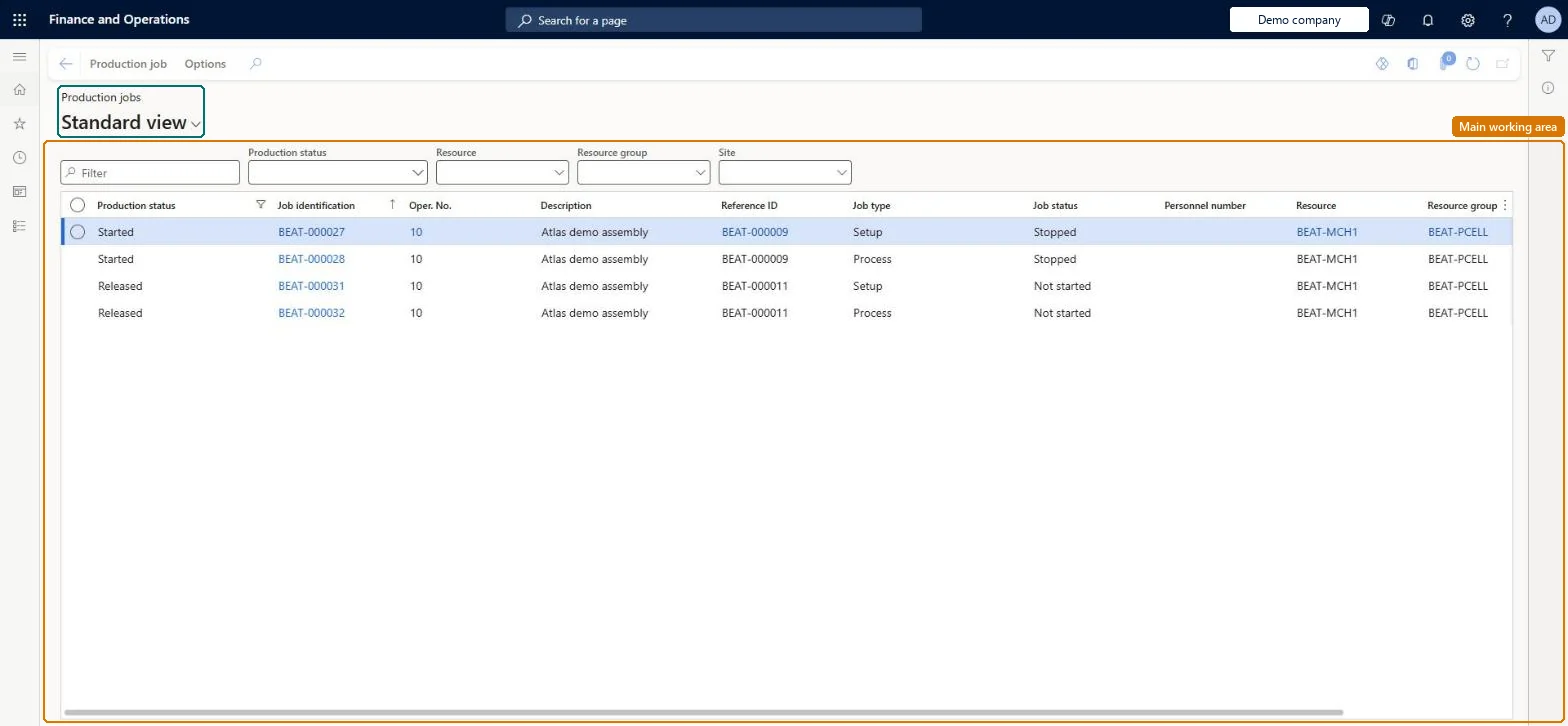
A list page that shows production jobs with their production status, job status, operation, assigned resource and the worker currently registered on each job.
Production controlManufacturing executionJobs and activities
JmgProdStatus
Used by
Shop supervisor, Production manager, Production supervisor and 1 more role
Business process
Consume resources
Menu item
JmgProdStatus
Main table
JmgJobTable
Show what matters for
PAGE GUIDEWhat the page does and how to use it7 sections. Choose a role to highlight what matters to you.
Everyone
1What it is and why
What it is
A list page that shows production jobs with their production status, job status, operation, assigned resource and the worker currently registered on each job.
What you do here
Use this page to follow the status and progress of production jobs from the manufacturing execution side, see who is working on a job, and open the job's active registrations, registration history and produced quantities.
Example
For example, a supervisor checks which jobs are started and who is working on them before reprioritising the job list for a resource.
The page in Dynamics 365. page title tab to open what to set or check
About the examples: Examples and screenshots in this guide use BEAT, a demo company in a Dynamics 365 test environment. Use your own company's codes and values instead of copying them.
How to use it
Go to Production control > Manufacturing execution > Jobs and activities > Production jobs.
Use the Production status, Resource, Resource group and Site filters above the list, or the Filter box, to narrow the jobs shown.
Read the Production status, Job identification, Oper. No., Description, Reference ID, Job type, Job status, Personnel number, Resource and Resource group columns for each job.
Select a job and use the Production job tab on the Action Pane to work with it.
Source: Checked in Dynamics 365
Fields on the page
Field
What it means
Table column
Production status
The status of the production order the job belongs to.Microsoft Learn
Reverting a job's completed status cancels the finished report on that job. Microsoft Learn
Technical architect
5Technical
Menu item
JmgProdStatusChecked in Dynamics 365
Form
JmgProdStatusListPageChecked in Dynamics 365
Table
JmgJobTableShown as “JOB TABLE” in Record infoChecked in Dynamics 365
Who can open it
PrivilegesView production status JmgProdStatusViewDutiesMaintain job assignments JmgJobAssignmentsMaintainMaintain job corrections JmgJobCorrectionsMaintainInquire into manufacturing execution progress JmgManufacturingExecutionProgressInquir4 security rolesShop supervisor JmgShopSupervisorProduction manager ProdProductionManagerProduction supervisor ProdProductionSupervisorProduction planner ReqProductionPlannerChecked in Dynamics 365
Roles to set it up and use it
To use itProduction supervisor ProdProductionSupervisorProduction manager ProdProductionManagerShop supervisor JmgShopSupervisorProduction planner ReqProductionPlannerGive people one of these roles. On this system, 4 roles can open this page.Checked in Dynamics 365