Purchasing agent, Purchasing Agent - Public Sector, Landed cost agent and 7 more roles
Business process
Procure goods and services
Menu item
PurchOrderMaintainWorkspace
Show what matters for
PAGE GUIDEWhat the page does and how to use it6 sections. Choose a role to highlight what matters to you.
Everyone
1What it is and why
What it is
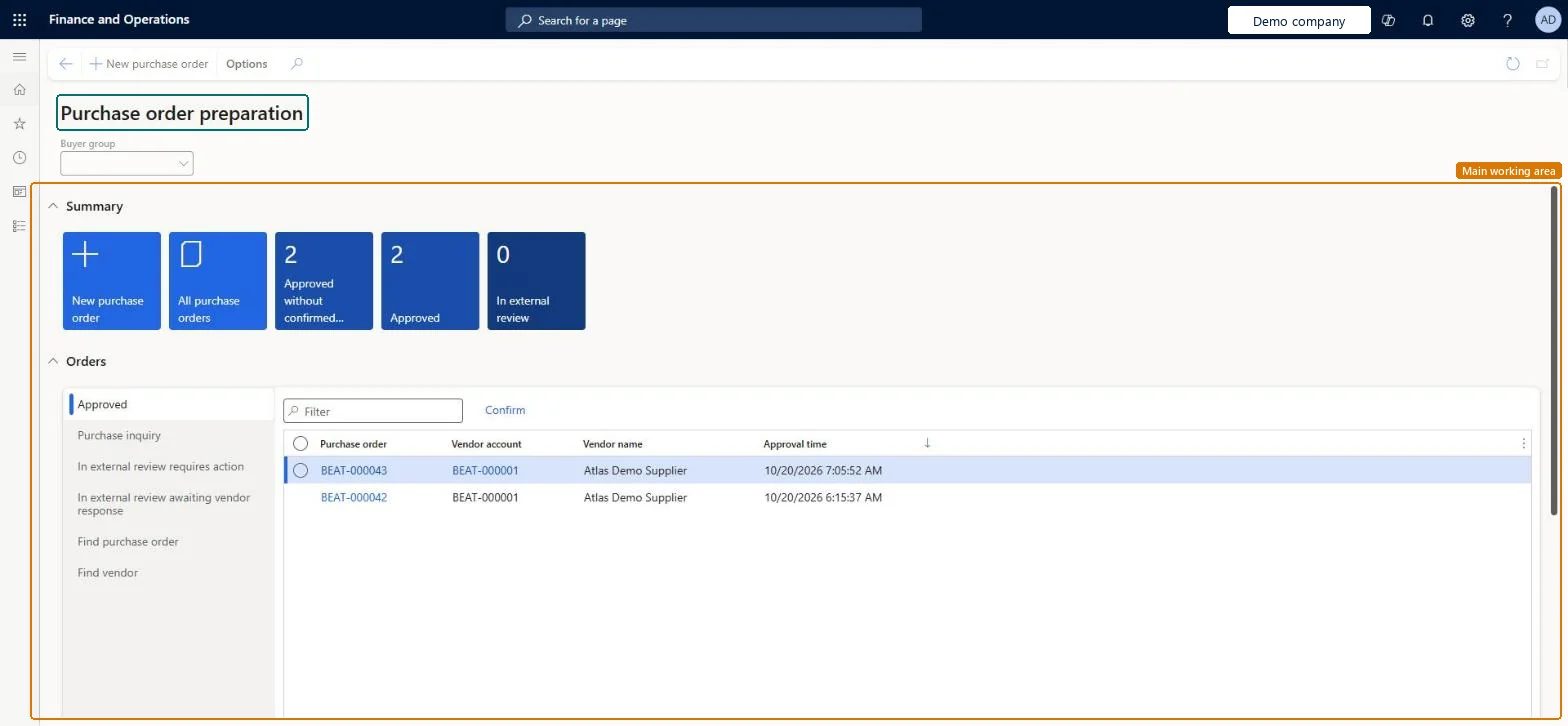
A workspace that focuses on creating and reviewing purchase orders, moving them through approval, and confirming them with the vendor.
What you do here
Use this workspace to see purchase orders at each stage of preparation, together with a summary of the actions that still need to be taken.
Example
For example, you can use the In external review requires action list to find purchase orders that a vendor accepted with changes and open the vendor's response.
The page in Dynamics 365. page title tab to open what to set or check
About the examples: Examples and screenshots in this guide use BEAT, a demo company in a Dynamics 365 test environment. Use your own company's codes and values instead of copying them.
Steps from Microsoft
Go to Procurement and sourcing > Workspaces > Purchase order preparation.
On the Action Pane, select New purchase order.
In the Create purchase order dialog, select a Vendor account and check the address fields.
If a purchase agreement applies, expand the General FastTab, select the effective agreement in the Purchase agreement field, and then select Yes.
Select OK to create the order.
Add lines by entering the Item number, Site and Quantity, and check that the price is copied from the agreement.
PurchOrderMaintainWorkspaceChecked in Dynamics 365
Form
PurchOrderMaintainWorkspaceChecked in Dynamics 365
Who can open it
PrivilegesView purchase order preparation workspace. PurchOrderMaintainWorkspaceViewDutiesMaintain purchase orders PurchOrderMaintain10 security rolesLanded cost agent ITMAgentProject assistant ProjProjectClerkRental coordinator agent RentalCoordinatorAgentRental manager RentalManagerRental purchasing manager RentalPurchasingManagerRetail service RetailServiceRetail store manager RetailStoreManagerBuying agent TradeBuyingAgentPurchasing agent VendPurchasingAgentPurchasing Agent - Public Sector VendPurchasingAgent_PSNChecked in Dynamics 365
Roles to set it up and use it
To use itPurchasing agent VendPurchasingAgentPurchasing Agent - Public Sector VendPurchasingAgent_PSNBuying agent TradeBuyingAgentRetail service RetailServiceProject assistant ProjProjectClerkGive people one of these roles. On this system, 10 roles can open this page.Checked in Dynamics 365
Actions on the page
Options: Personalize, Page options, ShareChecked in Dynamics 365