BeyondERP.Newsletter
Menu

Workspace page · Procurement and sourcing

Purchase order receipt and follow-up

A workspace that focuses on receiving goods or services against purchase orders.

Business process
Procure goods and services
Menu item
PurchOrderProcessReceiptsWorkspace
Show what matters for
PAGE GUIDEWhat the page does and how to use it6 sections. Choose a role to highlight what matters to you.
Everyone

1What it is and why

What it isA workspace that focuses on receiving goods or services against purchase orders.
What you do hereUse this workspace to follow up on receipts that are overdue or that the vendor will soon need to deliver.
ExampleFor example, a (Preview) Follow-up emails tile shows how many vendor follow-up emails drafted by the Procurement Agent are waiting for your review.
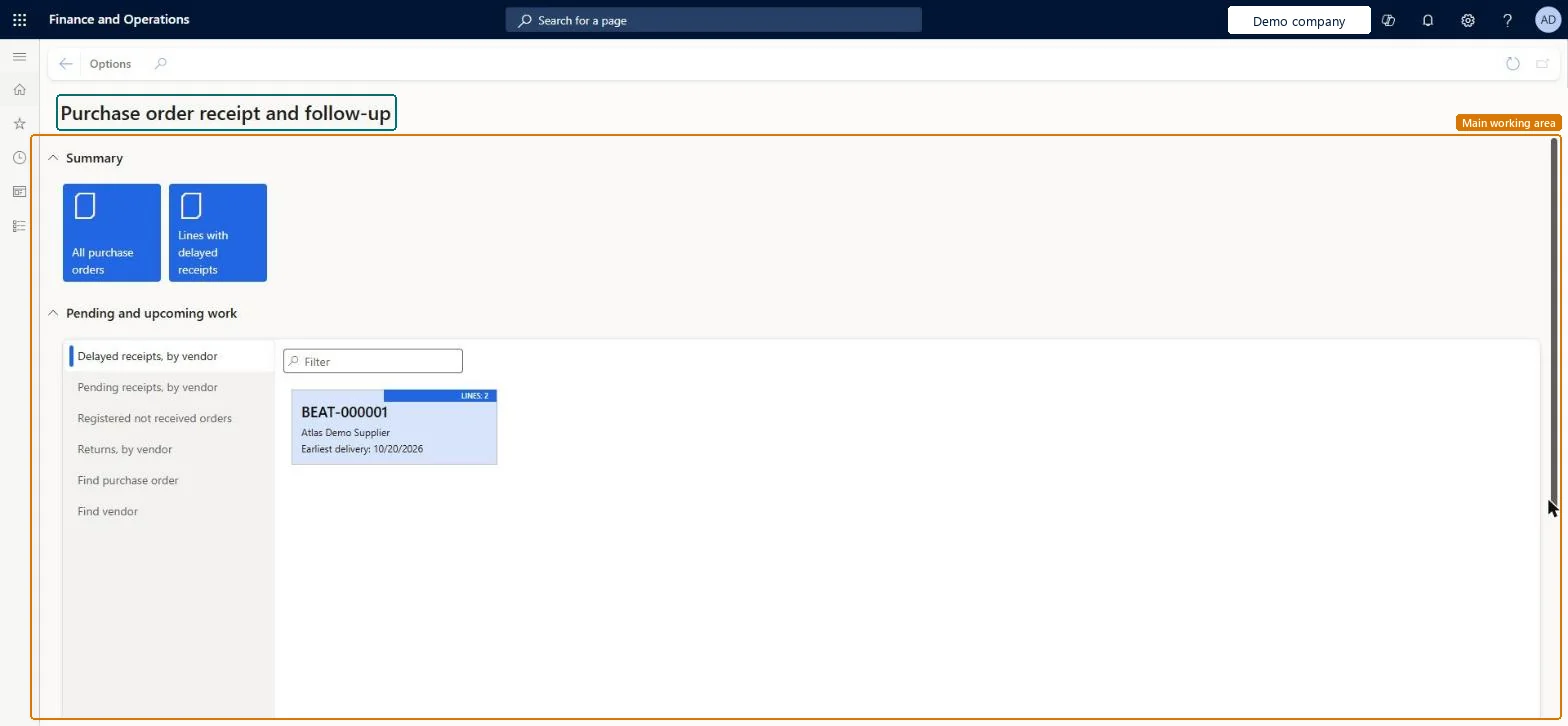
Purchase order receipt and follow-up page in Dynamics 365
The page in Dynamics 365. page title tab to open what to set or check
Functional consultant · Solution architect

2Where it fits

Business processProcure goods and services
Menu pathProcurement and sourcing › Workspaces › Purchase order receipt and follow-up
Related pagesPurchase order preparation Microsoft Learn
End user · Functional consultant

3How to do it

About the examples: Examples and screenshots in this guide use BEAT, a demo company in a Dynamics 365 test environment. Use your own company's codes and values instead of copying them.

How to use it

  1. Go to Procurement and sourcing > Workspaces > Purchase order receipt and follow-up.
  2. Under Summary, select All purchase orders or Lines with delayed receipts.
  3. Under Pending and upcoming work, select the Delayed receipts, by vendor, Pending receipts, by vendor, Registered not received orders or Returns, by vendor tab.
  4. Select Find purchase order or Find vendor to look one up.
  5. Use the Filter box to narrow the list.

Source: Checked in Dynamics 365

Technical architect

4Technical

Menu itemPurchOrderProcessReceiptsWorkspace Checked in Dynamics 365
FormPurchOrderProcessReceiptsWorkspace Checked in Dynamics 365
Roles to set it up and use itTo use itPurchasing agent VendPurchasingAgentPurchasing Agent - Public Sector VendPurchasingAgent_PSNBuying agent TradeBuyingAgentRetail service RetailServiceProject assistant ProjProjectClerkGive people one of these roles. On this system, 10 roles can open this page.Checked in Dynamics 365
Actions on the pageOptions: Personalize, Page options, ShareChecked in Dynamics 365
Developer

5Developer

Open it by URLhttps://<your-environment>/?mi=PurchOrderProcessReceiptsWorkspace
Everyone

6Sources