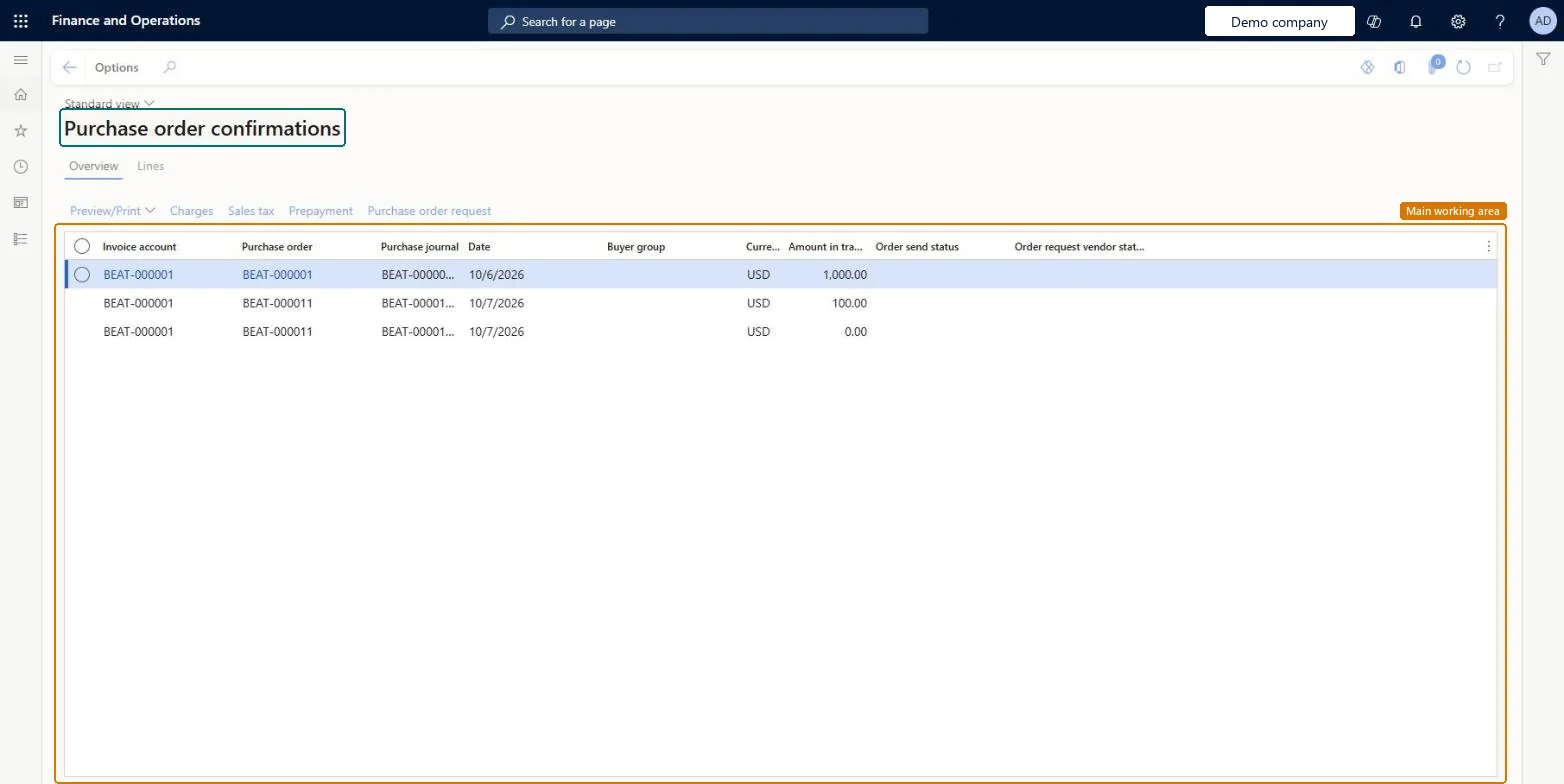
About the examples: Examples and screenshots in this guide use BEAT, a demo company in a Dynamics 365 test environment. Use your own company's codes and values instead of copying them.
How to use it
Go to Procurement and sourcing > Purchase orders > Purchase order confirmation > Purchase order confirmations.
On the Overview tab, check the Invoice account, Purchase order, Purchase journal, Date, Currency and Amount in transaction currency columns.
Select a confirmation in the list.
Select Preview/Print, Charges, Sales tax, Prepayment or Purchase order request for the selected confirmation.
Select the Lines tab to see the confirmation lines.
Changing the vendor's Purchase order prices/amount option later doesn't change confirmations already created; confirm the order again to get a new one. Microsoft Learn
Technical architect
5Technical
Menu item
VendPurchOrderJournalChecked in Dynamics 365
Form
VendPurchOrderJournalChecked in Dynamics 365
Table
VendPurchOrderJourShown as “Purchase order confirmations” in Record infoChecked in Dynamics 365
Data entities
PurchPurchaseOrderConfirmationHeaderEntityPurchase order confirmation headers Microsoft data model PurchPurchaseOrderConfirmationLineEntityPurchase order confirmation lines Microsoft data model
Who can open it
PrivilegesView purchase order VendPurchOrderJournalViewDutiesMaintain purchase orders PurchOrderMaintainInquire into purchase order to invoice progress PurchOrderToInvoiceProgressInquireMaintain rental purchase orders RentalPurchOrderMaintain15 security rolesLanded cost agent ITMAgentAccountant LedgerAccountantProject assistant ProjProjectClerkProject manager ProjProjectManagerRental coordinator agent RentalCoordinatorAgentRental manager RentalManagerRental purchasing manager RentalPurchasingManagerRetail service RetailServiceRetail store manager RetailStoreManagerBuying agent TradeBuyingAgentPurchasing manager TradePurchasingManagerAccounts payable clerk VendInvoiceAccountsPayableClerkAccounts payable manager VendInvoiceAccountsPayableManagerPurchasing agent VendPurchasingAgentPurchasing Agent - Public Sector VendPurchasingAgent_PSNChecked in Dynamics 365
Roles to set it up and use it
To use itPurchasing manager TradePurchasingManagerAccounts payable manager VendInvoiceAccountsPayableManagerPurchasing agent VendPurchasingAgentPurchasing Agent - Public Sector VendPurchasingAgent_PSNBuying agent TradeBuyingAgentGive people one of these roles. On this system, 15 roles can open this page.Checked in Dynamics 365
Actions on the page
Options: Personalize, Page options, ShareChecked in Dynamics 365
PurchPurchaseOrderConfirmationHeaderEntity (Purchase order confirmation headers): loaded for each company.PurchPurchaseOrderConfirmationLineEntity (Purchase order confirmation lines): loaded for each company.Microsoft Learn