BeyondERP.Newsletter
Menu

Page · Payroll

Earnings statements on hold

A list page that shows earnings statements that have lines on hold, which are kept out of pay statements until released.

Used by
Payroll administrator, Payroll manager
Business process
Pay employees
Menu item
PayrollEarningsStatementListOnHold
Main table
PayrollEarningStatement
Data entity
PayrollEarningStatementHeaderEntity
Show what matters for
PAGE GUIDEWhat the page does and how to use it8 sections. Choose a role to highlight what matters to you.
Everyone

1What it is and why

What it isA list page that shows earnings statements that have lines on hold, which are kept out of pay statements until released.
What you do hereUse this page to find earnings that were held so that you can correct them and then release them for payment.
ExampleFor example, you hold a statement with a wrong rate, fix the line, and then release it with Release lines on hold selected.
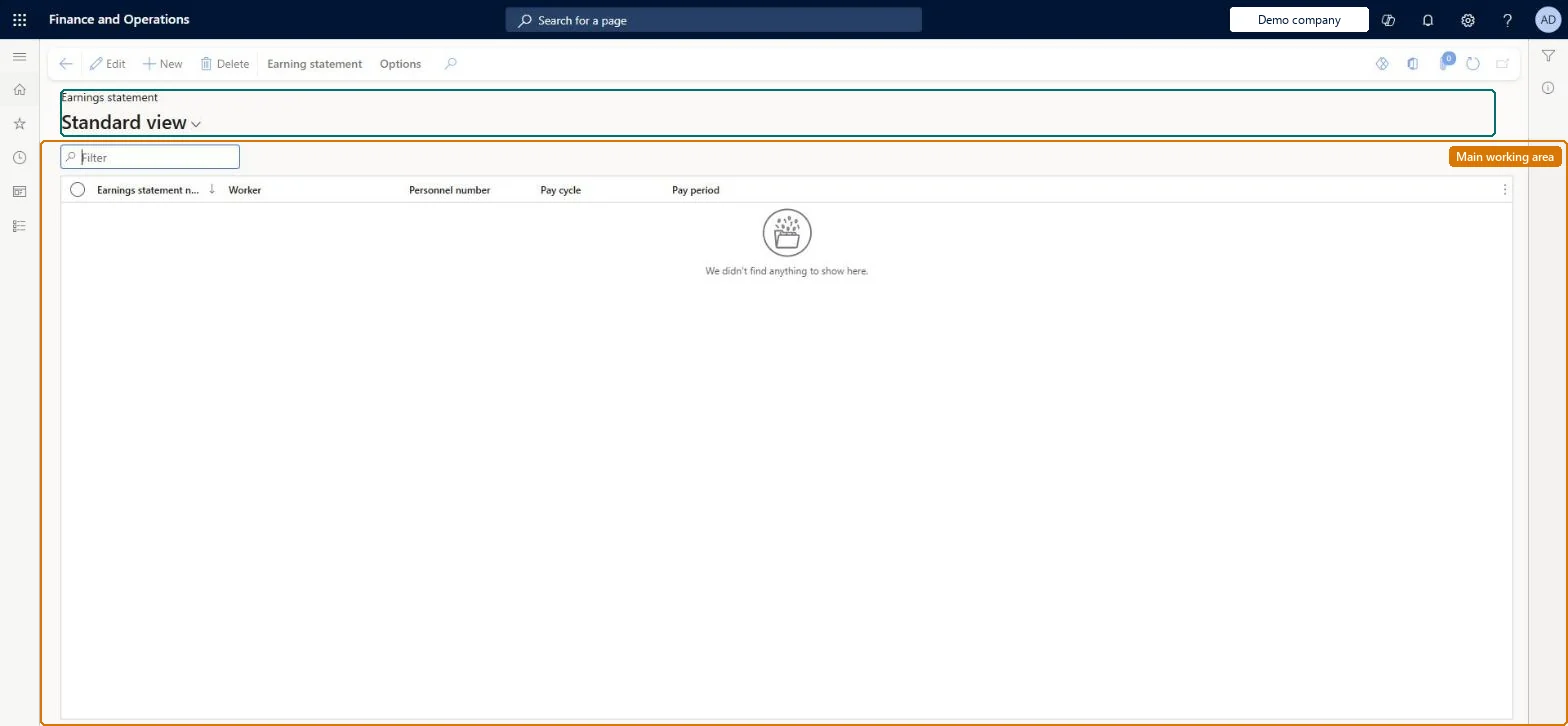
Earnings statements on hold page in Dynamics 365
The page in Dynamics 365. page title tab to open what to set or check
Functional consultant · Solution architect

2Where it fits

End user · Functional consultant

3How to do it

About the examples: Examples and screenshots in this guide use BEAT, a demo company in a Dynamics 365 test environment. Use your own company's codes and values instead of copying them.

How to use it

  1. Go to Payroll > Earnings statements > Earnings statements on hold.
  2. Use the Filter box to find an earnings statement by number, worker, pay cycle or pay period.
  3. Select a row and select Edit to open it, or select New to create one.
  4. Use the Earning statement tab on the Action Pane for actions on a selected statement.
  5. Select Delete to remove a selected statement.

Source: Checked in Dynamics 365

Fields on the page

FieldWhat it meansTable column
WorkerThe worker who will receive the earnings.Microsoft Learn Worker
Pay cycleThe pay cycle that was used when the earnings statement was generated.Microsoft Learn PayPeriod
Pay periodThe date range of the pay cycle that the statement covers.Microsoft Learn PayPeriod
Earnings statement numberThe unique ID of the earnings statement.Microsoft Learn DocumentNumber
Earnings dateThe date the earning was earned; it must fall in the statement's pay period.Microsoft Learn
Earning codeThe earning code that identifies the type of earning on the line.Microsoft Learn
Tax regionThe tax region used for tax calculation when pay statements are created.Microsoft Learn
Payment statusShows whether a line is None, Released, Processed or On hold.Microsoft Learn

Test checklist

  1. On All earnings statements, select a statement and choose Hold earnings statement.
  2. Check it appears here with Payment status On hold.
  3. Generate pay statements and check the held lines are not included.
  4. Run Release earnings statement with Release lines on hold selected and check the lines move to Released.

Source: Microsoft Learn

Functional consultant

4Setup decisions

Number sequences

ReferenceShared or per companyNote
Earnings statement numberPer companyNew records on this page take their Earnings statement number from the PayrollEarningStatementId reference; BEAT uses number sequence Payr_3. Checked in Dynamics 365
Solution architect

5Design impact

Can it be undoneReversible: Lines on hold are left out of pay statements until released. Release them with Release earnings statement and select Release lines on hold. A line that is already on a pay statement cannot be put on hold. Microsoft Learn
If you change it laterLines on hold are left out of pay statements, and premium earnings cannot be generated for them. Microsoft Learn
Technical architect

6Technical

Menu itemPayrollEarningsStatementListOnHold Checked in Dynamics 365
FormPayrollEarningStatement Checked in Dynamics 365
TablePayrollEarningStatementShown as “EARNINGS STATEMENTS” in Record infoKey field: DocumentNumberChecked in Dynamics 365
Data entitiesPayrollEarningStatementHeaderEntityEarnings statement header Microsoft data model
Who can open itPrivilegesMaintain payroll earnings PayrollEarningsMaintainView payroll earnings PayrollEarningsViewDutiesInquire into earning entry PayrollEarningStatementGenerationInquireMaintain earning entry PayrollEarningStatementGenerationMaintInquire into payroll payments PayrollPayStatementGenerationInquire
2 security rolesPayroll administrator HcmPayrollAdministratorPayroll manager HcmPayrollManager
Checked in Dynamics 365
Roles to set it up and use itTo set it up or change itPayroll administrator HcmPayrollAdministratorTo use itPayroll manager HcmPayrollManagerGive people one of these roles. On this system, 2 roles can open this page.Checked in Dynamics 365
Actions on the pageEarning statement: Generate, Process, Salary, Accounting(Action Pane without tabs): DeleteChecked in Dynamics 365
Developer

7Developer

Open it by URLhttps://<your-environment>/?mi=PayrollEarningsStatementListOnHold
Integrate withPayrollEarningStatementHeaderEntity data entity Microsoft data model
Data migrationPayrollEarningStatementHeaderEntity (Earnings statement header): shared by all companies.Microsoft Learn
Table definitionPayrollEarningStatement columns and relations Microsoft data model
Everyone

8Sources

KEEP EXPLORING

More in Payroll.

Open the other pages and setup steps in this module, or go back to the Atlas Hub to search every page.