Materials manager, Production manager, Production planner
Business process
Balance supply and demand
Menu item
ReqCreatePlanWorkspace
Show what matters for
PAGE GUIDEWhat the page does and how to use it7 sections. Choose a role to highlight what matters to you.
Everyone
1What it is and why
What it is
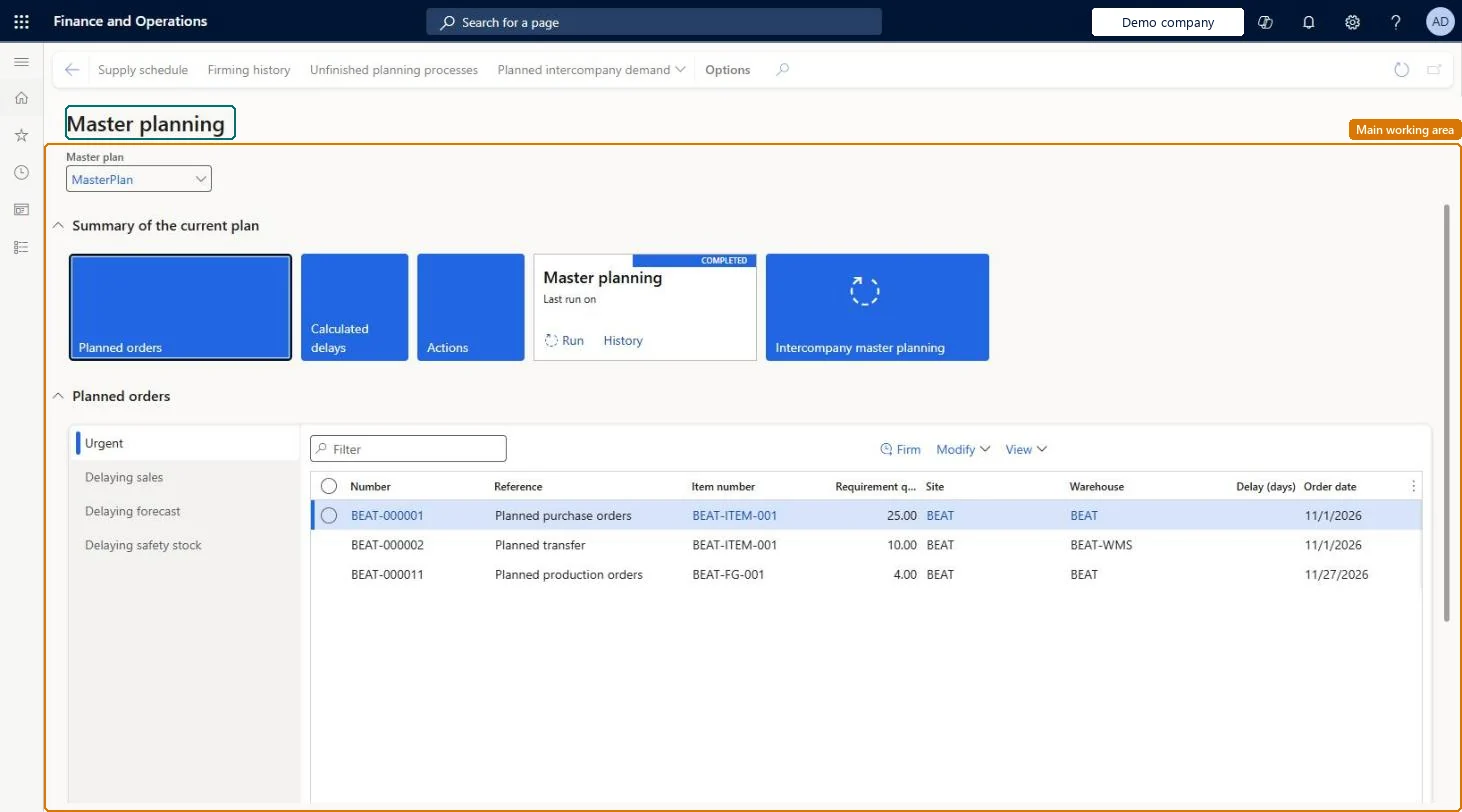
A workspace where planners select a master plan, run master planning for it, and open the planned orders, run history, and run progress for that plan.
What you do here
Use this page to run master planning for a selected plan, follow the progress and history of planning runs, and work with the planned orders that a run creates.
Example
For example, a planner selects a master plan, selects History on the Master planning tile, and opens Process task duration to see where a planning run spent its time.
The page in Dynamics 365. page title tab to open what to set or check
About the examples: Examples and screenshots in this guide use BEAT, a demo company in a Dynamics 365 test environment. Use your own company's codes and values instead of copying them.
Steps from Microsoft
Go to Master planning > Workspaces > Master planning.
In the Master plan field, select the master plan to run.
On the Master planning tile, select Run.
In the Master planning dialog box, enter a value in the Number of threads field.
On the Records to include FastTab, select Filter if you want to plan only some items.
Selects the master plan that the workspace shows and runs.Microsoft Learn
Run (Master planning tile)
Opens the Master planning dialog box to start a planning run for the selected plan.Microsoft Learn
History (Master planning tile)
Lists earlier planning jobs for the plan; from a job you can open its progress or task durations.Microsoft Learn
Unfinished planning process
An Action Pane button that lists planning jobs that are still running, so you can view their progress.Microsoft Learn
Intercompany master planning
Starts a planning run across the companies in an intercompany planning group.Microsoft Learn
Solution architect
4Design impact
If you change it later
Filters that you set in the Master planning run dialog box change how long the planning run takes. Microsoft Learn
Technical architect
5Technical
Menu item
ReqCreatePlanWorkspaceChecked in Dynamics 365
Form
ReqCreatePlanWorkspaceChecked in Dynamics 365
Who can open it
PrivilegesReqCreatePlanWorkspaceDutiesEnable master scheduling process ReqMasterSchedulingProcessEnableMaintain planned orders ReqPlannedOrdersMaintain3 security rolesMaterials manager InventMaterialsManagerProduction manager ProdProductionManagerProduction planner ReqProductionPlannerChecked in Dynamics 365
Roles to set it up and use it
To set it up or change itProduction planner ReqProductionPlannerProduction manager ProdProductionManagerMaterials manager InventMaterialsManagerGive people one of these roles. On this system, 3 roles can open this page.Checked in Dynamics 365
Actions on the page
(Action Pane without tabs): Supply schedule, Firming history, Unfinished planning processes, Planned intercompany demandChecked in Dynamics 365