PAGE GUIDEWhat the page does and how to use it6 sections. Choose a role to highlight what matters to you.
Everyone
1What it is and why
What it is
An inquiry page that shows supply and demand for a product or product family by period, filtered by location and master plan.
What you do here
Use this page to see expected inventory, demand, and supply over time and, from the same page, create orders, change planned orders, and run master planning.
Example
For example, a planner opens the page for a product, checks the expected period end inventory, and adds a planned order for a period that falls short.
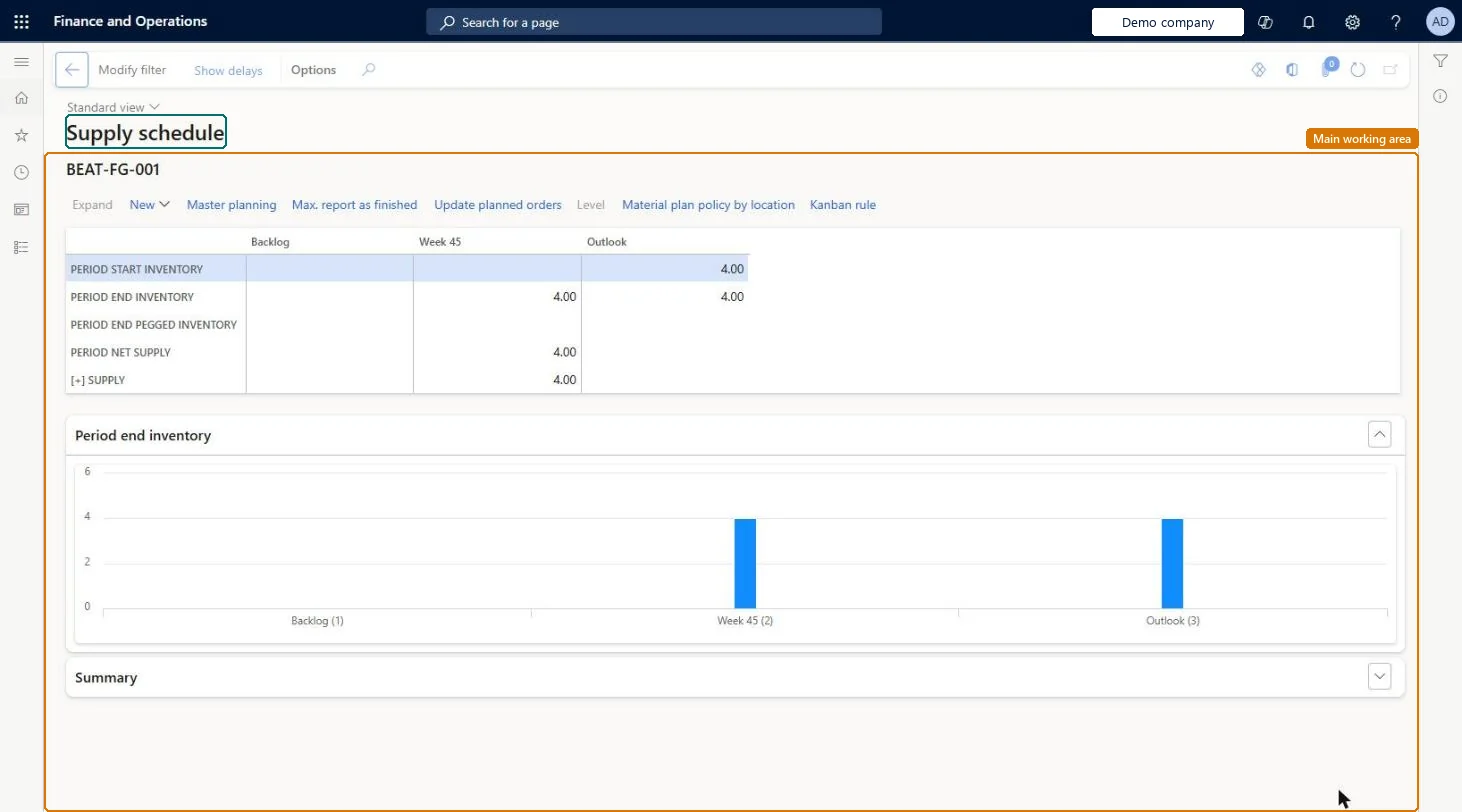
The page in Dynamics 365. page title tab to open what to set or check
About the examples: Examples and screenshots in this guide use BEAT, a demo company in a Dynamics 365 test environment. Use your own company's codes and values instead of copying them.
Steps from Microsoft
Go to Master planning > Master planning > Supply schedule.
In the Modify filter dialog box, enter the plan and product that you want to see.
Select OK.
Select a row under the Supply or Demand node, and then select a period column.
Use New on the toolbar to add an order, or select Master planning to run planning for the plan.
Demand for the product, grouped by transaction type such as sales and transfers.Microsoft Learn
Supply
Supply for the product, grouped by transaction type such as production and purchase.Microsoft Learn
Technical architect
4Technical
Menu item
ReqSupplyDemandScheduleChecked in Dynamics 365
Form
ReqSupplyDemandScheduleFiltersChecked in Dynamics 365
Data entities
ProdBatchOrderHeaderEntityBatch orders Microsoft data model PurchPurchaseOrderLineSoftDeletedCDSEntityCDS purchase order line soft deleted entity Checked in Dynamics 365ProdProductionOrderHeaderEntityProduction orders Microsoft data model ProjSubContractPurchaseOrderLineEntityProject subcontract purchase order line Checked in Dynamics 365PurchPurchaseOrderLineEntityPurchase order lines Checked in Dynamics 365PurchPurchaseOrderLineV2EntityPurchase order lines V2 Microsoft data model PurchPurchaseOrderLineV2ExistAddrReadOnlyEntityPurchase order lines V2 readonly with the delivery address Checked in Dynamics 365InventTransferOrderHeaderEntityTransfer order headers Microsoft data model
Roles to set it up and use it
To use itProduction planner ReqProductionPlannerMaterials manager InventMaterialsManagerSales manager TradeSalesManagerGive people one of these roles. On this system, 3 roles can open this page.Checked in Dynamics 365