PAGE GUIDEWhat the page does and how to use it8 sections. Choose a role to highlight what matters to you.
Everyone
1What it is and why
What it is
A periodic job that transfers any number of fixed assets to new financial dimension values in one run, using query criteria to pick the assets.
What you do here
Use this periodic task to move the financial values of many assets to a new department, cost center or other dimension at the same time.
Example
For example, after a reorganization, assets 180 through 950 in group FURN move from department 022 to department 024 on 1 July in one run, instead of one transfer per asset.
The page in Dynamics 365. page title tab to open what to set or check
About the examples: Examples and screenshots in this guide use BEAT, a demo company in a Dynamics 365 test environment. Use your own company's codes and values instead of copying them.
When to run it
When to run it
When an organization change moves many assets to a new department, cost center or other dimension at once.
How often
On demand, after each reorganization.
Batch settings
Schedule it on the Batch tab for large selections; assets are processed in groups.
What the output shows
Transfer transactions that move the asset books to the new financial dimension values on the transfer date. An asset that wasn't transferred was in a group in which another asset failed.
Transfer the financial dimensions of many asset books at once.
Steps from Microsoft
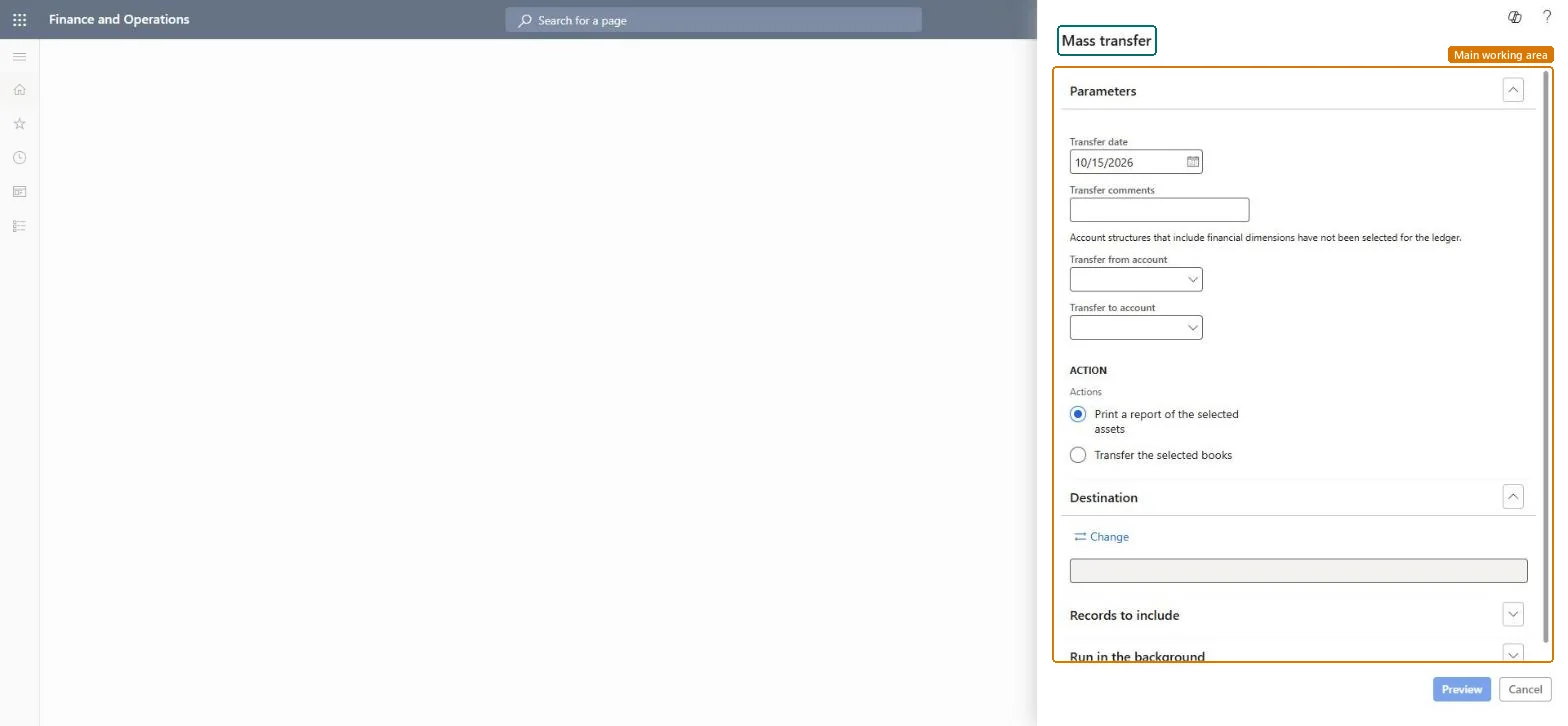
Go to Fixed assets > Periodic tasks > Mass transfer.
In Transfer date, enter the date for the accounting transactions that the transfer creates, and add Transfer comments if needed.
In Transfer to financial dimensions, select the new dimension values. Values you leave blank are transferred as blank if the account structure allows it.
Select Select and enter the criteria for the assets to move, for example one fixed asset group or the old department.
Run the transfer, then open the fixed asset transactions of a few assets to check the new dimension values.
The date used for the accounting transactions that the transfer creates.Microsoft Learn
Transfer to financial dimensions
The financial dimension values the selected asset books move to; every dimension value changes, including those you leave blank if the account structure allows blanks.Microsoft Learn
Common errors and fixes
Message
What to do
A dimension became blank after the transfer
All dimension values change in a transfer, also the blank ones. Enter every value the books must keep. Microsoft Learn
Test checklist
Selected assets show the new dimension values on their books.
Transfer transactions are dated on the transfer date.
Enter every dimension value the books must have, run a test on a few assets first, and use a transfer date at the start of a period.All dimension values change when a transfer occurs, whether a value is entered or left blank.
Fixed assets is part of Dynamics 365 Finance. Fixed asset accountants run transfers after a reorganization. On this system the roles that open the page include Accounting supervisor, Accountant, Rental manager, Rental purchasing manager. No Feature management feature needs to be turned on for this page.
No: Posted transfers can't be undone by the job. Run another transfer back to the old dimension values if needed. Microsoft Learn
If you change it later
Assets are processed in groups of about 200; if one asset in a group fails, none of the assets in that group are transferred. Microsoft Learn
Technical architect
6Technical
Menu item
action:AssetTransferMassChecked in Dynamics 365
Form
SysOperationTemplateFormChecked in Dynamics 365
Roles to set it up and use it
To use itAccounting supervisor LedgerAccountingSupervisorAccountant LedgerAccountantRental manager RentalManagerRental purchasing manager RentalPurchasingManagerGive people one of these roles. On this system, 4 roles can run this page.Checked in Dynamics 365
Load order: Mass transfer has no data entity in Data management, so it can't be loaded from a file or a configuration template. The report stores nothing of its own: it reads the posted fixed asset data, so migrate the assets, books and transactions and run it again in the new environment.Microsoft Learn