BeyondERP.Newsletter
Menu

Workspace page · Credit and collections

Collections coordinator

A workspace that shows a collections coordinator the collection information for their customers on one page.

Used by
Collections agent, Collections manager
Business process
Manage credit and collections
Menu item
CustCollectionsCoordinatorWorkspaceLanding
Show what matters for
PAGE GUIDEWhat the page does and how to use it6 sections. Choose a role to highlight what matters to you.
Everyone

1What it is and why

What it isA workspace that shows a collections coordinator the collection information for their customers on one page.
What you do hereUse this workspace to prepare for customer contacts by seeing a customer's aged balances, last payment, outstanding invoices and activities together, and to act on them.
ExampleFor example, a collections agent starts from the overview, which lists the activities assigned to them and the customers with the highest and oldest balances, and then opens the customers that need the most attention.
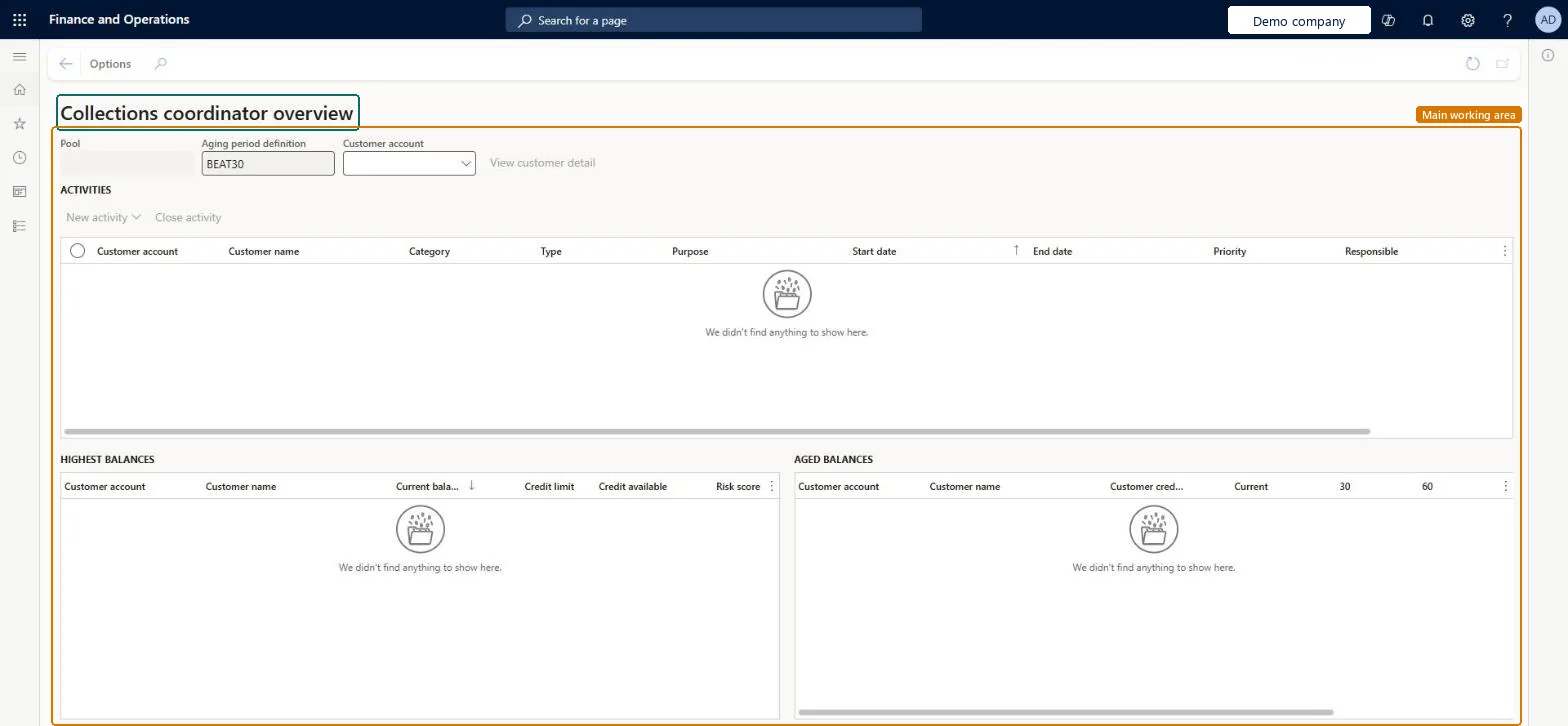
Collections coordinator page in Dynamics 365
The page in Dynamics 365. page title tab to open what to set or check
Functional consultant · Solution architect

2Where it fits

Business processManage credit and collections
Menu pathCredit and collections › Workspaces › Collections coordinator
Set up firstCollections agents Microsoft Learn Customer pools Microsoft Learn
Used next byCollection letter journal Microsoft Learn
End user · Functional consultant

3How to do it

About the examples: Examples and screenshots in this guide use BEAT, a demo company in a Dynamics 365 test environment. Use your own company's codes and values instead of copying them.

Steps from Microsoft

  1. Go to Credit and collections > Workspaces > Collections coordinator.
  2. Review the activities assigned to you and the Highest balances and Aged balances grids.
  3. Select a customer name to open the workspace for that customer.
  4. Use the Open transactions, Disputed invoices, Promised to pay and Unsettled payments tabs to review the customer's items.
  5. On the Open transactions tab, use options such as Change status, Write-off or Settle as needed.
  6. Use the Customer timeline and Contact details sections to follow up with the customer.

Source: Microsoft Learn

Fields on the page

FieldWhat it means
PoolLimits the customers shown to a customer pool; it's filled in automatically for an agent who has a default pool.Microsoft Learn
Highest balancesGrid of the 100 customers with the highest outstanding balances, with credit limit, credit available and risk score.Microsoft Learn
Aged balancesGrid of the customers with the oldest aged balances, with their customer credit group and account status.Microsoft Learn
Open transactionsTab with the customer's transactions that aren't fully settled yet.Microsoft Learn
Disputed invoicesTab with open transactions whose collections status is Disputed.Microsoft Learn
Promised to payTab with open transactions whose collections status is Promised to pay.Microsoft Learn
Unsettled paymentsTab with the customer's posted payments that aren't settled against an invoice.Microsoft Learn
Customer timelineShows posted invoices, received payments, sent collection letters and activities for the last year.Microsoft Learn
Collections contactThe customer contact for collections, taken from the customer's Credit and collections tab.Microsoft Learn
Summary by CopilotAI-generated summary of the customer's payment history, outstanding debt and recent invoices.Microsoft Learn
Create reminder emailDrafts a reminder email with AI that you review and edit before sending.Microsoft Learn
Technical architect

4Technical

Menu itemCustCollectionsCoordinatorWorkspaceLanding Checked in Dynamics 365
FormCustCollectionsCoordinatorWorkspaceLanding Checked in Dynamics 365
Who can open itPrivileges CustCollectionsCoordinatorWorkspaceViewDutiesCollections workspace CustCollectionsWorkspace
2 security rolesCollections agent CollectionLetterCollectionsAgentCollections manager CollectionLetterCollectionsManager
Checked in Dynamics 365
Roles to set it up and use itTo use itCollections manager CollectionLetterCollectionsManagerCollections agent CollectionLetterCollectionsAgentGive people one of these roles. On this system, 2 roles can open this page.Checked in Dynamics 365
Actions on the pageOptions: Personalize, Page options, ShareChecked in Dynamics 365
Developer

5Developer

Open it by URLhttps://<your-environment>/?mi=CustCollectionsCoordinatorWorkspaceLanding
Everyone

6Sources