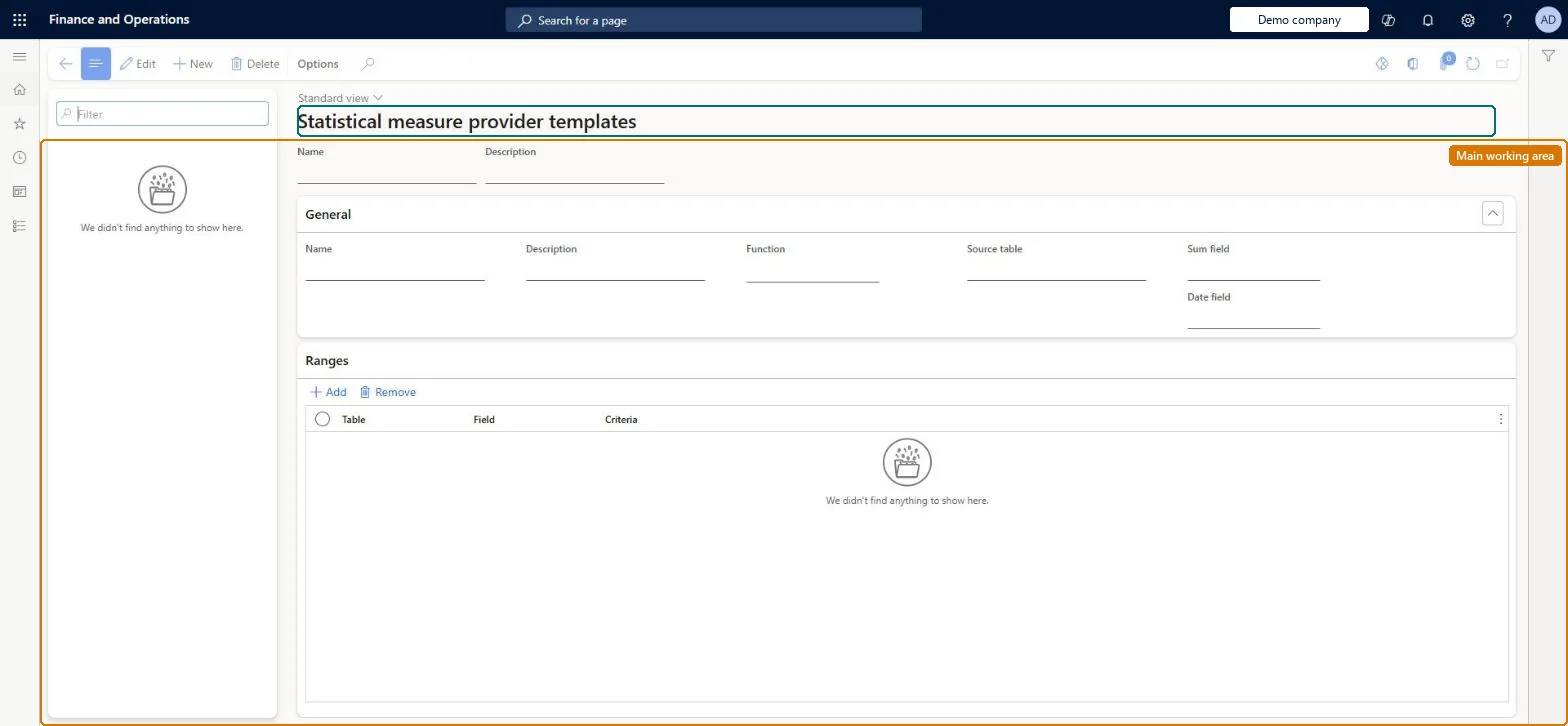
A setup page where you define reusable templates that extract statistical (nonmonetary) measures from Dynamics 365 Finance tables, either as a count of records or a sum of a field, per cost object.
PAGE GUIDEWhat the page does and how to use it8 sections. Choose a role to highlight what matters to you.
Everyone
1What it is and why
What it is
A setup page where you define reusable templates that extract statistical (nonmonetary) measures from Dynamics 365 Finance tables, either as a count of records or a sum of a field, per cost object.
What you do here
Use this page to define which source table, function (Count or Sum), sum and date fields, and ranges supply a measure such as employee headcount or production hours; the template is then linked to a statistical dimension member on the cost accounting ledger so the measure can be reported or used as an allocation base.
Example
For example, a template that counts records in the HcmEmployment table with a Worker type range of Employee gives the number of full-time employees per cost center.
The page in Dynamics 365. page title tab to open what to set or check
About the examples: Examples and screenshots in this guide use BEAT, a demo company in a Dynamics 365 test environment. Use your own company's codes and values instead of copying them.
Setup steps on this page
Set up Statistical measure provider templates
Use this page to define which source table, function (Count or Sum), sum and date fields, and ranges supply a measure such as employee headcount or production hours; the template is then linked to a statistical dimension member on the cost accounting ledger so the measure can be reported or used as an allocation base.
Steps from Microsoft
Go to Cost accounting > Setup > Statistical measure provider templates.
Select New and enter a Name.
In the Function field, choose Count or Sum.
Select the Source table (any table that contains financial dimensions).
For the Sum function, select the Sum field and the Date field.
Add one or more ranges (field and criteria) to narrow the records that are read.
Save.
Go to Cost accounting ledger > Actual version > Manage > Statistical measures to link the template to a statistical dimension member.
The name of the template, which is later referenced in the data provider configuration as the statistical template name.Microsoft Learn
Name
Function
Count transfers the number of records per cost object; Sum transfers the total of a field per cost object.Microsoft Learn
Function
Source table
The Finance table the measure is read from; any table that carries financial dimensions can be used.Microsoft Learn
SourceTable
Sum field
The numeric field that is totalled when the function is Sum; required for Sum.Microsoft Learn
Date field
The date field used to place summed records in a fiscal period; required for Sum.Microsoft Learn
Ranges (Field / Criteria)
Optional filters on the source table that limit which records are counted or summed.Microsoft Learn
Common errors and fixes
Message
What to do
The statistical measure has no values for a legal entity
When the template's source table is company-specific, choose the legal entity on the data provider configuration of the statistical measure. Microsoft Learn
Imported statistical measures create no statistical entries
In the data provider configuration, enter the import source identifier and name the cost object dimensions to match against the imported rows, then process the source data again. Microsoft Learn
Test checklist
Create a template named FTEs with Function Count, Source table HcmEmployment and a range Worker type = Employee.
On the cost accounting ledger, open Actual versions > Manage > Statistical measures. Add a data source with the Dynamics 365 Finance – Statistical measures connector and the FTEs statistical dimension member, then select the FTEs template in the data provider configuration.
Run source data processing for the period.
Check that a Statistical entry transfer journal is created and that the statistical entries show one magnitude per cost center equal to its employee count.
Repeat with a Sum template on ProdRouteTrans and check that the data provider asks for a legal entity.
Count for headcount-type measures (for example HcmEmployment with a Worker type = Employee range); Sum, with a Sum field and a Date field, for quantities such as production hours from ProdRouteTransCount transfers the number of records per cost object, and Sum transfers a total per cost object. Sum needs both the Sum field and the Date field. Ranges narrow the source table to the records that belong in the measure.
Cost accounting has four roles: Cost accounting manager (Activity licence), Cost accountant and Cost accountant clerk (Operations licence), and Cost object controller (Team members licence). Cost accountants and cost accounting managers maintain templates. No Feature management feature needs to be turned on for this page.
Shared: Cost accounting setup isn't kept per legal entity. It is the same from every company, and one cost accounting ledger can collect data from several legal entities. Checked in Dynamics 365
Can it be undone
Reversible: You can edit the function, fields or ranges at any time. Because one template can serve several statistical dimension members, the change affects every member linked to it from the next time source data is processed. Microsoft Learn
If you change it later
When a template is linked to a statistical dimension member and the source data is processed, a statistical entry transfer journal is created and the measures become the allocation factors used by distribution and allocation rules. Microsoft Learn
Technical architect
6Technical
Menu item
CAMAXStatisticalMeasureProviderTemplateChecked in Dynamics 365
Form
CAMAXStatisticalMeasureProviderTemplateChecked in Dynamics 365
Table
CAMAXDataStatisticalMeasureProviderTemplateShown as “STATISTICAL MEASURE PROVIDER TEMPLATES” in Record infoKey field: NameChecked in Dynamics 365
Who can open it
3 security roles. Select a role to see its duties and privileges.
To set it up or change itMaintain statistical measure provider templates CAMAXStatisticalMeasureProviderTemplateMaintainTo use itInquire into statistical measure provider templates CAMAXStatisticalMeasureProviderTemplateInquireGive people a role that holds these duties. On this system, 3 roles give access to this page.Checked in Dynamics 365
Load order: A statistical measure provider template has no data entity in Data management, so it can't be loaded from a file or a configuration template. Create the templates by hand in each environment; they are short (a table, a function and a few ranges).Microsoft Learn