Chief financial officer, Accountant, Accounting manager and 2 more roles
Business process
Consolidate and eliminate financials
Menu item
LedgerJournalTable_Elimination
Main table
LedgerJournalTable
Data entity
None for this page's own settings
Setup steps
1 on this page
Show what matters for
PAGE GUIDEWhat the page does and how to use it8 sections. Choose a role to highlight what matters to you.
Everyone
1What it is and why
What it is
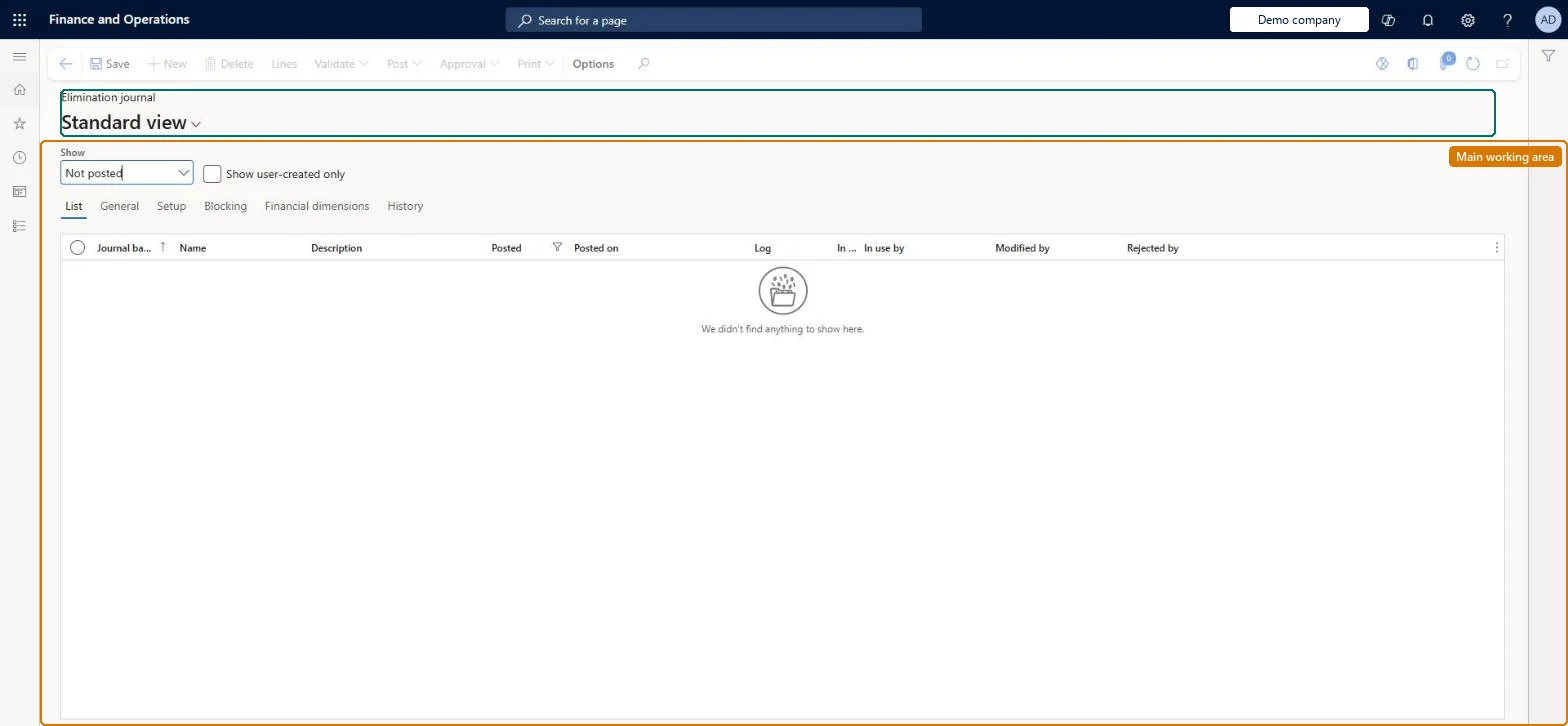
A journal page, used in an elimination company, where elimination entries are proposed from elimination rules, reviewed and posted.
What you do here
Use this page to run an elimination proposal separately from the consolidation process, review the proposed amounts and post the journal.
Example
For example, BEAT's elimination company runs the elimination proposal for rule IC-SALES with the consolidation company as source for October 2026 with GL posting date 10/31/2026, and eliminates 15,000.00 of intercompany sales between legal entities A and B.
The page in Dynamics 365. page title tab to open what to set or check
About the examples: Examples and screenshots in this guide use BEAT, a demo company in a Dynamics 365 test environment. Use your own company's codes and values instead of copying them.
Setup steps on this page
Run and post the elimination proposal
Use this page to run an elimination proposal separately from the consolidation process, review the proposed amounts and post the journal.
Steps from Microsoft
Go to Consolidations > Elimination journal.
Create a journal and select the journal name.
Select Lines.
Select Proposals > Elimination proposal.
Select the source company of the consolidated data and the elimination rule to process.
Enter the start and end dates and the GL posting date, and then select OK.
The elimination rule isn't offered in the elimination proposal
Set Active to Yes on the rule and check the effective and expiration dates cover the proposal period. Microsoft Learn
The legal entity can't be chosen as the company the elimination journal posts to
Select Use for financial elimination process on that legal entity in Organization administration > Organizations > Legal entities. Microsoft Learn
The amounts in the elimination journal are in an unexpected currency
The elimination journal shows account amounts in the currency of their originating transactions, not in the accounting currency. Check them against that currency before you post. Microsoft Learn
Test checklist
In the elimination company create a journal with a journal name of type Elimination and select Lines.
Select Proposals > Elimination proposal, the source company, an active rule, the dates and the GL posting date.
Check the proposed lines against the intercompany balances, then post.
Check the trial balance of the elimination company shows the eliminated amounts.
Run the proposal in the elimination company after the consolidation, one rule at a time, and review the amounts before posting.Proposals give a reviewable journal, and the amounts show in the currency of the originating transactions.
Consolidations is part of General ledger in Dynamics 365 Finance. In this system Accountant, Accounting manager, Accounting supervisor, Chief financial officer and Financial controller hold the consolidation duties. The accountant runs and posts the proposal; the controller reviews it. No Feature management feature is needed for this page.
Posts in the elimination company: a legal entity with Use for financial elimination process selected; the proposal reads the source company you choose. Microsoft Learn
Can it be undone
Hard to reverse: Review the proposed amounts before you post: posting writes the eliminations to the ledger of the elimination company. Microsoft Learn
If you change it later
Posting moves the eliminations into the ledger of the elimination company; the journal can post only to the Current layer, and its amounts show in the currency of the originating transactions. Microsoft Learn
Technical architect
6Technical
Menu item
LedgerJournalTable_EliminationChecked in Dynamics 365
Form
LedgerJournalTableChecked in Dynamics 365
Table
LedgerJournalTableShown as “LEDGER JOURNAL TABLE” in Record infoKey field: JournalNumChecked in Dynamics 365
Data entities
LedgerJournalHeaderEntityLedger journal table (journal headers of the journal table that every journal type shares; elimination lines are created by the elimination proposal or the consolidation) Microsoft data model
To set it up or change itAccounting supervisor LedgerAccountingSupervisorAccounting manager LedgerAccountingManagerAccountant LedgerAccountantTo use itChief financial officer CompanyChiefFinancialOfficerFinancial controller LedgerFinancialControllerGive people one of these roles. On this system, 5 roles can open this page.Checked in Dynamics 365
Actions on the page
(Action Pane without tabs): Lines, Validate, Post, Approval, PrintChecked in Dynamics 365
LedgerJournalHeaderEntity (Ledger journal table): journal headers, per company.Load order: Elimination journals are created by the elimination proposal or during Consolidate online; open journals aren't moved, post or delete them before cut-over.Load first: Elimination rule, Journal namesMicrosoft Learn