About the examples: Examples and screenshots in this guide use BEAT, a demo company in a Dynamics 365 test environment. Use your own company's codes and values instead of copying them.
Setup steps on this page
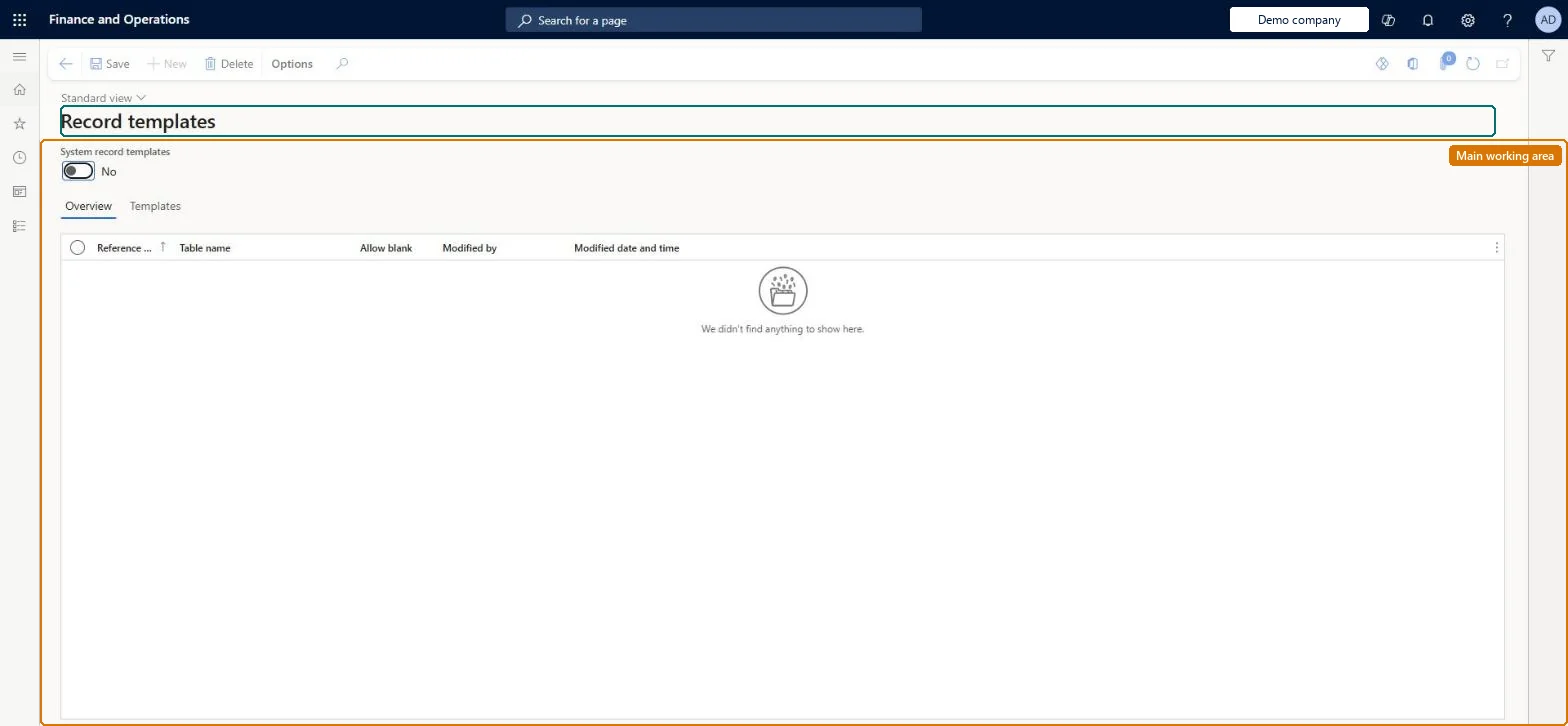
Set up Record templates
Use this page to review and maintain record templates so that users can create new records more quickly with common values filled in.
How to use it
Go to Common > Setup > Record templates.
Set System record templates to Yes to see templates shared by all users, or No to see your own.
On the Overview tab, select the table the templates belong to.
On the Templates tab, review or delete the templates for that table.
Select Save.
Source: Checked in Dynamics 365
Fields on the page
Field
What it means
Example
System record templates
Yes shows the templates shared by all users; No shows your own templates.Microsoft Learn
Yes
Table
The table the templates belong to, selected on the Overview tab.Checked in Dynamics 365
Fixed assets
Templates
The templates of the selected table, with name and description.Microsoft Learn
Laptop - 3 year
Common errors and fixes
Message
What to do
The template prompt no longer appears when creating a record
The user selected Do not ask again; turn it back on with Record info > Show template selection. Microsoft Learn
Test checklist
On Fixed assets, enter a record with the common values, then select Options > Record info > User template and save it with a name and description.
Select New on the same page and check that the Select a template for page appears.
Select the template and check the new record is filled with the template values.
Select Do not ask again, create another record and check no prompt appears; then turn it back on with Record info > Show template selection.
Record templates for the record types that are created often with the same values, named so that every user can see the name without exposing confidential informationTemplates fill common field values when a record is created, which speeds up data entry. All users can see the titles of templates shared with all users, so names must be safe for everyone to read.
Who creates shared (system) record templates?A template name such as one mentioning commission reveals confidential information, because users see all template titles when they create a record even in areas they can't apply them. Users who tick Do not ask again stop seeing the template prompt until they turn it back on with Record info > Show template selection.Test: Create a record from a template
Feature management and licence
Licence or add-in
On the live system, these roles can open the page: Information technology manager, System user, TestEssentialsRole, Retail store IT, Retail service.
Checked in Dynamics 365
Solution architect
5Design impact
Shared or per company
Per company and per user or for all users: user templates are personal, system templates are shared by everyone in the legal entity. Microsoft Learn
Can it be undone
Reversible: Templates can be changed or removed at any time. They only provide default values at the moment a new record is created from the Select a template for page. Microsoft Learn
If you change it later
Template names can be seen by all users when templates are shared with all users, and the template selection prompt appears whenever someone creates a record on a form that has templates they can use. Microsoft Learn
Technical architect
6Technical
Menu item
SysRecordTemplateTableChecked in Dynamics 365
Form
SysRecordTemplateTableChecked in Dynamics 365
Table
SysRecordTemplateTableShown as “RECORD TEMPLATES” in Record infoChecked in Dynamics 365
Who can open it
PrivilegesMaintain record templates for tables SysRecordTemplateTableMaintainView record templates for tables SysRecordTemplateTableViewDutiesUse basic functionality SysServerAXBasicMaintainMaintain system settings SysServerSettingsMaintain7 security rolesAifTestSecRoleEventTestRoleRetail service RetailServiceRetail store IT RetailStoreITInformation technology manager SysServerITManagerSystem user SystemUserTestEssentialsRoleChecked in Dynamics 365
Roles to set it up and use it
To set it up or change itInformation technology manager SysServerITManagerTo use itSystem user SystemUserTestEssentialsRole Retail store IT RetailStoreITRetail service RetailServiceGive people one of these roles. On this system, 5 roles can open this page.Checked in Dynamics 365
Load order: Record templates has no data entity in Data management. Create the templates again from a record with Options > Record info > User template or Company template in the new environment.Microsoft Learn