BeyondERP.Newsletter
Menu

Setup page · Asset management

Maintenance downtime reason codes

A setup page where you create reason codes that explain why an asset was not available and control whether that downtime counts in asset KPIs.

Used by
Maintenance clerk, Maintenance manager
Business process
Develop maintenance strategy
Menu item
EntAssetProductionStopType
Main table
EntAssetProductionStopType
Data entity
EntAssetMaintenanceProductionStopTypeEntity
Setup steps
1 on this page
Show what matters for
PAGE GUIDEWhat the page does and how to use it8 sections. Choose a role to highlight what matters to you.
Everyone

1What it is and why

What it isA setup page where you create reason codes that explain why an asset was not available and control whether that downtime counts in asset KPIs.
What you do hereUse this page to create one reason code for each kind of stop you want to tell apart in reporting, and choose which codes count toward KPIs.
ExampleFor example, you create Breakdown with KPI include selected and Planned stop with it cleared, so planned stops don't lower availability.
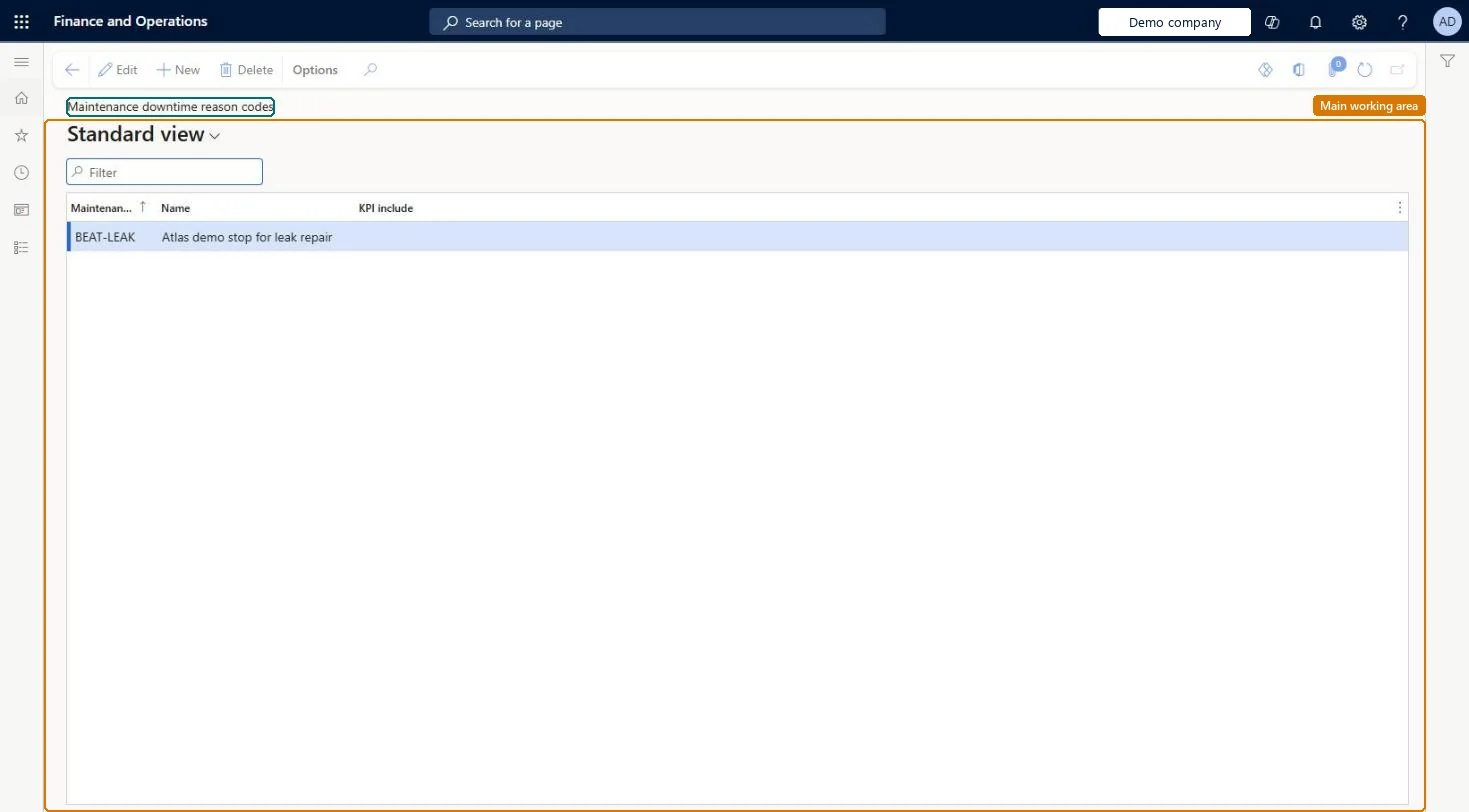
Maintenance downtime reason codes page in Dynamics 365
The page in Dynamics 365. page title tab to open what to set or check
Functional consultant · Solution architect

2Where it fits

Business processDefine asset strategy › Develop maintenance strategy
Menu pathAsset management › Setup › Work orders › Maintenance downtime reason codes
Used next byMaintenance downtime Microsoft Learn Asset KPIs Microsoft Learn
End user · Functional consultant

3How to do it

About the examples: Examples and screenshots in this guide use BEAT, a demo company in a Dynamics 365 test environment. Use your own company's codes and values instead of copying them.

Setup steps on this page

Set up Maintenance downtime reason codes

Use this page to create one reason code for each kind of stop you want to tell apart in reporting, and choose which codes count toward KPIs.

Steps from Microsoft

  1. Go to Asset management > Setup > Work orders > Maintenance downtime reason codes.
  2. On the Action Pane, select New.
  3. In the Maintenance downtime reason code field, enter a unique ID.
  4. In the Name field, enter a name.
  5. Select the KPI include check box if the downtime should count in asset KPIs.
  6. On the Action Pane, select Save.

Source: Microsoft Learn

Fields on the page

FieldWhat it meansTable column
Maintenance downtime reason codeA unique ID for the reason code.Microsoft Learn ProductionStopTypeID
NameThe name of the reason code.Microsoft Learn Name
KPI includeCounts downtime with this code toward asset KPIs such as availability and number of stops.Microsoft Learn KPIInclude

Test checklist

  1. Create codes Breakdown (KPI include selected) and Planned stop (KPI include cleared).
  2. On a work order, register downtime for the asset with code Breakdown and another with Planned stop.
  3. Open Asset KPIs and check only the Breakdown downtime counts in Downtime and Number of stops.
  4. Try to delete code Breakdown and check it is refused.

Source: Microsoft Learn

Functional consultant

4Setup decisions

Setup stepRecommended value and whyDecision, common mistake and test
Set up Maintenance downtime reason codesOne code per kind of stop; KPI include selected for breakdowns, cleared for planned stopsLearn says planned production stops generally shouldn't be included in KPI calculations because they don't affect expected performance.Leaving the reason code blank on planned downtime: registrations without a reason code still count in asset KPIs; only codes with KPI include cleared are left out.Test: Planned stops stay out of asset KPIs
Solution architect

5Design impact

Can it be undoneHard to reverse: A reason code can't be deleted once it is used on a downtime registration. Plan the code list before go-live. Microsoft Learn
If you change it laterDowntime is left out of asset KPIs only when its reason code has KPI include cleared. Microsoft Learn
Technical architect

6Technical

Menu itemEntAssetProductionStopType Checked in Dynamics 365
FormEntAssetProductionStopType Checked in Dynamics 365
TableEntAssetProductionStopTypeShown as “MAINTENANCE DOWNTIME REASON CODES” in Record infoKey field: ProductionStopTypeIDChecked in Dynamics 365
Data entitiesEntAssetMaintenanceProductionStopTypeEntityAsset management maintenance downtime types Checked in Dynamics 365
Who can open itPrivilegesMaintain maintenance management setup EntAssetSetupMaintainView maintenance management setup EntAssetSetupViewDutiesMaintain Asset Management setup EntAssetSetupMaintainView Enterprise Asset Management setup EntAssetSetupView
2 security rolesMaintenance clerk EntAssetMaintenanceClerkMaintenance manager EntAssetMaintenanceManager
Checked in Dynamics 365
Roles to set it up and use itTo set it up or change itMaintenance manager EntAssetMaintenanceManagerTo use itMaintenance clerk EntAssetMaintenanceClerkGive people one of these roles. On this system, 2 roles can open this page.Checked in Dynamics 365
Developer

7Developer

Open it by URLhttps://<your-environment>/?mi=EntAssetProductionStopType
Integrate withEntAssetMaintenanceProductionStopTypeEntity data entity Checked in Dynamics 365
Everyone

8Sources