PAGE GUIDEWhat the page does and how to use it6 sections. Choose a role to highlight what matters to you.
Everyone
1What it is and why
What it is
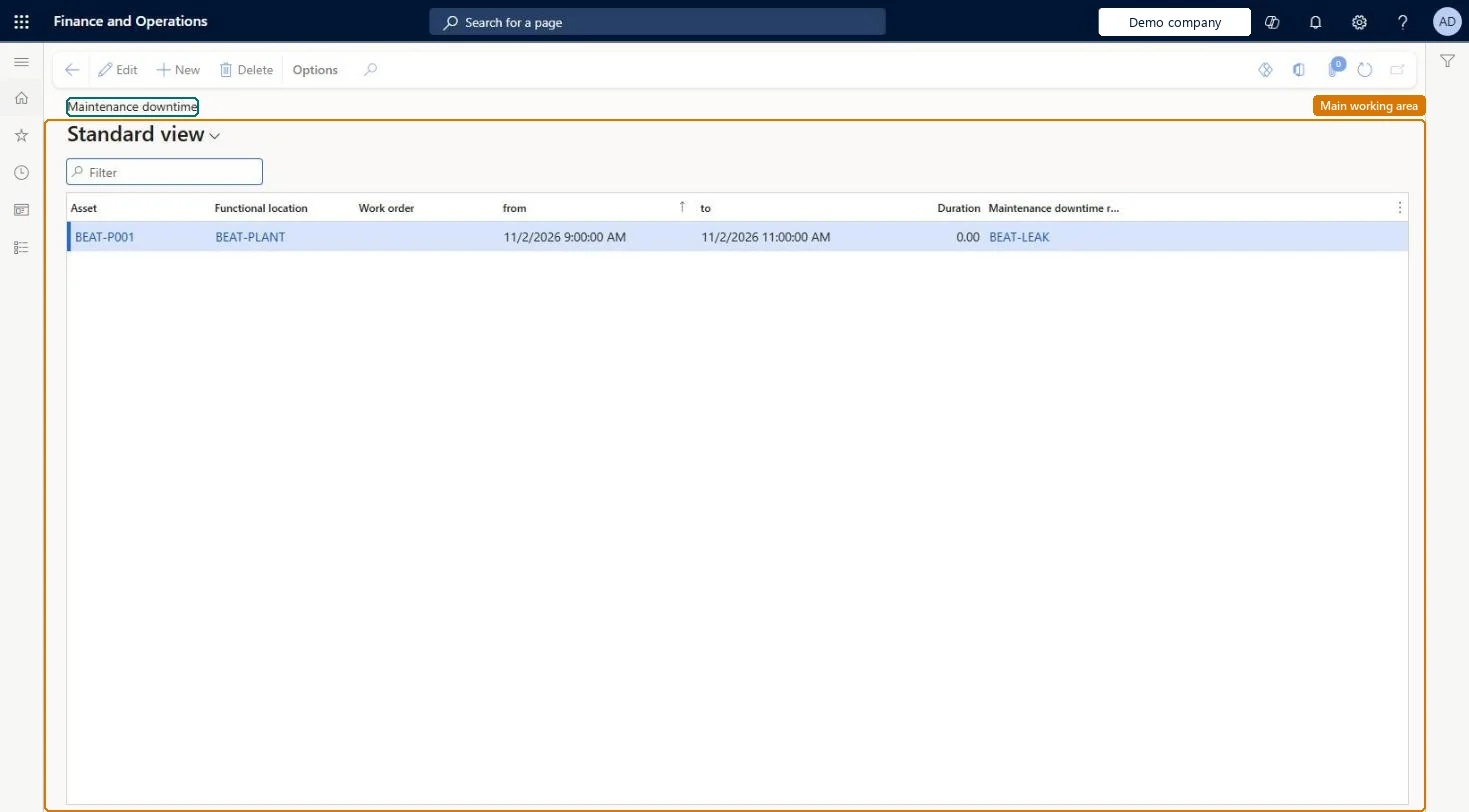
An inquiry page that shows the maintenance downtime registrations for all assets.
What you do here
Use this page to review the periods when assets were not available and the reason codes for them; these registrations give the downtime figures on the Asset KPIs page.
Example
For example, a maintenance manager reviews the registrations for a line of machines to see which stops were breakdowns and which were planned stops.
The page in Dynamics 365. page title tab to open what to set or check
About the examples: Examples and screenshots in this guide use BEAT, a demo company in a Dynamics 365 test environment. Use your own company's codes and values instead of copying them.
How to use it
Go to Asset management > Inquiries > Maintenance downtime.
Select New.
Select the Asset; the Functional location fills in.
Enter the from and to date and time of the downtime.
The date and time when the downtime ended; it must be later than From.Microsoft Learn
Duration
The downtime in hours, counted only over the working hours of the calendar that applies; you can't edit it.Microsoft Learn
StopDuration
Maintenance downtime reason code
Explains why the asset was not available and controls whether the downtime counts in asset KPIs.Microsoft Learn
ProductionStopTypeID
Asset, Functional location, Work order
Filled in from the work order that the registration was created from and can't be changed afterward.Microsoft Learn
Technical architect
4Technical
Menu item
EntAssetObjectProductionStopChecked in Dynamics 365
Form
EntAssetObjectProductionStopChecked in Dynamics 365
Table
EntAssetObjectProductionStopShown as “MAINTENANCE DOWNTIMES” in Record infoKey field: Object_ObjectIDChecked in Dynamics 365
Who can open it
PrivilegesMaintain work order data EntAssetWorkOrderDataMaintainView work order data EntAssetWorkOrderDataViewDutiesMaintain work orders EntAssetWorkOrderMaintainInquire into work orders EntAssetWorkOrderView3 security rolesMaintenance clerk EntAssetMaintenanceClerkMaintenance manager EntAssetMaintenanceManagerMaintenance worker EntAssetMaintenanceWorkerChecked in Dynamics 365
Roles to set it up and use it
To set it up or change itMaintenance manager EntAssetMaintenanceManagerMaintenance clerk EntAssetMaintenanceClerkMaintenance worker EntAssetMaintenanceWorkerGive people one of these roles. On this system, 3 roles can open this page.Checked in Dynamics 365