BeyondERP.Newsletter
Menu

Page · Asset leasing

Expiring lease query

An inquiry that lists leases whose expiration or end date falls within a chosen number of days, 30 by default.

Used by
Lease accountant, Lease manager, Accountant and 1 more role
Business process
Maintain asset leases
Menu item
AssetLeaseDetailExpIn30Days
Main table
AssetLeaseLeaseDetails
Data entity
AssetLeaseLeaseMasterEntity
Setup steps
1 on this page
Show what matters for
PAGE GUIDEWhat the page does and how to use it8 sections. Choose a role to highlight what matters to you.
Everyone

1What it is and why

What it isAn inquiry that lists leases whose expiration or end date falls within a chosen number of days, 30 by default.
What you do hereUse this page to see which leases are about to end, with their group, location and the person responsible, so you can act before they expire.
ExampleFor example, a lease manager reviews it each week to decide which equipment leases to renew or return.
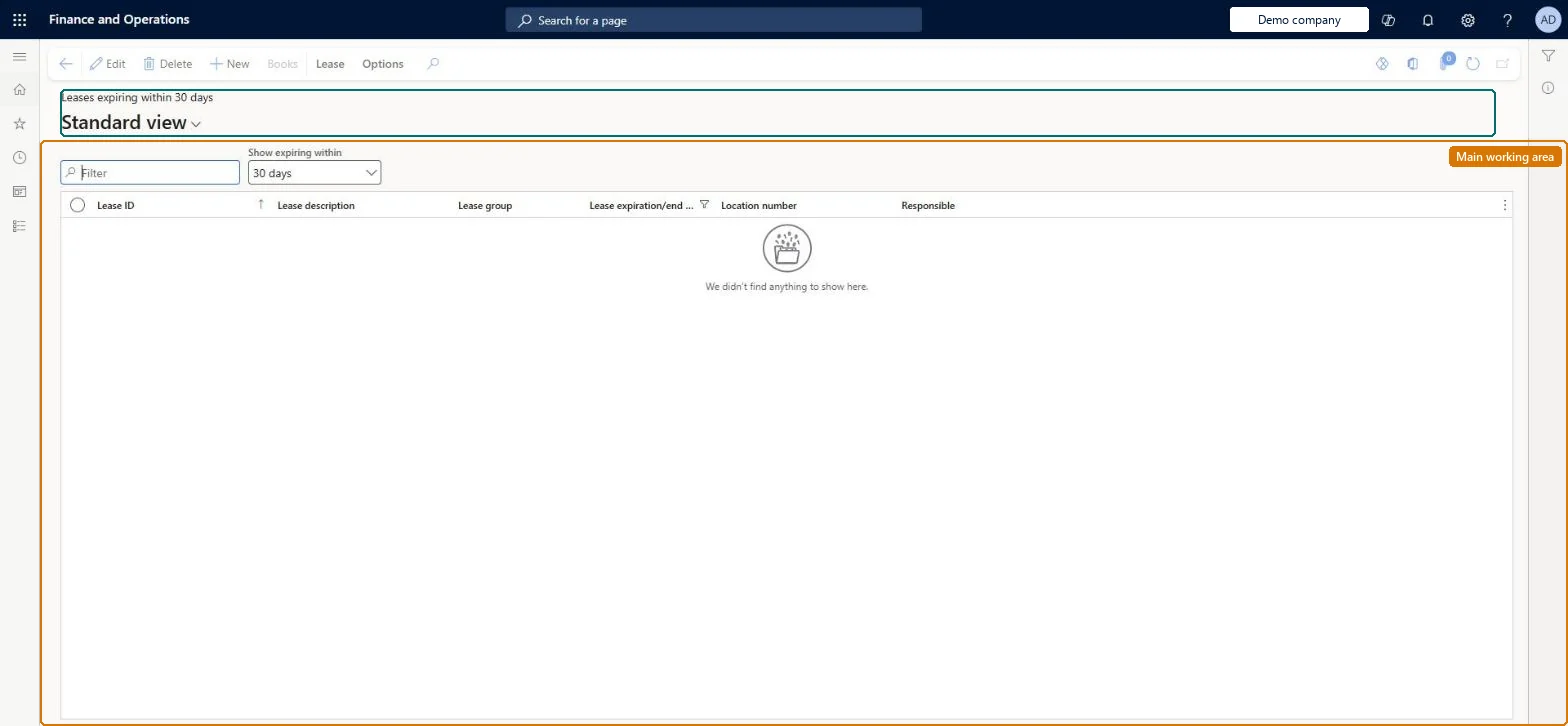
Expiring lease query page in Dynamics 365
The page in Dynamics 365. page title tab to open what to set or check
Functional consultant · Solution architect

2Where it fits

Business processManage active assets › Maintain asset leases
Menu pathAsset leasing › Leases › Expiring lease query
Set up firstLease summary Microsoft Learn
Used next byLease adjustments (renewal) Microsoft Learn Termination proposal Microsoft Learn
Related pagesExpiring book query Microsoft Learn Location details Checked in Dynamics 365
End user · Functional consultant

3How to do it

About the examples: Examples and screenshots in this guide use BEAT, a demo company in a Dynamics 365 test environment. Use your own company's codes and values instead of copying them.

Setup steps on this page

Review leases that expire soon

Find leases that end soon so a renewal, extension or return is decided in time.

Steps from Microsoft

  1. Go to Asset leasing > Leases > Expiring lease query (Leases expiring within 30 days).
  2. Set Show expiring within to the window you need.
  3. Filter on Location number or Responsible.
  4. Select a lease and select Books, or start a Termination proposal or an adjustment from Lease summary.

Source: Microsoft Learn

Fields on the page

FieldWhat it meansExample
Show expiring withinThe window the list uses; 30 days by default.Checked in Dynamics 36530 days
Lease ID / Lease descriptionThe lease.Microsoft Learn
Lease groupThe lease group of the lease.Microsoft Learn
Lease expiration/end dateThe date the lease ends.Checked in Dynamics 365
Location numberThe location the lease refers to, from Location details.Checked in Dynamics 365BEAT-LOC
ResponsibleThe person responsible for the lease.Checked in Dynamics 365

Common errors and fixes

MessageWhat to do
A lease that ends next quarter isn't listedWiden Show expiring within; it defaults to 30 days. Checked in Dynamics 365

Test checklist

  1. Create a lease that ends within 45 days.
  2. With 30 days it isn't listed; widen Show expiring within and it is.
  3. Filter on its Location number.

Source: Microsoft Learn

Functional consultant

4Setup decisions

Setup stepRecommended value and whyDecision, common mistake and test
Review leases that expire soonSet Show expiring within to the longest notice period in your lease contracts, such as 90 days, and review the list each month.A renewal decided late still has to go through the Adjustment wizard, and the default 30-day window is usually shorter than the notice period.How far ahead should lease expiries be reviewed?Relying on the 30-day default and finding a lease after its renewal notice date has passed.Test: Expiry window

Feature management and licence

Feature to turn onAsset leasing (Must be on)
Licence or add-inAsset leasing must be turned on in Feature management (feature Asset leasing). Microsoft Learn describes three Asset leasing roles: Maintain lease (add, edit and post leases), View lease (view leases and schedules and run reports) and Lease clerk (create new leases only). Maintain lease and View lease users read this list.

Microsoft Learn

Solution architect

5Design impact

Shared or per companyPer company: leases with their books, schedules and journals belong to the legal entity you are working in, and Lease ID numbers come from a number sequence set per company. Turn on Cross entity batch in Asset leasing parameters to create journals for other legal entities from the current one. Microsoft Learn
Can it be undoneReversible: The query changes no data. Microsoft Learn
If you change it laterA renewal or extension found here is a lease modification: it goes through the Adjustment wizard, which creates a new lease version and remeasures the liability. Microsoft Learn
Technical architect

6Technical

Menu itemAssetLeaseDetailExpIn30Days Checked in Dynamics 365
FormAssetLeaseDetail Checked in Dynamics 365
TableAssetLeaseLeaseDetailsShown as “LEASES” in Record infoKey field: LeaseIdChecked in Dynamics 365
Data entitiesAssetLeasePaymentAmountBreakdownEntityLease payment amount breakdown (only the payment amount breakdown lines) Checked in Dynamics 365AssetLeaseLeaseMasterEntityParent leases Checked in Dynamics 365
Who can open itPrivilegesMaintain lease AssetLeaseLeaseMaintainMaintain lease without vendor invoice access AssetLeaseLeaseMaintainWithoutVendInvoiceAccessView lease AssetLeaseLeaseViewDutiesLease inquire AssetLeaseLeaseInquireMaintain lease AssetLeaseLeaseMaintainMaintain lease without vendor invoice access AssetLeaseLeaseMaintainWithoutVendInvoiceAccess
4 security rolesLease accountant AssetLeaseLeaseMaintainLease manager AssetLeaseLeaseViewAccountant LedgerAccountantAccounting manager LedgerAccountingManager
Checked in Dynamics 365
Roles to set it up and use itTo set it up or change itLease accountant AssetLeaseLeaseMaintainAccountant LedgerAccountantTo use itLease manager AssetLeaseLeaseViewAccounting manager LedgerAccountingManagerGive people one of these roles. On this system, 4 roles can open this page.Checked in Dynamics 365
Actions on the pageLease: New, Maintain(Action Pane without tabs): New, BooksChecked in Dynamics 365
Developer

7Developer

Open it by URLhttps://<your-environment>/?mi=AssetLeaseDetailExpIn30Days
Integrate withAssetLeaseLeaseMasterEntity data entity Checked in Dynamics 365
Data migrationAssetLeaseLeaseMasterEntity (Parent leases): reads and exports the leases. Bulk lease changes go through the Lease import framework.Load order: Load the Asset leasing setup in Microsoft's order: lease books, lease groups, then the parameters (journal names, posting accounts, executory cost accounts), expense types, payment amount types, index rate types and locations, and only then the leases.Load first: Lease summaryMicrosoft Learn
Everyone

8Sources

KEEP EXPLORING

More in Asset leasing.

Open the other pages and setup steps in this module, or go back to the Atlas Hub to search every page.