Inquiry page · Accounts payable
Product receipt
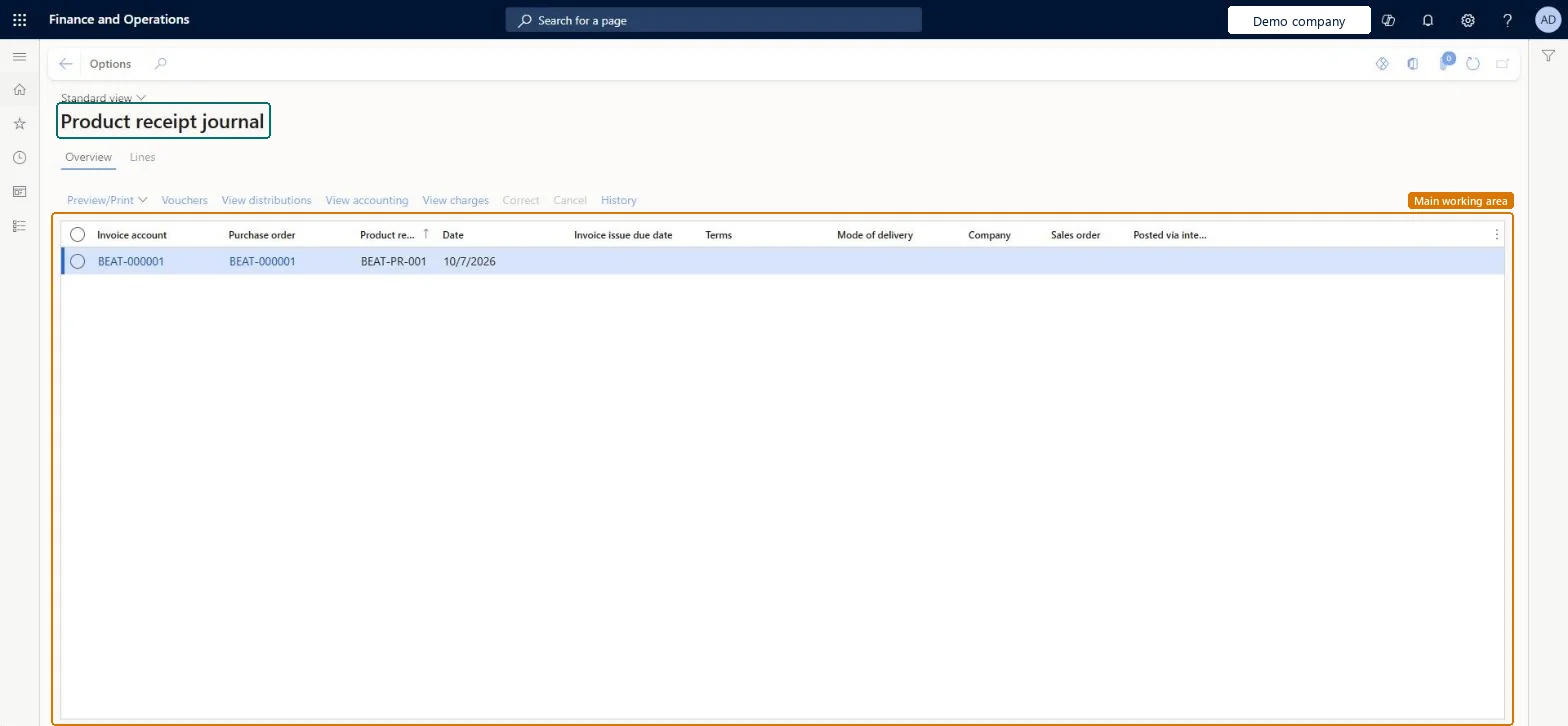
The product receipt journals, which record products received against purchase orders, including quantities, dates, and dimensions.
- Used by
- Accounts payable clerk, Accounts payable manager, Purchasing agent and 16 more roles
- Business process
- —
- Menu item
VendPackingSlipJournal- Main table
VendPackingSlipJour- Data entity
VendProductReceiptHeaderEntity- Setup steps
- —
Show what matters for
Everyone
1What it is and why
| What it is | The product receipt journals, which record products received against purchase orders, including quantities, dates, and dimensions. |
|---|---|
| What you do here | Used to review details about products that are already received, and to correct or cancel a product receipt. |
| Example | Select a product receipt and use Correct to reduce the received quantity, or Cancel to cancel the receipt. |
Functional consultant · Solution architect
2Where it fits
| Business process | — |
|---|---|
| Menu path | Accounts payable › Inquiries and reports › Product receipt |
| Set up first | All purchase orders Microsoft Learn ↗ |
| Used next by | Purchase orders received but not invoiced Microsoft Learn ↗ |
| Related pages | — |
End user · Functional consultant
3How to do it
Microsoft's steps
- Open the Product receipt journal page.
- On the Overview tab, select the product receipt to change.
- On the Overview tab toolbar, select Correct to make corrections, or Cancel to cancel the receipt.
Source: Microsoft Learn ↗
Field guide
| Field | What it means | Worked example | Table column |
|---|---|---|---|
| — | |||
Functional consultant
4Setup decisions
| Setup step | Recommended value and why | Decision · common mistake · test |
|---|---|---|
| — No setup is made on this page. | ||
Solution architect
5Design impact
| Shared or per company | Per company: each legal entity has its own records. Microsoft data model ↗ |
|---|---|
| Can it be undone | — |
| Feature or country | — |
| If you change it later | A correction can only lower the received quantity; to raise it, post a new product receipt. Cancelling posts a separate reversal instead of changing the original receipt. Microsoft Learn ↗ |
Technical architect
6Technical
| Menu item | VendPackingSlipJournal Checked in Dynamics 365 |
|---|---|
| Form | VendPackingSlipJournal Checked in Dynamics 365 |
| Table | VendPackingSlipJourShown as “Vendor product receipts” in Record infoKey field: dataAreaIdChecked in Dynamics 365 |
| Data entities | VendProductReceiptHeaderEntityProduct receipt header Microsoft data model ↗ |
| Who can open it | PrivilegesView product receipt journal from purchase order VendPackingSlipJournalViewDutiesInquire into cost master InventItemPriceCostMasterInquireMaintain purchase orders PurchOrderMaintainInquire into purchase order to invoice progress PurchOrderToInvoiceProgressInquireMaintain product receipt PurchPackingSlipMaintainMaintain rental purchase orders RentalPurchOrderMaintainEnable invoice and payment process VendInvoiceInvoicePaymentProcessEnable19 security rolesInventory accountantInventCostAccountantInventory accountant clerk InventCostCostClerkLanded cost agent ITMAgentAccountant LedgerAccountantAccounting manager LedgerAccountingManagerAccounting supervisor LedgerAccountingSupervisorProject assistant ProjProjectClerkProject manager ProjProjectManagerRental coordinator agent RentalCoordinatorAgentRental manager RentalManagerRental purchasing manager RentalPurchasingManagerRetail service RetailServiceRetail store manager RetailStoreManagerBuying agent TradeBuyingAgentPurchasing manager TradePurchasingManagerAccounts payable clerk VendInvoiceAccountsPayableClerkAccounts payable manager VendInvoiceAccountsPayableManagerPurchasing agent VendPurchasingAgentPurchasing Agent - Public Sector VendPurchasingAgent_PSN |
| Actions on the page | — |
Developer
7Developer
| Open it directly | https://<your-environment>/?mi=VendPackingSlipJournal |
|---|---|
| Integrate with | VendProductReceiptHeaderEntity data entity Microsoft data model ↗ |
| Table definition | VendPackingSlipJour columns and relations Microsoft data model ↗ |
Everyone
8Sources and checks
- learn.microsoft.com/dynamics365/supply-chain/procurement/product-receipt-against-purchase-orders
- learn.microsoft.com/dynamics365/supply-chain/procurement/product-receipt-against-purchase-orders
- learn.microsoft.com/common-data-model/schema/core/operationscommon/tables/supplychain/procurementandsourcing/transaction/vendpackingslipjour
- Checked in a working Dynamics 365 system, version 10.0.49: the menu item, form, table and security, the page.