BeyondERP.Newsletter
Menu

Setup step on the Override charges page · Transportation management

Set up Override charges

Use this page to keep override charge records for customer or vendor accounts, with the charge details held on the Charge FastTab.

Used by
Logistics manager, Transportation coordinator
Business process
Manage freight and transportation
Menu item
TMSChargeOverride
Main table
TMSChargeOverride
Data entity
TMSTransportationCustomerChargeEntity
Setup steps
1 on this page
Show what matters for
SETUP GUIDEHow to set it up7 sections. Choose a role to highlight what matters to you.
Everyone

1What it is and why

What it isA setup page where you maintain override charge records by module and account number, with a customer account or vendor account and the charge details.
What you do hereUse this page to keep override charge records for customer or vendor accounts, with the charge details held on the Charge FastTab.
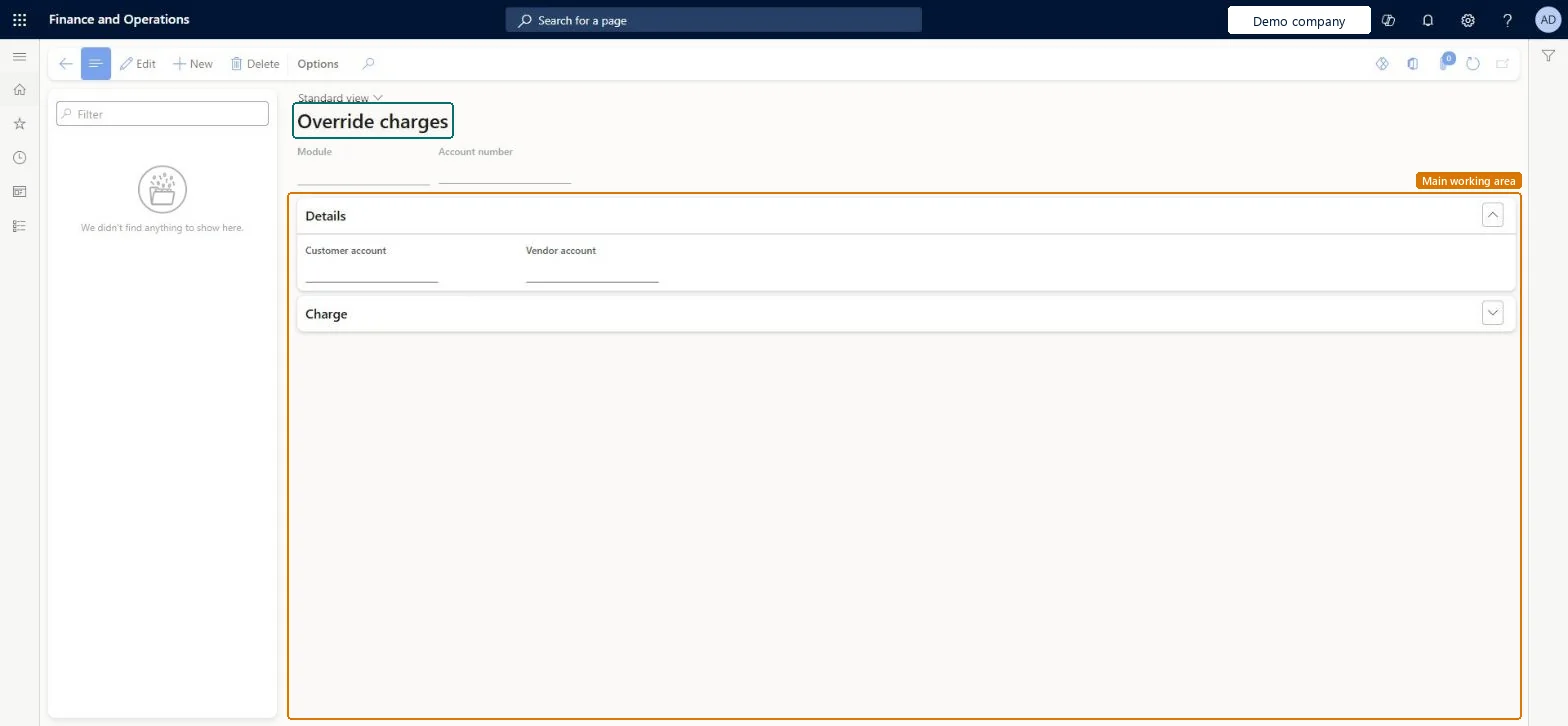
Override charges page in Dynamics 365
The page in Dynamics 365. page title tab to open what to set or check
Functional consultant · Solution architect

2Where it fits

Business processManage freight and transportation
Menu pathTransportation management › Setup › Rating › Override charges
In this process Set up Discounts · Set up Rating metadata
End user · Functional consultant

3How to do it

About the examples: Examples and screenshots in this guide use BEAT, a demo company in a Dynamics 365 test environment. Use your own company's codes and values instead of copying them.

Setup steps on this page

Set up Override charges

Use this page to keep override charge records for customer or vendor accounts, with the charge details held on the Charge FastTab.

How to use it

  1. Go to Transportation management > Setup > Rating > Override charges.
  2. Select New.
  3. In the header, select the Module and enter the Account number.
  4. On the Details FastTab, select the Customer account or Vendor account.
  5. Expand the Charge FastTab to enter the charge details.

Source: Checked in Dynamics 365

Solution architect

4Design impact

Shared or per companyPer company: each legal entity has its own records. Microsoft data model
Technical architect

5Technical

Menu itemTMSChargeOverride Checked in Dynamics 365
FormTMSChargeOverride Checked in Dynamics 365
TableTMSChargeOverrideShown as “OVERRIDE CHARGES” in Record infoChecked in Dynamics 365
Data entitiesTMSTransportationCustomerChargeEntityTransportation customer charges Microsoft data model TMSTransportationVendorChargeEntityTransportation vendor charges Microsoft data model
Who can open itPrivilegesMaintain override charges TMSChargeOverrideMaintainView override charges information TMSChargeOverrideViewDutiesInquire into carrier master and network planning information TMSCarrierMasterInquireMaintain carrier and network planning master TMSCarrierMasterMaintain
2 security rolesLogistics manager TMSLogisticsManagerTransportation coordinator TMSTransportationCoordinator
Checked in Dynamics 365
Roles to set it up and use itTo set it up or change itLogistics manager TMSLogisticsManagerTo use itTransportation coordinator TMSTransportationCoordinatorGive people one of these roles. On this system, 2 roles can open this page.Checked in Dynamics 365
Developer

6Developer

Open it by URLhttps://<your-environment>/?mi=TMSChargeOverride
Integrate withTMSTransportationCustomerChargeEntity data entity Microsoft data model
Data migrationTMSTransportationCustomerChargeEntity (Transportation customer charges): loaded for each company, in Microsoft's default template 405 - Transportation management.TMSTransportationVendorChargeEntity (Transportation vendor charges): loaded for each company, in Microsoft's default template 405 - Transportation management.Load order: Microsoft's default template 405 - Transportation management loads Transportation customer charges at execution unit 1, level 405, sequence 30. Lower levels load first, and entities at the same level load in sequence order.Load first: Transportation route plans, Shipping carrier, Shipping carrier service, the default templates at lower levels (System setup to Warehouse management)Microsoft Learn
Table definitionTMSChargeOverride columns and relations Microsoft data model
Everyone

7Sources

To cite this step: TM-RATE-090, Set up Override charges. Beyond ERP Atlas Hub, 2026-11-11. https://www.beyonderp.cloud/atlas/step/TM-RATE-090