BeyondERP.Newsletter
Menu

Setup step on the Accessorial assignments page · Transportation management

Set up Accessorial assignments

Use this page to link a carrier or hub accessorial charge to the criteria that trigger it and to the fee type, unit and amount used to calculate it.

Used by
Logistics manager, Transportation coordinator
Business process
Manage freight and transportation
Menu item
TMSAccessorialAssignment
Main table
TMSAccessorialAssignment
Data entity
TMSTransportationAccessorialChargeAssignmentEntity
Setup steps
1 on this page
Show what matters for
SETUP GUIDEHow to set it up8 sections. Choose a role to highlight what matters to you.
Everyone

1What it is and why

What it isA setup page where you define when an accessorial charge applies and how it is calculated, using the Details, Criteria and Calculation FastTabs.
What you do hereUse this page to link a carrier or hub accessorial charge to the criteria that trigger it and to the fee type, unit and amount used to calculate it.
ExampleFor example, you can apply a fuel surcharge only within a range of ZIP/postal codes and calculate it by mileage.
Accessorial assignments page in Dynamics 365
The page in Dynamics 365. page title tab to open what to set or check
Functional consultant · Solution architect

2Where it fits

Business processManage freight and transportation
Menu pathTransportation management › Setup › Rating › Accessorial assignments
Set up firstHub accessorial charges Microsoft Learn Accessorial masters Microsoft Learn
Related pagesCarrier accessorial charges Microsoft Learn
In this process Set up Equipment · Set up Constraints
End user · Functional consultant

3How to do it

About the examples: Examples and screenshots in this guide use BEAT, a demo company in a Dynamics 365 test environment. Use your own company's codes and values instead of copying them.

Setup steps on this page

Set up Accessorial assignments

Use this page to link a carrier or hub accessorial charge to the criteria that trigger it and to the fee type, unit and amount used to calculate it.

Steps from Microsoft

  1. Go to Transportation management > Setup > Rating > Accessorial assignments.
  2. Select New, and in the Name field, type a value.
  3. Expand the Details section, and in the Hub and Hub accessorial ID fields, select the hub charge that the assignment is for.
  4. Expand the Criteria section and choose the criteria for when the charge should apply, or set the Always apply option to Yes.
  5. In the Accessorial assignment level field, select an option.
  6. Expand the Calculation section, and in the Accessorial fee type field, select how the charge is calculated, such as Flat.
  7. In the Accessorial fee field, enter a number.
  8. Select Save.

Source: Microsoft Learn

Fields on the page

FieldWhat it meansTable column
Accessorial fee typeDetermines how the actual charge is calculated, for example as a flat charge or a fuel surcharge.Microsoft Learn FeeType
Accessorial unitThe unit used as the base for calculating the charge, such as mileage.Microsoft Learn

Test checklist

  1. Create an assignment for a carrier accessorial charge with a ZIP/postal code range in Criteria.
  2. Set Accessorial fee type and Accessorial unit on Calculation.
  3. Rate a load inside the range and check the charge.
  4. Rate a load outside the range and check there is no charge.

Source: Microsoft Learn

Functional consultant

4Setup decisions

Setup stepRecommended value and whyDecision, common mistake and test
Set up Accessorial assignmentsUse Criteria (for example a ZIP/postal code range) rather than Always apply unless the contract charges on every shipment; set Accessorial fee type and Accessorial unit to match the contract (for example Fuel surcharge per Mileage with a region)The Criteria FastTab controls when a charge applies and the Calculation FastTab controls how it is calculated from the accessorial unit.Leaving Always apply on Yes for a charge that only applies in a region, so every load gets the surcharge.Test: Accessorial charge applies only inside its criteria
Solution architect

5Design impact

Shared or per companyPer company: each legal entity has its own records. Microsoft data model
Can it be undoneReversible: Applies to loads rated after the change.
Technical architect

6Technical

Menu itemTMSAccessorialAssignment Checked in Dynamics 365
FormTMSAccessorialAssignment Checked in Dynamics 365
TableTMSAccessorialAssignmentShown as “ACCESSORIAL ASSIGNMENTS” in Record infoKey field: NameChecked in Dynamics 365
Data entitiesTMSTransportationAccessorialChargeAssignmentEntityTransportation accessorial charge assignments Microsoft data model
Who can open itPrivilegesMaintain accessorial assignments TMSAccessorialAssignmentMaintainView accessorial assignments TMSAccessorialAssignmentViewDutiesInquire into carrier master and network planning information TMSCarrierMasterInquireMaintain carrier and network planning master TMSCarrierMasterMaintain
2 security rolesLogistics manager TMSLogisticsManagerTransportation coordinator TMSTransportationCoordinator
Checked in Dynamics 365
Roles to set it up and use itTo set it up or change itLogistics manager TMSLogisticsManagerTo use itTransportation coordinator TMSTransportationCoordinatorGive people one of these roles. On this system, 2 roles can open this page.Checked in Dynamics 365
Developer

7Developer

Open it by URLhttps://<your-environment>/?mi=TMSAccessorialAssignment
Integrate withTMSTransportationAccessorialChargeAssignmentEntity data entity Microsoft data model
Data migrationTMSTransportationAccessorialChargeAssignmentEntity (Transportation accessorial charge assignments): loaded for each company, in Microsoft's default template 405 - Transportation management.Load order: Microsoft's default template 405 - Transportation management loads Transportation accessorial charge assignments at execution unit 1, level 405, sequence 30. Lower levels load first, and entities at the same level load in sequence order.Load first: the default templates at lower levels (System setup to Warehouse management)Microsoft Learn
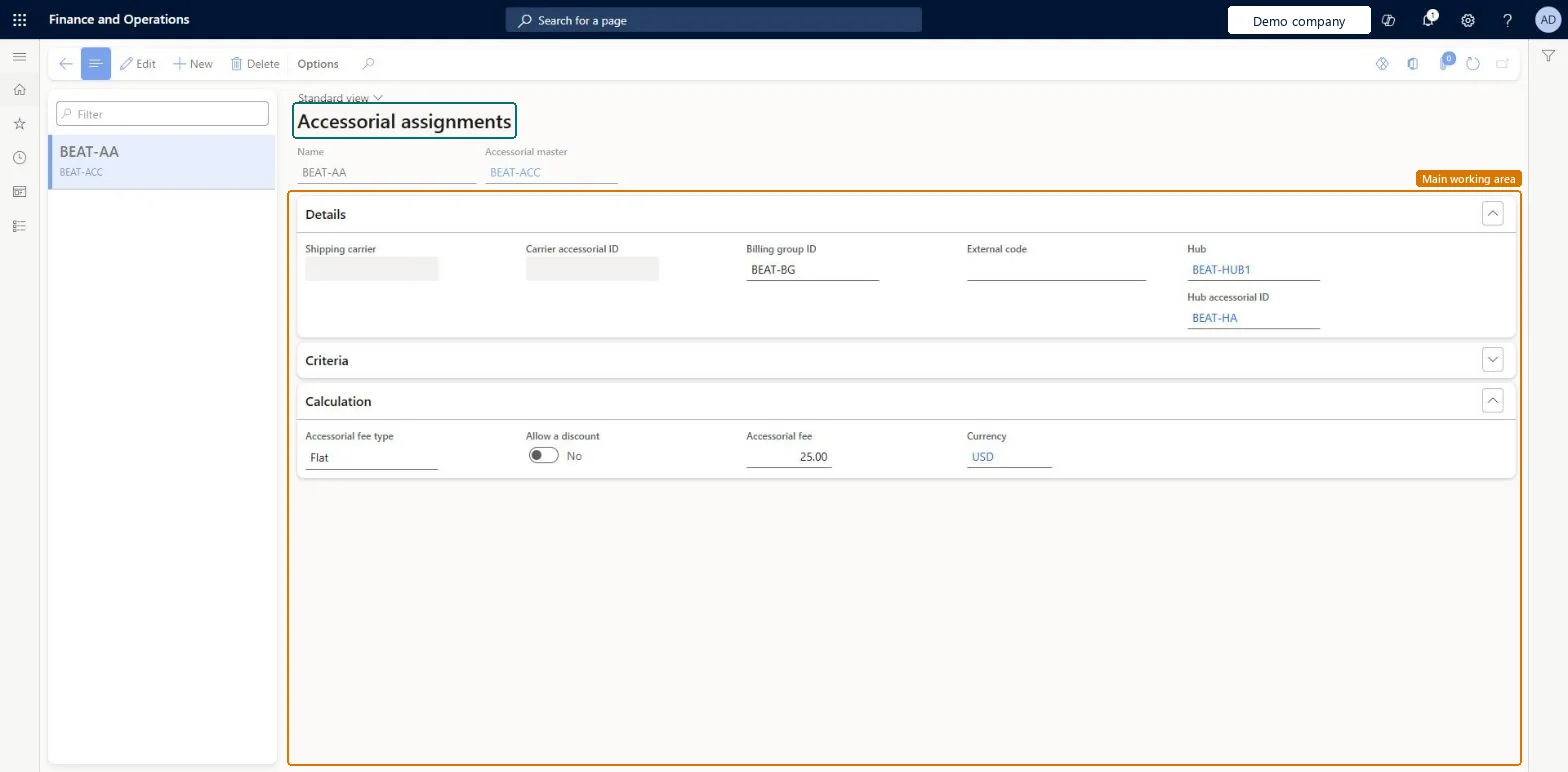
Table definitionTMSAccessorialAssignment columns and relations Microsoft data model
Everyone

8Sources

To cite this step: TM-RATE-030, Set up Accessorial assignments. Beyond ERP Atlas Hub, 2026-11-11. https://www.beyonderp.cloud/atlas/step/TM-RATE-030