Time and attendanceInquiries and reportsRegistrations
JmgTermRegTrans
Used by
Manager, Shop supervisor, Production manager and 2 more roles
Business process
Record employee time
Menu item
JmgTermRegTrans
Main table
JmgTermReg
Data entity
None for this page's own settings
Setup steps
1 on this page
Show what matters for
SETUP GUIDEHow to set it up8 sections. Choose a role to highlight what matters to you.
Everyone
1What it is and why
What it is
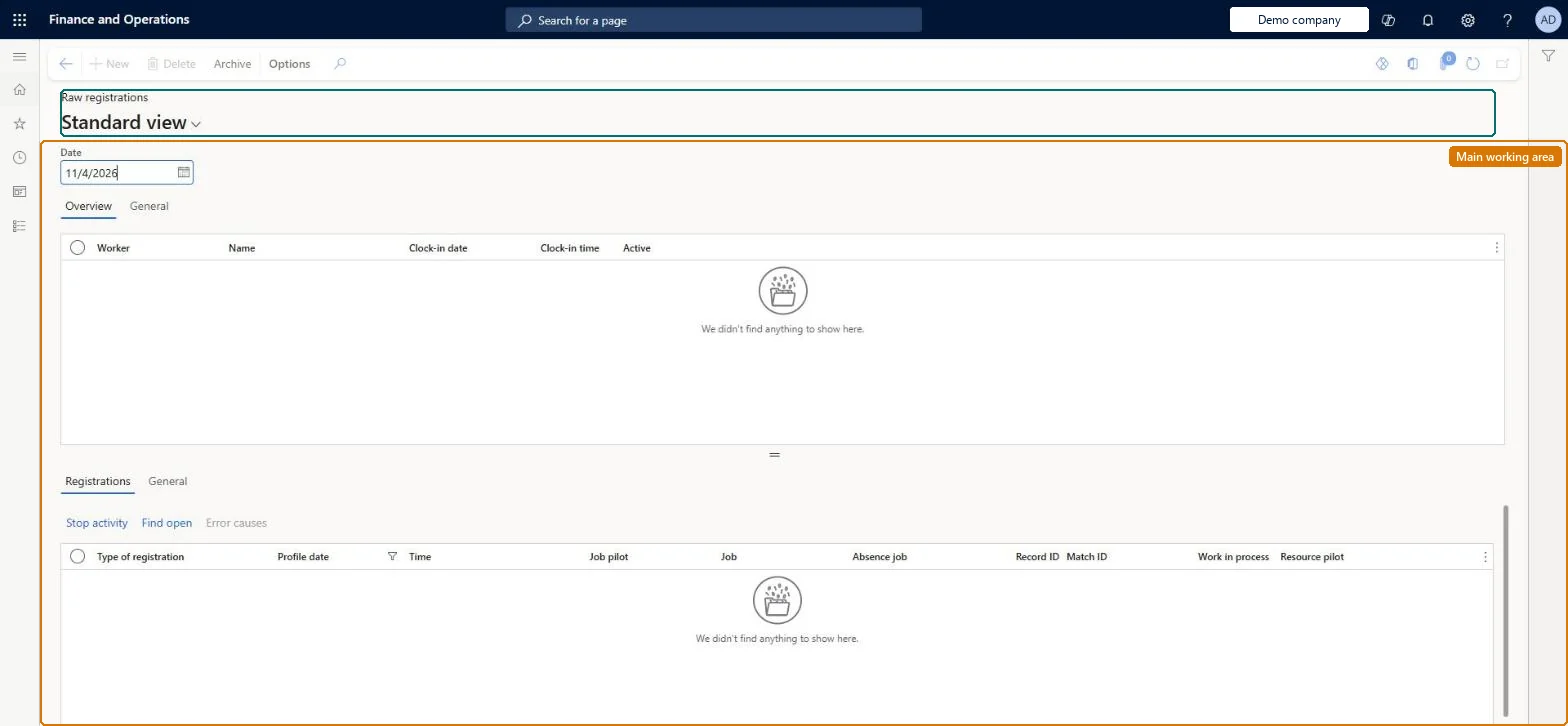
An inquiry page that shows the raw clock-in, clock-out, and job registrations that time registration workers have made, by date.
What you do here
Use this page to view workers' raw registrations, including archived ones, and to find and stop jobs that were not stopped correctly.
Example
For example, a worker on a 07:00-15:00 profile forgot to clock out; the raw registrations show the clock-in at 07:00 and no clock-out, until Clock out workers adds one at 15:00.
The page in Dynamics 365. page title tab to open what to set or check
About the examples: Examples and screenshots in this guide use BEAT, a demo company in a Dynamics 365 test environment. Use your own company's codes and values instead of copying them.
Setup steps on this page
Read a worker's raw registrations
Read the page to answer one question about registrations or pay.
Steps from Microsoft
Go to Time and attendance > Inquiries and reports > Registrations > Raw registrations.
Select the worker.
To view archived registrations, select Archive.
Select the date for which to view archived registrations.
A registration with a future timestamp is in the raw registrations, often from Missing clock-out entered with the wrong date. Run Archive future registrations and ask the worker to register again. Microsoft Learn
A missing clock-out added as a new journal line doesn't stop the worker's day
Create missing clock-outs only with Clock-in and out > Missing clock-out or Clock out workers; only these options write the clock-out to the raw registrations. Microsoft Learn
Filter on the worker and profile date; select Archive to see older registrations.Raw registrations decide whether the next registration is a clock-in or a clock-out.
Time and attendance roles come from the security read in the Technical section. On this system the page is opened with roles such as Manager, Shop supervisor, Production manager and 2 more. The Microsoft Learn article for this page names no Feature management feature to turn on.
Reversible: The report or inquiry only reads data; nothing is changed.
If you change it later
Raw registrations decide whether a worker counts as clocked in or out, so missing clock-outs must be created with the Clock-in and out options rather than as new journal lines, and registrations with future timestamps should be removed. Microsoft Learn
Technical architect
6Technical
Menu item
JmgTermRegTransChecked in Dynamics 365
Form
JmgTermRegTransChecked in Dynamics 365
Table
JmgTermRegShown as “RAW REGISTRATIONS” in Record infoChecked in Dynamics 365
Data entities
JmgTimeAndAttendanceTimeRegistrationWorkerEntityTime and attendance registration workers (only the time registration workers listed in the upper pane; the raw registrations have no data entity) Checked in Dynamics 365
Who can open it
PrivilegesView raw registrations JmgTermRegTransViewDutiesInquire into manufacturing execution progress JmgManufacturingExecutionProgressInquirInquire into time and attendance progress JmgTimeAttendanceProgressInquire5 security rolesManager HcmManagerShop supervisor JmgShopSupervisorProduction manager ProdProductionManagerProduction supervisor ProdProductionSupervisorProduction planner ReqProductionPlannerChecked in Dynamics 365
Roles to set it up and use it
To use itProduction supervisor ProdProductionSupervisorProduction manager ProdProductionManagerManager HcmManagerShop supervisor JmgShopSupervisorProduction planner ReqProductionPlannerGive people one of these roles. On this system, 5 roles can open this page.Checked in Dynamics 365
Actions on the page
(Action Pane without tabs): ArchiveChecked in Dynamics 365
Developer
7Developer
Open it by URL
https://<your-environment>/?mi=JmgTermRegTrans
Data migration
Load order: A raw registration has no data entity in Data management, so it can't be loaded from a file or a configuration template. Raw registrations are created at the terminal; start registering in the new environment. The workers load with Time and attendance registration workers.Checked in Dynamics 365