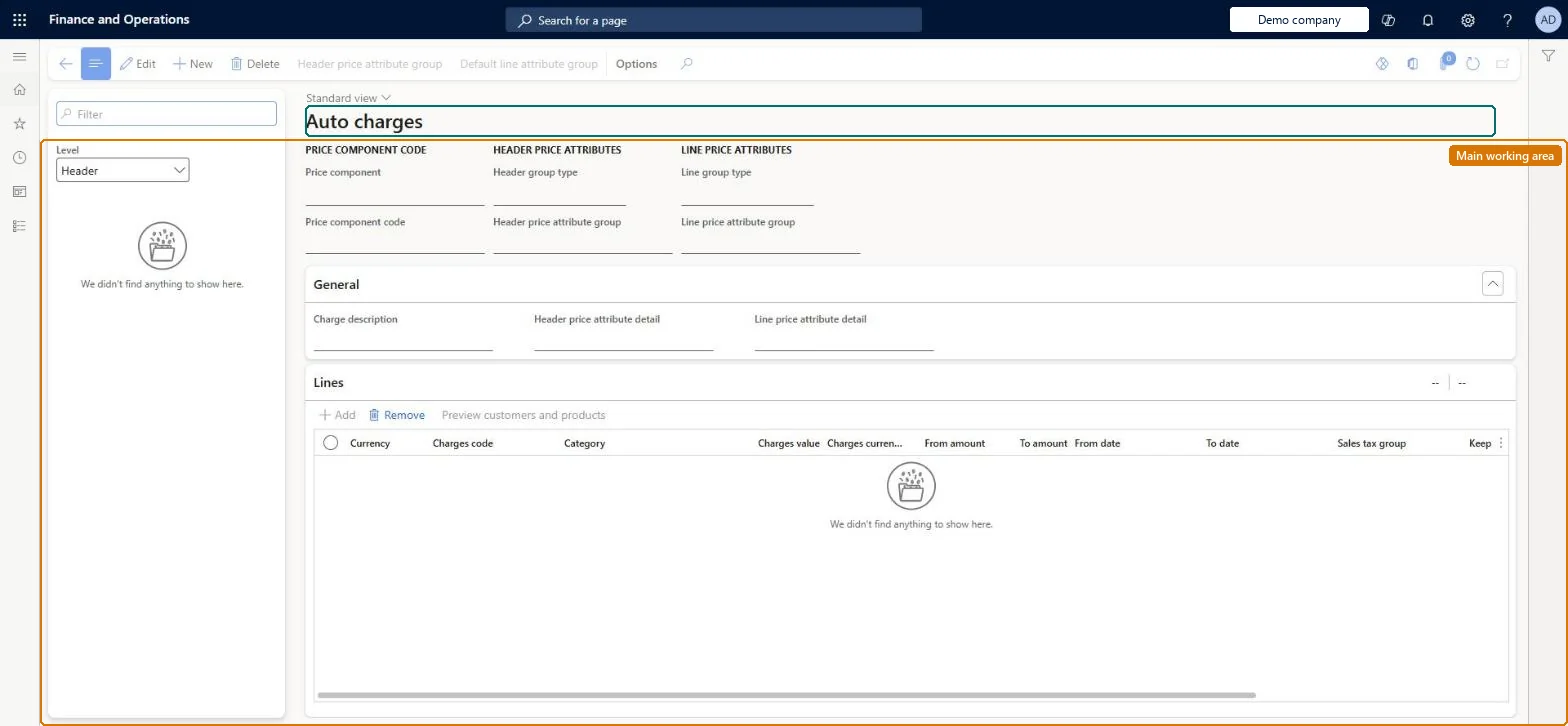
Setup step on the Auto charges page · Pricing management
Set up Auto charges
Use this page to define header-level or line-level charges, with their charge codes and rates, that the system adds when a matching sales order is created.
Credit management clerk, Accounts receivable clerk, Accounts receivable manager and 15 more roles
Business process
Set product prices
Menu item
GUPMarkupAutoSetup_Cust
Main table
MarkupAutoTable
Data entity
GUPSalesAutomaticSalesDocumentHeaderChargeEntity
Setup steps
1 on this page
Show what matters for
SETUP GUIDEHow to set it up8 sections. Choose a role to highlight what matters to you.
Everyone
1What it is and why
What it is
A setup page where you define charges that are added automatically to sales orders and quotations for chosen customers, items, and delivery modes.
What you do here
Use this page to define header-level or line-level charges, with their charge codes and rates, that the system adds when a matching sales order is created.
Example
For example, a retailer can add a fixed setup fee to every order line for a specific computer model.
The page in Dynamics 365. page title tab to open what to set or check
About the examples: Examples and screenshots in this guide use BEAT, a demo company in a Dynamics 365 test environment. Use your own company's codes and values instead of copying them.
Setup steps on this page
Set up Auto charges
Use this page to define header-level or line-level charges, with their charge codes and rates, that the system adds when a matching sales order is created.
Steps from Microsoft
Go to Pricing management > During-sales pricing > Charges setup > Auto charges.
In the list pane, set the Level field to Header or Line.
Select New to define a new auto charge.
Set the Account code and Customer relation fields.
For line-level charges, set the Item code and Item relation fields.
Set the Mode of delivery code and Mode of delivery relation fields.
On the Lines FastTab, add lines and set Currency, Charges code, Category, and Charges value.
Header level for order-wide fees (Fixed or Percent); Line level for item-specific fees, with Table, Group and All set so they don't overlapFixed and Percent categories can be used on headers and lines, while Pcs and specific-unit categories apply only to lines. The system applies every matching auto charge, so All is not a fallback.
Manually changing a header auto charge and then changing Mode of delivery or Charges group on the order. The system deletes and re-inserts the header auto charge at its original value.
Reversible: Auto charges are added when a sales order or quotation is created. Changing the setup affects new orders; existing orders keep their charges unless the header charges group or mode of delivery is changed.
Technical architect
6Technical
Menu item
GUPMarkupAutoSetup_CustChecked in Dynamics 365
Form
MarkupAutoSetupChecked in Dynamics 365
Table
MarkupAutoTableShown as “AUTO CHARGES TRANSACTIONS” in Record infoChecked in Dynamics 365
Data entities
GUPSalesAutomaticSalesDocumentHeaderChargeEntityAutomatic sales document charges - Pricing management Checked in Dynamics 365GUPSalesAutomaticSalesDocumentHeaderChargeTableV2EntityAutomatic sales document charges table V2 - Pricing management Checked in Dynamics 365GUPSalesAutomaticSalesDocumentLineChargeV2EntityAutomatic sales document line charges V2 - Pricing management Checked in Dynamics 365GUPSalesAutomaticSalesDocumentLineChargeTableV2EntityAutomatic sales document line charges table V2 - Pricing management Checked in Dynamics 365
Who can open it
PrivilegesMaintain charges in the sale process GUPMarkupAutoSetup_CustMaintainView charges in the sales process GUPMarkupAutoSetup_CustViewDutiesInquire into sales order progress SalesOrderProgressInquireEnable quotation to sales order process SalesQuotationToSalesOrderProcessEnable19 security rolesCredit management clerk CredManClerkAccounts receivable clerk CustInvoiceAccountsReceivableClerkAccounts receivable manager CustInvoiceAccountsReceivableManagerMCRTestUserRoleAccounts receivable centralized payments clerk PaymAccountsReceivableCentralPaymClerkAccounts receivable payments clerk PaymAccountsReceivablePaymentsClerkProject manager ProjProjectManagerRental clerk RentalClerkRental coordinator agent RentalCoordinatorAgentRental manager RentalManagerRental purchasing manager RentalPurchasingManagerRental representative RentalRepresentativeProduction planner ReqProductionPlannerRetail service RetailServiceRetail store manager RetailStoreManagerCustomer service representative TradeCustomerServiceRepresentativeSales clerk TradeSalesClerkSales manager TradeSalesManagerSales representative TradeSalesRepresentativeChecked in Dynamics 365
Roles to set it up and use it
To set it up or change itRetail service RetailServiceSales manager TradeSalesManagerAccounts receivable manager CustInvoiceAccountsReceivableManagerTo use itSales clerk TradeSalesClerkRetail store manager RetailStoreManagerAccounts receivable clerk CustInvoiceAccountsReceivableClerkAccounts receivable centralized payments clerk PaymAccountsReceivableCentralPaymClerkAccounts receivable payments clerk PaymAccountsReceivablePaymentsClerkGive people one of these roles. On this system, 18 roles can open this page.Checked in Dynamics 365
Actions on the page
(Action Pane without tabs): Header price attribute group, Default line attribute groupChecked in Dynamics 365