SETUP GUIDEHow to set it up8 sections. Choose a role to highlight what matters to you.
Everyone
1What it is and why
What it is
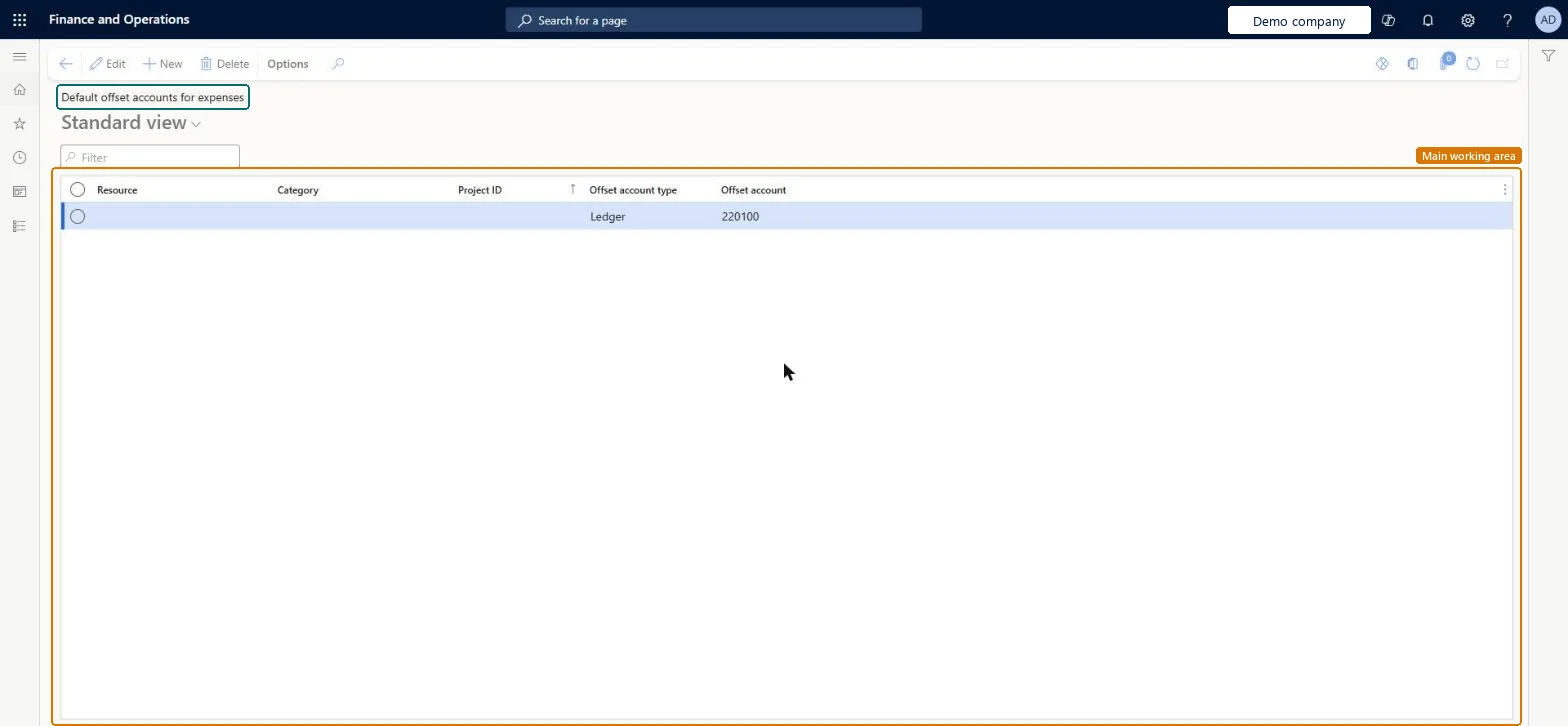
A setup page where you set the offset account that is suggested on project expense lines, based on the project, category and worker.
What you do here
Use this page to give expense journal lines a default vendor, customer, ledger or bank offset account.
Example
For example, BEAT defaults the offset of the category TRAVEL-AIR to the airline's vendor account V-0310 for all workers, and the offset of other travel to each worker's own vendor account, so a 950.00 flight on PRJ-0042 is owed to the airline.
The page in Dynamics 365. page title tab to open what to set or check
About the examples: Examples and screenshots in this guide use BEAT, a demo company in a Dynamics 365 test environment. Use your own company's codes and values instead of copying them.
Step by step, with screenshots
Set up Default offset accounts for expenses1 screen
Use this page to give expense journal lines a default vendor, customer, ledger or bank offset account.
Screen 1
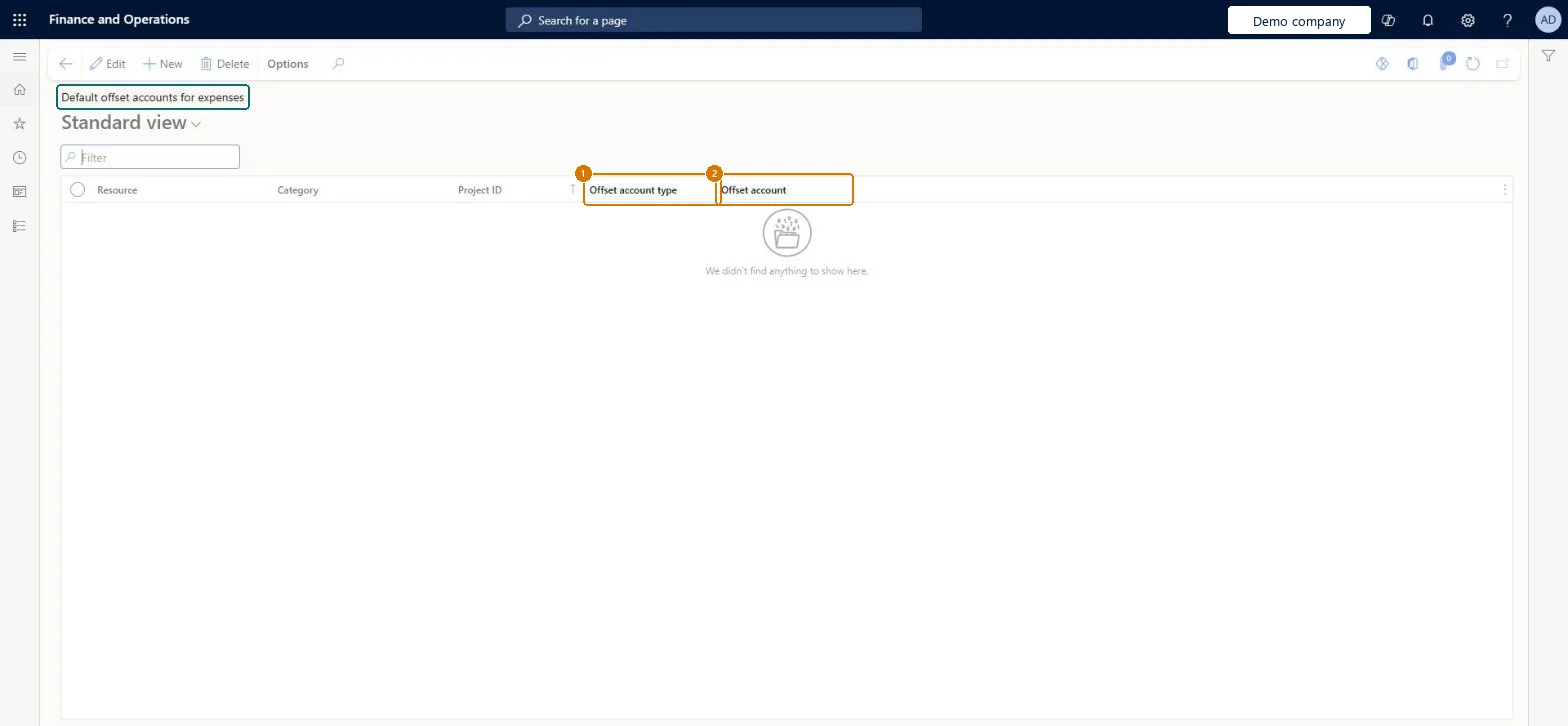
Set a default offset account for expenses
Go to Project management and accounting > Setup > Posting > Default offset accounts for expenses
Select New
Choose the worker, category or project the default applies to (leave them blank for every expense)
Select the offset account type
Select the offset account
Select Save
Show the full screen page title tab to open what to set or check
Steps from Microsoft
Go to Project management and accounting > Setup > Posting > Default offset accounts for expenses.
Select New and choose the Resource, Category and Project ID the default applies to, leaving a field empty to cover all.
Select the Offset account type and the Offset account.
Add the more specific rows, such as one category for all workers, before the general row is relied on.
Create an expense journal line for that category and check the offset account it suggests.
A row per expense category that has a fixed payee (such as the travel agency), plus a worker-level row for out-of-pocket costs that are repaid to the workerThe default offset decides who is owed for an expense line, so the right row saves manual correction and keeps vendor balances right.
Reversible: Rows only suggest the offset on new lines.
If you change it later
An offset account entered on a journal header overrides these defaults for that journal. Microsoft Learn
Technical architect
6Technical
Menu item
ProjDefaultOffsetSetupChecked in Dynamics 365
Form
ProjDefaultOffsetSetupChecked in Dynamics 365
Table
ProjDefaultOffsetSetupShown as “Default offset accounts” in Record infoKey field: ProjId, Resource, Resource_Name, Resource_ResourceId, Resource_ResourceCompanyId, ProjCategoryIdChecked in Dynamics 365
Data entities
ProjProjectDefaultOffsetAccountEntityProject default offset accounts for expenses Microsoft data model
Who can open it
PrivilegesMaintain project journal names ProjJournalSetupMaintainView project journal names ProjJournalSetupViewDutiesEnable project accounting process ProjProjectAccountingProcessEnableInquire into project accounting reference data ProjProjectAccountingReferenceDataInqui1 security roleProject supervisor ProjProjectSupervisorChecked in Dynamics 365
Roles to set it up and use it
To set it up or change itProject supervisor ProjProjectSupervisorGive people one of these roles. On this system, 1 role can open this page.Checked in Dynamics 365
Actions on the page
Options: Personalize, Page options, ShareChecked in Dynamics 365
ProjProjectDefaultOffsetAccountEntity Project default offset accounts for expenses, loaded for each company.Load order: Load default offset accounts after projects, project categories, workers, vendors and main accounts, because each row refers to them.Load first: Projects, Project categories, Vendors, Main accountsMicrosoft Learn
Checked in a working Dynamics 365 system, version 10.0.49: the menu item, form, table and security, the page, the demo records and the values in the screenshots.
To cite this step: PM-SETUP-110, Set up Default offset accounts for expenses. Beyond ERP Atlas Hub, 2026-11-11. https://www.beyonderp.cloud/atlas/step/PM-SETUP-110