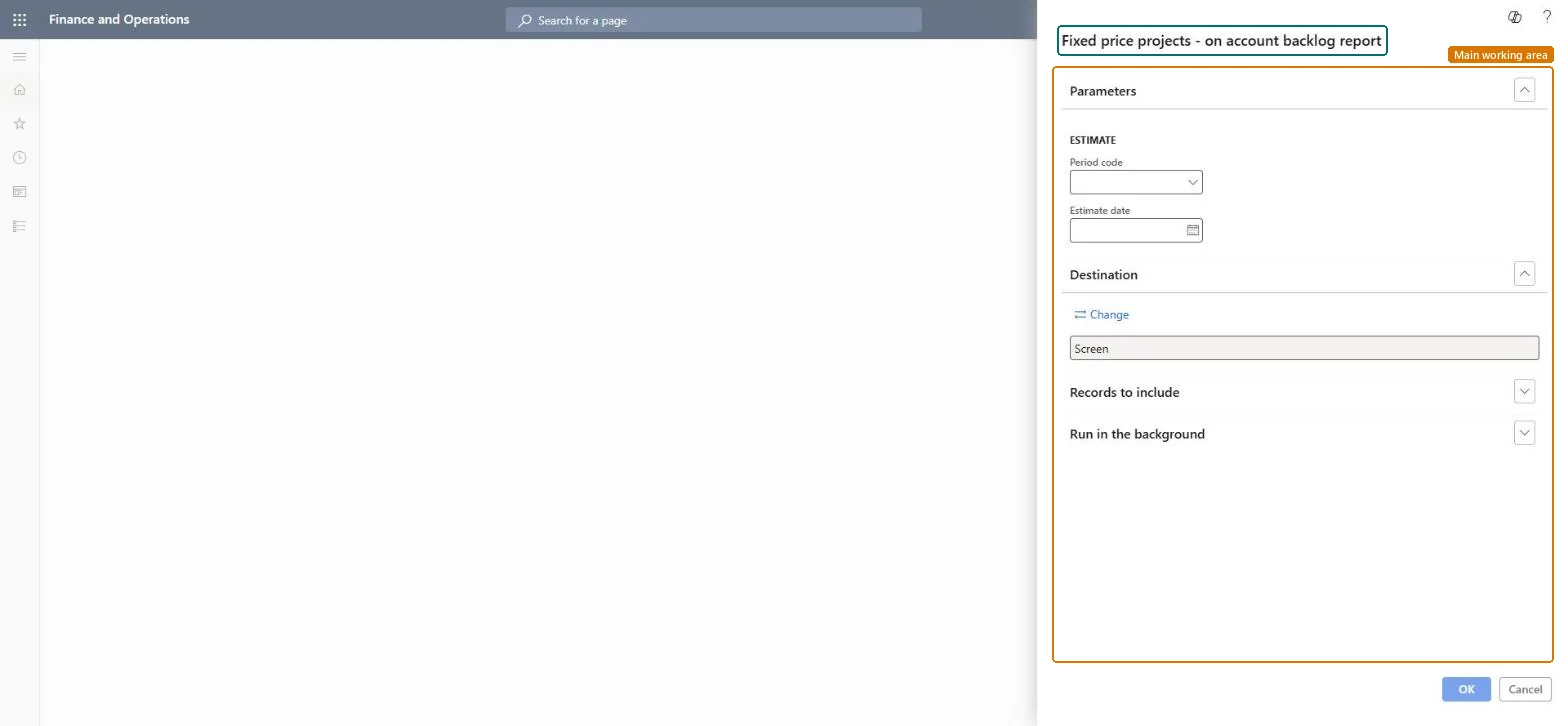
Set period code and estimate date for Fixed price projects - on account backlog report
Project management and accountingInquiries and reportsRevenue recognition inquiries and reports
output:ProjListEstimateProdBacklogOnAcc
Business process
Analyze project performance
Menu item
output:ProjListEstimateProdBacklogOnAcc
Setup steps
1 on this page
Show what matters for
SETUP GUIDEHow to set it up8 sections. Choose a role to highlight what matters to you.
Everyone
1What it is and why
What it is
A report that shows, per fixed-price revenue recognition project, the on-account amount still to be invoiced: the contract value minus the on-account amounts already invoiced, at an estimate date.
What you do here
Use it before milestone billing to see how much of each fixed-price contract is left to invoice.
Example
For estimate date 2026-10-31 BEAT's project accountant sees PRJ-0057 with a contract value of 85,000.00 and 55,000.00 invoiced on-account, so 30,000.00 (milestone 3) is left to bill.
The page in Dynamics 365. page title tab to open what to set or check
About the examples: Examples and screenshots in this guide use BEAT, a demo company in a Dynamics 365 test environment. Use your own company's codes and values instead of copying them.
When to run it
When to run it
Before on-account billing, when you want to see how much of each fixed-price contract is still to be invoiced.
How often
At each period end or before each milestone billing run.
What the output shows
The on-account backlog per fixed-price project: the contract amount minus what is already invoiced. A backlog that is too high usually means invoiced milestones haven't been posted.
Set period code and estimate date for Fixed price projects - on account backlog report
Report on the right revenue recognition period.
Steps from Microsoft
Go to Project management and accounting > Inquiries and reports > Revenue recognition inquiries and reports > Fixed price projects - on account backlog report.
Under Estimate, choose the Period code of the fixed-price projects.
Enter the Estimate date of the period you want the on-account backlog for.
Run the report and compare the amount still to invoice with the milestones on the project contract line.
Run it for the estimate date of the billing period and compare each project's backlog with the milestones still open on the contract line.Fixed-price projects are invoiced only through on-account transactions, so the backlog is exactly what the remaining milestones must cover.
Update labels for revenue recognition and related forms and processes in Project Operations (mandatory since version 10.0.36; it renamed Estimates to Revenue recognition in these menus)
Licence or add-in
On the live system, Project manager, Project supervisor, Chief executive officer and Chief financial officer can run this page.
Per legal entity: the report reads only the project data of the company you are signed in to, so run it in each company you close. Checked in Dynamics 365
Can it be undone
Reversible: Running or rerunning the report changes no data.
If you change it later
The report reads on-account and revenue recognition data. A change in the contract milestones changes the backlog only after the on-account transactions are updated. Microsoft Learn
Technical architect
6Technical
Menu item
output:ProjListEstimateProdBacklogOnAccChecked in Dynamics 365
Form
SysOperationTemplateFormChecked in Dynamics 365
Roles to set it up and use it
To use itProject manager ProjProjectManagerProject supervisor ProjProjectSupervisorChief executive officer CompanyChiefExecutiveOfficerChief financial officer CompanyChiefFinancialOfficerGive people one of these roles. On this system, 4 roles can run this page.Checked in Dynamics 365
Load order: Fixed price projects - on account backlog report has no data entity in Data management: the menu item ProjListEstimateProdBacklogOnAcc opens a report that only reads posted project data. There is nothing to migrate for the report itself; load the project data it reads, for example opening balances through Journals > Beginning balance, then run the report in the new system and compare its totals with the old one.Checked in Dynamics 365
Checked in a working Dynamics 365 system, version 10.0.49: the menu item, form, table and security, the page.
To cite this step: PM-RC-250, Set period code and estimate date for Fixed price projects - on account backlog report. Beyond ERP Atlas Hub, 2026-11-11. https://www.beyonderp.cloud/atlas/step/PM-RC-250