Project management and accountingInquiries and reportsActual transactions reports
output:ProjListTransCategory
Business process
Analyze project performance
Menu item
output:ProjListTransCategory
Setup steps
1 on this page
Show what matters for
SETUP GUIDEHow to set it up8 sections. Choose a role to highlight what matters to you.
Everyone
1What it is and why
What it is
A report that lists posted project transactions grouped first by project category, with amounts per category for the project and ledger dates you choose. The report design is ProjListTrans.
What you do here
Use it to answer 'what did we spend on each kind of cost or earn on each kind of revenue across projects?', for example travel against consulting.
Example
BEAT's finance lead runs the report for October with Expense on and Level 1 Category and sees TRAVEL at 12,300.00 EUR across 9 projects, 40.00 percent above September, so travel approvals are reviewed.
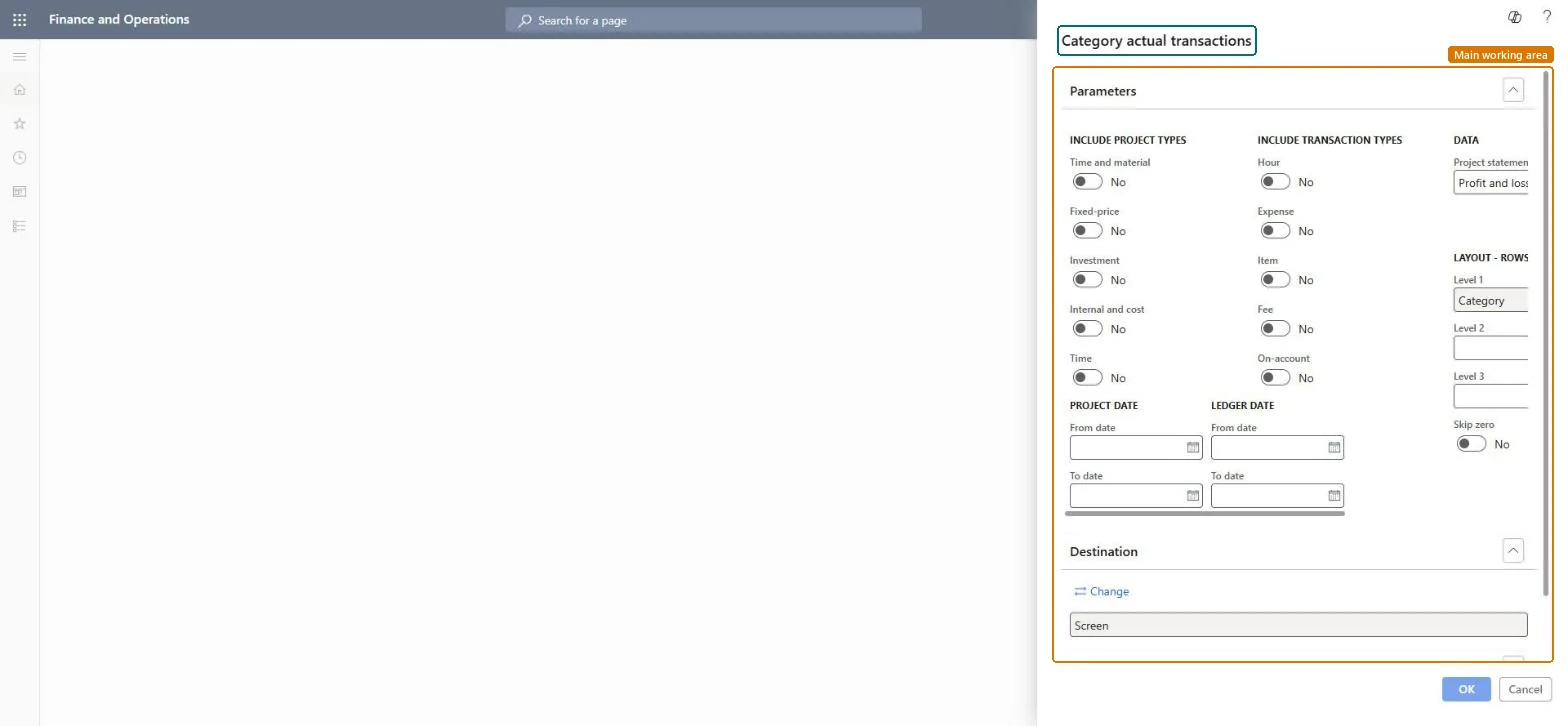
The page in Dynamics 365. page title tab to open what to set or check
About the examples: Examples and screenshots in this guide use BEAT, a demo company in a Dynamics 365 test environment. Use your own company's codes and values instead of copying them.
When to run it
When to run it
Monthly, when you compare spending by category across projects.
How often
Monthly.
What the output shows
Posted amounts per category, with the projects at the next level if chosen. The report design is ProjListTrans.
Which project types to include; the dialog toggles Time and material, Fixed-price, Investment, Internal and cost (Internal and Cost project types) and Time.Checked in Dynamics 365
All but Time
Include transaction types
Hour, Expense, Item, Fee and On-account; for a cost review turn on Expense only.Checked in Dynamics 365
Expense
(Project date) From date / To date
The range of project dates: when the work was done.Microsoft Learn
1 October to 31 October
(Ledger date) From date / To date
The range of ledger dates: when the transactions were posted to the ledger.Microsoft Learn
Project statement
The statement the amounts follow; the dialog suggests Profit and loss.Checked in Dynamics 365
Profit and loss
Skip zero
Leaves out rows whose amounts are zero.Checked in Dynamics 365
Yes
Show amount
Choose how amounts appear, such as with or without decimals, or in thousands.Microsoft Learn
Show hour
Choose whether to show hour quantities, hour cost values, or both.Microsoft Learn
PL ratio
Choose whether to add a profit and loss ratio column, such as gross margin.Microsoft Learn
Layout - rows
Level 1 is Category on this report; add Project at Level 2 to see which projects carry each category.Checked in Dynamics 365
Level 1 Category, Level 2 Project
Common errors and fixes
Message
What to do
A category you expected isn't listed.
It had no transactions in the range and Skip zero hid it, or its transaction type is turned off. Checked in Dynamics 365
Test checklist
Post two expenses of 300.00 EUR in TRAVEL on two projects.
Run the report with Expense on and Level 1 Category.
Turn on one transaction type, keep Level 1 on Category and add Project at Level 2.Category totals across projects show trends that per-project reports hide.
On the live system, Project manager, Project supervisor, Project accountant, Project assistant and Chief executive officer run this report. The report runs with the reporting framework's transaction scope switched off in code, so large runs don't hold the TempDB log; there is no switch to set.
Per company: the report reads the posted project transactions of the current legal entity. Microsoft data model
Can it be undone
Reversible: Reading the page changes no data.
If you change it later
The report reflects postings and adjustments at the moment it runs, so totals for a closed period change if transactions are adjusted later. Microsoft Learn
Technical architect
6Technical
Menu item
output:ProjListTransCategoryChecked in Dynamics 365
Form
SysOperationTemplateFormChecked in Dynamics 365
Roles to set it up and use it
To use itProject manager ProjProjectManagerProject supervisor ProjProjectSupervisorProject accountant ProjProjectAccountantChief executive officer CompanyChiefExecutiveOfficerProject assistant ProjProjectClerkGive people one of these roles. On this system, 6 roles can run this page.Checked in Dynamics 365
Load order: The Category actual transactions report has no data entity in Data management: it reads posted project transactions. Open balances from a former system are loaded as beginning balance journals, which update only the project subledger, so compare their totals with this report after cutover.Microsoft Learn