BeyondERP.Newsletter
Menu

Setup step on the Hazardous material packing descriptions page · Product information management

Set up Hazardous material packing descriptions

Use this page to create the packing description codes and descriptions that you can apply to hazardous products.

Used by
Hazardous materials manager, Hazardous materials viewer
Business process
Develop product strategy
Menu item
HMIMPackDescriptionListDisplay
Main table
HMIMPackDescription
Data entity
HMIMPackDescriptionEntity
Setup steps
1 on this page
Show what matters for
SETUP GUIDEHow to set it up8 sections. Choose a role to highlight what matters to you.
Everyone

1What it is and why

What it isA setup page where you define packing descriptions that indicate how to pack a hazardous item.
What you do hereUse this page to create the packing description codes and descriptions that you can apply to hazardous products.
ExampleFor example, you might need to pack the item in a specific type of steel drum or use another type of special packaging.
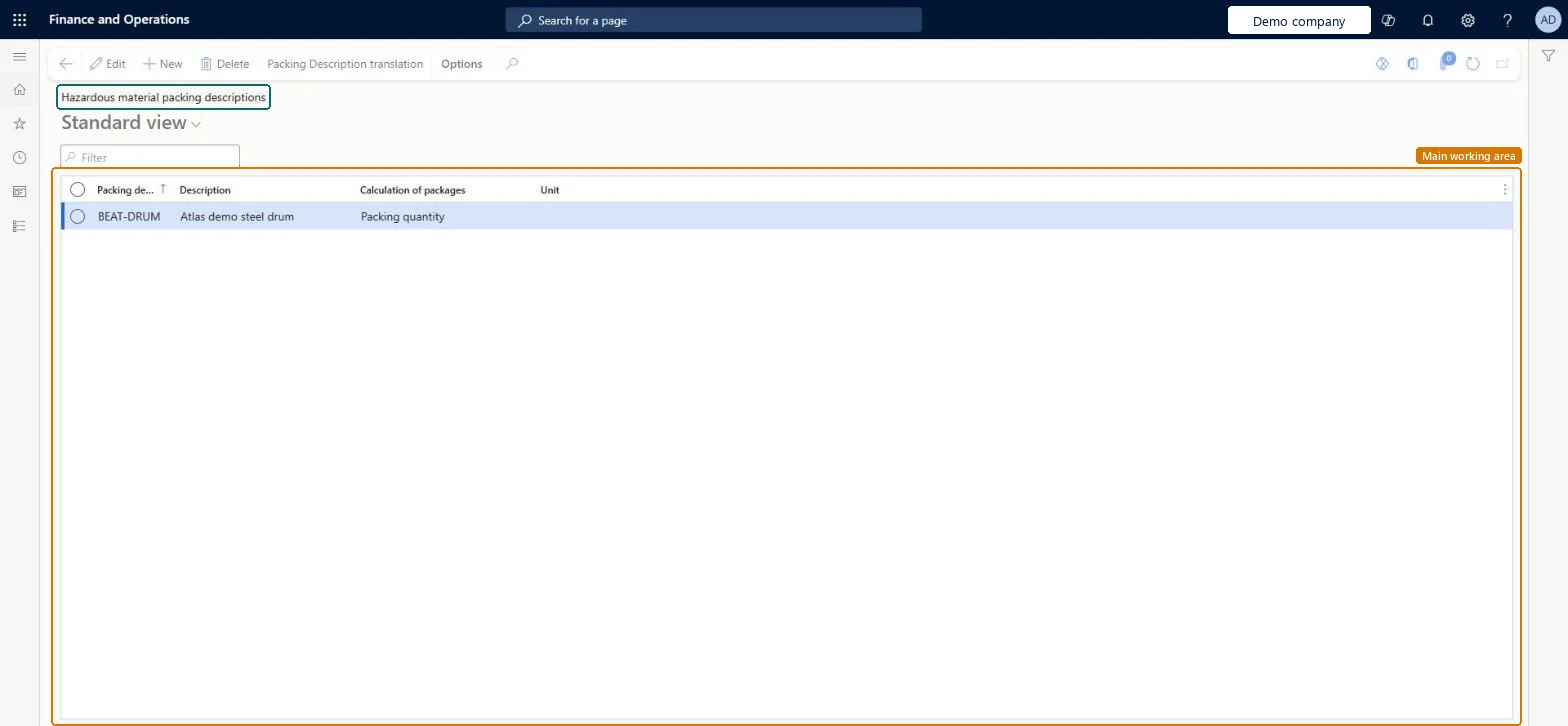
Hazardous material packing descriptions page in Dynamics 365
The page in Dynamics 365. page title tab to open what to set or check
Functional consultant · Solution architect

2Where it fits

Business processDevelop product strategy
Menu pathProduct information management › Setup › Hazardous material shipping documentation › Hazardous material packing descriptions
Used next byReleased products Microsoft Learn
In this process Set up Style groups · Set up Versions
End user · Functional consultant

3How to do it

About the examples: Examples and screenshots in this guide use BEAT, a demo company in a Dynamics 365 test environment. Use your own company's codes and values instead of copying them.

Setup steps on this page

Set up Hazardous material packing descriptions

Use this page to create the packing description codes and descriptions that you can apply to hazardous products.

Steps from Microsoft

  1. Go to Product information management > Setup > Hazardous material shipping documentation > Hazardous material packing descriptions.
  2. Select New to add a packing description.
  3. Enter an identifying code for the packing description.
  4. In the Description field, enter a short description.
  5. Where relevant, complete the Calculation of packages and Unit fields.

Source: Microsoft Learn

Test checklist

  1. Create a packing description.
  2. Assign it to a hazardous released item.
  3. Add Packing description to the print setup and print the bill of lading; check it prints.

Source: Microsoft Learn

Functional consultant

4Setup decisions

Setup stepRecommended value and whyDecision, common mistake and test
Set up Hazardous material packing descriptionsOne code per packaging type you use (for example a specific type of steel drum), bundled per regulation in material codesThe packing description tells the packer how to pack the item, and material codes apply it with the other settings for a regulation.Not adding Packing description to the regulation's print setup, so the instruction never reaches the shipping text.
Solution architect

5Design impact

Shared or per companyShared: the same records are used by every legal entity. Microsoft data model
Can it be undoneReversible: Shared reference values.
Technical architect

6Technical

Menu itemHMIMPackDescriptionListDisplay Checked in Dynamics 365
FormHMIMPackDescriptionList Checked in Dynamics 365
TableHMIMPackDescriptionShown as “PACKING DESCRIPTION” in Record infoKey field: PackCodeChecked in Dynamics 365
Data entitiesHMIMPackDescriptionEntityPacking description Microsoft data model
Who can open itPrivilegesHazardous material pack description maintain HMIMPackDescriptionListDisplayMaintainHazardous material pack description view HMIMPackDescriptionListDisplayViewDutiesMaintain Hazardous materials HMIMHazardousMaterialsMaintainView Hazardous materials HMIMHazardousMaterialsView
2 security rolesHazardous materials manager HMIMHazardousMaterialsManagerHazardous materials viewer HMIMHazardousMaterialsViewer
Checked in Dynamics 365
Roles to set it up and use itTo set it up or change itHazardous materials manager HMIMHazardousMaterialsManagerTo use itHazardous materials viewer HMIMHazardousMaterialsViewerGive people one of these roles. On this system, 2 roles can open this page.Checked in Dynamics 365
Actions on the page(Action Pane without tabs): Packing Description translationChecked in Dynamics 365
Developer

7Developer

Open it by URLhttps://<your-environment>/?mi=HMIMPackDescriptionListDisplay
Integrate withHMIMPackDescriptionEntity data entity Microsoft data model
Data migrationHMIMPackDescriptionEntity (Packing description): shared by all companies.Microsoft Learn
Table definitionHMIMPackDescription columns and relations Microsoft data model
Everyone

8Sources

To cite this step: PIM-HAZ-090, Set up Hazardous material packing descriptions. Beyond ERP Atlas Hub, 2026-11-11. https://www.beyonderp.cloud/atlas/step/PIM-HAZ-090