BeyondERP.Newsletter
Menu

Setup step on the Size groups page · Product information management

Set up Size groups

Use this page to group sizes so that a product master that is assigned the size group can use all the sizes in it.

Used by
Purchasing agent, Purchasing Agent - Public Sector, Product designer and 15 more roles
Business process
Develop product strategy
Menu item
RetailSizeGroupTable
Main table
RetailSizeGroupTable
Data entity
EcoResProductSizeGroupEntity
Setup steps
1 on this page
Show what matters for
SETUP GUIDEHow to set it up8 sections. Choose a role to highlight what matters to you.
Everyone

1What it is and why

What it isA setup page where you create size groups, which are sets of predefined size values that can be assigned to a product master.
What you do hereUse this page to group sizes so that a product master that is assigned the size group can use all the sizes in it.
ExampleFor example, you can create a size group for t-shirts with the sizes extra small, small, medium, large and extra large.
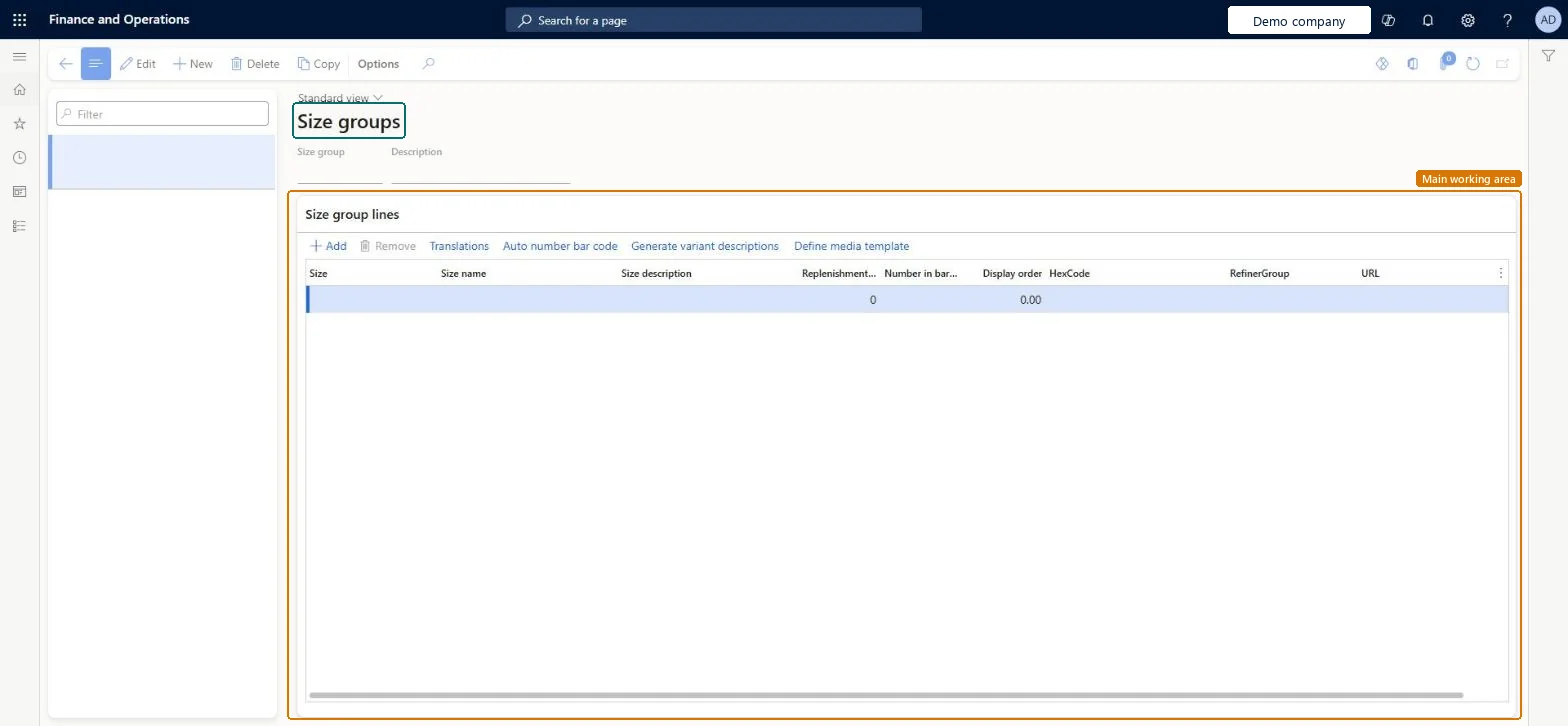
Size groups page in Dynamics 365
The page in Dynamics 365. page title tab to open what to set or check
Functional consultant · Solution architect

2Where it fits

Business processDevelop product strategy
Menu pathProduct information management › Setup › Dimension and variant groups › Size groups
Used next byProduct masters Microsoft Learn
In this process Set up Attribute groups · Set up Hazardous material identification
End user · Functional consultant

3How to do it

About the examples: Examples and screenshots in this guide use BEAT, a demo company in a Dynamics 365 test environment. Use your own company's codes and values instead of copying them.

Setup steps on this page

Set up Size groups

Use this page to group sizes so that a product master that is assigned the size group can use all the sizes in it.

Steps from Microsoft

  1. Go to Product information management > Setup > Dimension and variant groups > Size groups.
  2. On the Action Pane, select New.
  3. In the Size group field, enter a name for the size group, and in the Description field, enter a description.
  4. Under Size group lines, select Add.
  5. Enter the Size, Size name, Replenishment weight, Number in barcode and Display order for each size.
  6. Select Save.

Source: Microsoft Learn

Fields on the page

FieldWhat it meansTable column
Size groupThe name of the size group.Microsoft Learn sizeGroup
SizeA string that represents the size, for example XL.Microsoft Learn size
Size nameA name for the size, for example Extra Large.Microsoft Learn Name
Replenishment weightA number that represents the replenishment weight of the size.Microsoft Learn weight
Number in barcodeA number that represents the size in the barcode.Microsoft Learn
Display orderA number that sets the display order of the size.Microsoft Learn DisplayOrder

Test checklist

  1. Create a size group with three sizes.
  2. Assign it in the Size group field of a new product master.
  3. Open Product variants, run Variant suggestions and check all three sizes are offered.
  4. Create the variants and release them.

Source: Microsoft Learn

Functional consultant

4Setup decisions

Setup stepRecommended value and whyDecision, common mistake and test
Set up Size groupsOne size group per size range (for example apparel sizes, shoe sizes), assigned to each product master that uses itWhen you assign a size group to a product master, the product can use all the sizes in that group, so you don't add sizes product by product.Using a group as a substitute for variant generation. The group gives the master its allowed sizes; variants still have to be generated and released.
Solution architect

5Design impact

Shared or per companyShared: the same records are used by every legal entity. Microsoft data model
Can it be undoneReversible: Groups can be edited at any time; they predefine values for product masters and don't post anything.
Technical architect

6Technical

Menu itemRetailSizeGroupTable Checked in Dynamics 365
FormRetailSizeGroupTable Checked in Dynamics 365
TableRetailSizeGroupTableShown as “SIZE GROUP” in Record infoKey field: sizeGroupChecked in Dynamics 365
Data entitiesEcoResProductSizeGroupEntityProduct size groups Microsoft data model
Who can open itPrivilegesView retail size groups RetailSizeGroupsViewMaintain retail sizes RetailSizesMaintainDutiesInquire into products definition master EcoResProductDefinitionMasterInquireMaintain products definition master EcoResProductDefinitionMasterMaintainInquire into products for operations master EcoResProductForOperationsMasterInquireMaintain products for operations master InventProductsForOperationsMasterMaintaMaintain retail product reference data RetailItemReferenceDataMaintain
18 security rolesProduct designer BOMProductDesignerProduct design manager BOMProductDesignManagerMaterials manager InventMaterialsManagerQuality control manager InventQualityControlManagerLanded cost agent ITMAgentLanded cost manager ITMManagerShop supervisor JmgShopSupervisorProduction supervisor ProdProductionSupervisorRetail catalog manager RetailCatalogManagerRetail merchandising manager RetailMerchandisingManagerRetail service RetailServiceProcess engineer RouteProcessEngineerProcess engineering manager RouteProcessEngineeringManagerBuying agent TradeBuyingAgentPurchasing manager TradePurchasingManagerPurchasing agent VendPurchasingAgentPurchasing Agent - Public Sector VendPurchasingAgent_PSNWarehouse manager WMSWarehouseManager
Checked in Dynamics 365
Roles to set it up and use itTo set it up or change itProduct designer BOMProductDesignerProcess engineer RouteProcessEngineerRetail service RetailServiceRetail merchandising manager RetailMerchandisingManagerRetail catalog manager RetailCatalogManagerTo use itProduct design manager BOMProductDesignManagerProcess engineering manager RouteProcessEngineeringManagerMaterials manager InventMaterialsManagerProduction supervisor ProdProductionSupervisorWarehouse manager WMSWarehouseManagerGive people one of these roles. On this system, 18 roles can open this page.Checked in Dynamics 365
Actions on the page(Action Pane without tabs): CopyChecked in Dynamics 365
Developer

7Developer

Open it by URLhttps://<your-environment>/?mi=RetailSizeGroupTable
Integrate withEcoResProductSizeGroupEntity data entity Microsoft data model
Table definitionRetailSizeGroupTable columns and relations Microsoft data model
Everyone

8Sources

To cite this step: PIM-DIM-050, Set up Size groups. Beyond ERP Atlas Hub, 2026-11-11. https://www.beyonderp.cloud/atlas/step/PIM-DIM-050