BeyondERP.Newsletter
Menu

Setup step on the Incident costs report page · Human resources

Total incident costs per period

Use the report for the period you review, on complete cases.

Business process
Report an injury or illness
Menu item
HRMIncidentCosts
Setup steps
1 on this page
Show what matters for
SETUP GUIDEHow to set it up8 sections. Choose a role to highlight what matters to you.
Everyone

1What it is and why

What it isA report that lists the costs recorded against injury and illness incidents.
What you do hereRun this report to see the cost types and amounts logged for each incident.
ExampleFor example, for the 2026 insurance renewal BEAT runs the report for 2025 and totals 18,400 EUR over 9 cases, of which therapy costs are 6,200 EUR.
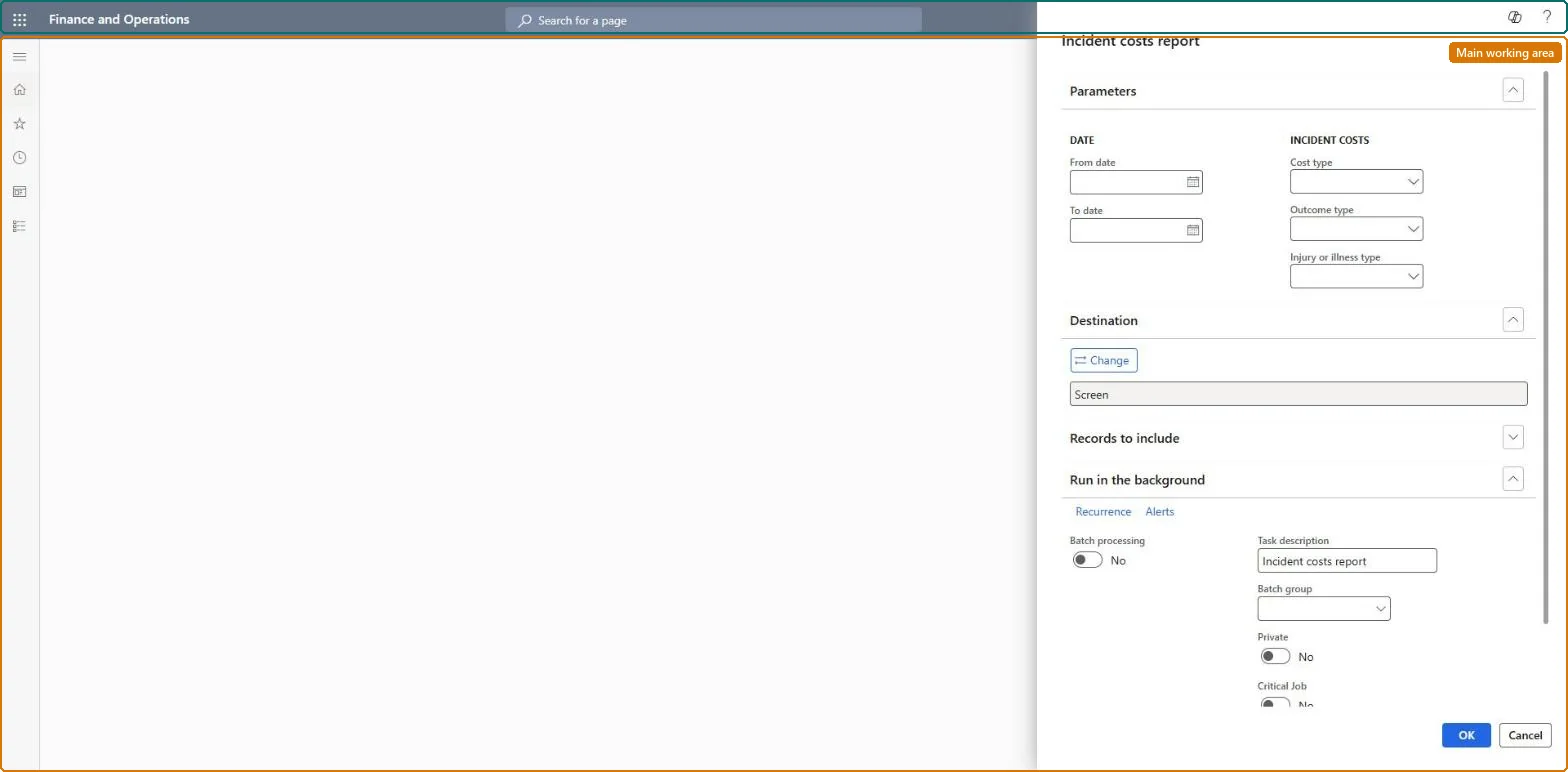
Incident costs report page in Dynamics 365
The page in Dynamics 365. page title tab to open what to set or check
Functional consultant · Solution architect

2Where it fits

End user · Functional consultant

3How to do it

About the examples: Examples and screenshots in this guide use BEAT, a demo company in a Dynamics 365 test environment. Use your own company's codes and values instead of copying them.

When to run it

When to run itWhen you need the cost of workplace injuries and illnesses for a period, for example for budgeting, insurance or a workers' compensation review.
How oftenOn demand, often at period end when cost figures are reported.
What the output showsThe costs recorded on injury or illness incidents in the period by cost type. A total that is too low usually means cost lines were not added in the Injury or illness costs section of the case.

Source: Microsoft Learn

Setup steps on this page

Total incident costs per period

Use the report for the period you review, on complete cases.

Steps from Microsoft

  1. Go to Human resources > Workers > Injury and illness > Incident costs report.
  2. Under Parameters, set the From date and To date of the period whose costs you want to total.
  3. Select a Cost type, Outcome type and Injury or illness type to narrow the costs, for example only Therapy costs.
  4. In Records to include, filter on the worker or case when you need the costs of one incident.
  5. Read the cost lines and totals, and compare them with invoices for the same cases.

Source: Microsoft Learn

Common errors and fixes

MessageWhat to do
The total is lower than the invoicesCost lines are missing on some cases. Add them in the Injury or illness costs section (also on a closed case) and run the report again. Microsoft Learn
Functional consultant

4Setup decisions

Setup stepRecommended value and whyDecision, common mistake and test
Total incident costs per periodRun it at period end after the cost lines of the period, with invoices or doctor's notes attached, are added to the cases.The report reads the injury or illness cases with their costs and treatments, which are added to a case as they come in.Who owns incident cost figures?Reading the total as the full cost when cost lines are still missing on open cases.Test: Report shows the case lines

Feature management and licence

Licence or add-inHR and safety staff run it from the Injury and illness menu. No Feature management feature is needed for this page.

Microsoft Learn

Solution architect

5Design impact

Shared or per companyPer company data: the report reads injury or illness incidents, which Data management lists as not shared, so cases belong to the legal entity. Checked in Dynamics 365
Can it be undoneNothing to undo: The report only reads incident records.
If you change it laterThe report only reads the incidents and their cost and treatment lines as they are; lines added to a case later, even to a closed case, appear only when the report is run again. Microsoft Learn
Technical architect

6Technical

Menu itemHRMIncidentCosts Checked in Dynamics 365
FormSysOperationTemplateForm Checked in Dynamics 365
Roles to set it up and use itTo use itHuman resource manager HcmHumanResourceManagerCompensation and benefits manager HcmCompensationAndBenefitsManagerPayroll administrator HcmPayrollAdministratorGive people one of these roles. On this system, 3 roles can run this page.Checked in Dynamics 365
Developer

7Developer

Open it by URLhttps://<your-environment>/?mi=HRMIncidentCosts
Data migrationLoad order: This report has no data entity in Data management, so it can't be loaded from a file or a configuration template. It prints the incidents; load them with the Case management template and run the report in each environment.Microsoft Learn
Everyone

8Sources

To cite this step: HR-RWRK-140, Total incident costs per period. Beyond ERP Atlas Hub, 2026-11-11. https://www.beyonderp.cloud/atlas/step/HR-RWRK-140