BeyondERP.Newsletter
Menu

Setup step on the Fixed asset transactions page · Fixed assets

Trace an asset's transactions

Check what was posted to an asset book and open the vouchers.

Used by
Accounts payable clerk, Accounts payable manager, Lease accountant and 13 more roles
Business process
Analyze fixed assets
Menu item
AssetTrans
Main table
AssetTrans
Setup steps
1 on this page
Show what matters for
SETUP GUIDEHow to set it up8 sections. Choose a role to highlight what matters to you.
Everyone

1What it is and why

What it isAn inquiry page that lists fixed asset transactions by voucher, transaction date, fixed asset number, book, transaction type, amount and fixed asset group.
What you do hereUse this inquiry to see every posted transaction of an asset book, open its voucher, and reverse a transaction when it was posted in error.
ExampleFor example, the accountant filters on asset COMP-0042 and book CORP and sees the acquisition of 1,500.00 and twelve depreciation lines of 41.67, which add up to the net book value on the asset.
Fixed asset transactions page in Dynamics 365
The page in Dynamics 365. page title tab to open what to set or check
Functional consultant · Solution architect

2Where it fits

Business processAnalyze assets › Analyze fixed assets
Menu pathFixed assets › Inquiries and reports › Fixed asset transactions
Set up firstFixed assets journal Microsoft Learn
Used next byFixed asset roll forward Microsoft Learn
Related pagesFixed asset management Microsoft Learn
In this processRun Future value of fixed assets report
End user · Functional consultant

3How to do it

About the examples: Examples and screenshots in this guide use BEAT, a demo company in a Dynamics 365 test environment. Use your own company's codes and values instead of copying them.

Setup steps on this page

Trace an asset's transactions

Check what was posted to an asset book and open the vouchers.

Steps from Microsoft

  1. Go to Fixed assets > Inquiries and reports > Fixed asset transactions.
  2. On the Overview tab, read the Voucher, Transaction date, Fixed asset number, Book, Transaction type, Amount and Fixed asset group columns.
  3. Select the General, Financial dimensions or History tab to see more detail.
  4. Select a transaction, then select Details to open it.
  5. Select Reverse transaction or Reversed tracing on the Action Pane when a transaction is selected.

Source: Microsoft Learn

Fields on the page

FieldWhat it meansExample
Voucher / Transaction dateThe posted voucher and its date.Checked in Dynamics 365
Fixed asset number / BookThe asset and book the transaction belongs to.Checked in Dynamics 365
Transaction typeAcquisition, Depreciation, Disposal - sale and so on.Microsoft Learn Depreciation
AmountThe transaction amount in accounting currency.Checked in Dynamics 365
Posting layerThe layer the book posts to, or None.Microsoft Learn Current

Common errors and fixes

MessageWhat to do
Transactions of a tax book have no general ledger voucherExpected: books with Post to general ledger = No post only to the fixed asset subledger. Microsoft Learn

Test checklist

  1. Filter on one asset and book.
  2. Total the amounts.
  3. Compare with the net book value on Fixed asset valuations.
  4. Open a voucher and check the ledger accounts.

Source: Microsoft Learn

Functional consultant

4Setup decisions

Setup stepRecommended value and whyDecision, common mistake and test
Trace an asset's transactionsFilter on the asset and book first, then on transaction type.An asset has transactions on every book; without the book filter, a tax book and the corporate book add up.Who may reverse transactions here?Adding the transactions of all books together and reading it as the asset's value.Test: Transactions add up to net book value

Feature management and licence

Licence or add-inFixed assets is part of Dynamics 365 Finance. Fixed asset accountants and auditors use the inquiry. On this system the roles that open the page include Accounting supervisor, Accountant, Accounting manager, Chief financial officer. No Feature management feature needs to be turned on for this page.

Checked in Dynamics 365

Solution architect

5Design impact

Shared or per companyPer company: each legal entity has its own records. Microsoft data model
Can it be undoneReversible: The inquiry changes no data.
If you change it laterThe inquiry shows posted transactions for all books, whatever kind; reversing a transaction from here posts a new reversing transaction. Microsoft Learn
Technical architect

6Technical

Menu itemAssetTrans Checked in Dynamics 365
FormAssetTrans Checked in Dynamics 365
TableAssetTransShown as “Fixed asset transactions” in Record infoKey field: AssetId, BookId, Voucher, TransDate, AssetGroupChecked in Dynamics 365
Who can open itPrivilegesMaintain lease AssetLeaseLeaseMaintainView lease AssetLeaseLeaseViewView asset book transactions AssetTransViewDutiesManage fixed asset impairment AssetFixedAssetImpairmentManage_JPInquire into fixed asset transaction status AssetFixedAssetTransactionStatusInquireLease inquire AssetLeaseLeaseInquireMaintain lease AssetLeaseLeaseMaintain
16 security rolesLease accountant AssetLeaseLeaseMaintainLease manager AssetLeaseLeaseViewBudget manager BudgetBudgetManagerChief financial officer CompanyChiefFinancialOfficerAccountant LedgerAccountantAccounting manager LedgerAccountingManagerAccounting supervisor LedgerAccountingSupervisorFinancial controller LedgerFinancialControllerAccounts payable centralized payments clerk PaymAccountsPayableCentralPaymClerkAccounts payable payments clerk PaymAccountsPayablePaymentsClerkRental coordinator agent RentalCoordinatorAgentRental manager RentalManagerRental purchasing manager RentalPurchasingManagerRental sales manager RentalSalesManagerAccounts payable clerk VendInvoiceAccountsPayableClerkAccounts payable manager VendInvoiceAccountsPayableManager
Checked in Dynamics 365
Roles to set it up and use itTo use itAccounting supervisor LedgerAccountingSupervisorAccountant LedgerAccountantAccounting manager LedgerAccountingManagerChief financial officer CompanyChiefFinancialOfficerBudget manager BudgetBudgetManagerGive people one of these roles. On this system, 16 roles can open this page.Checked in Dynamics 365
Actions on the pageOptions: Personalize, Page options, ShareChecked in Dynamics 365
Developer

7Developer

Open it by URLhttps://<your-environment>/?mi=AssetTrans
Data migrationLoad order: The fixed asset transactions table (AssetTrans) has no data entity in Data management: the Common Data Model lists no entity on it. Migrate opening values through the fixed asset journal instead.Load first: Fixed asset journalMicrosoft data model
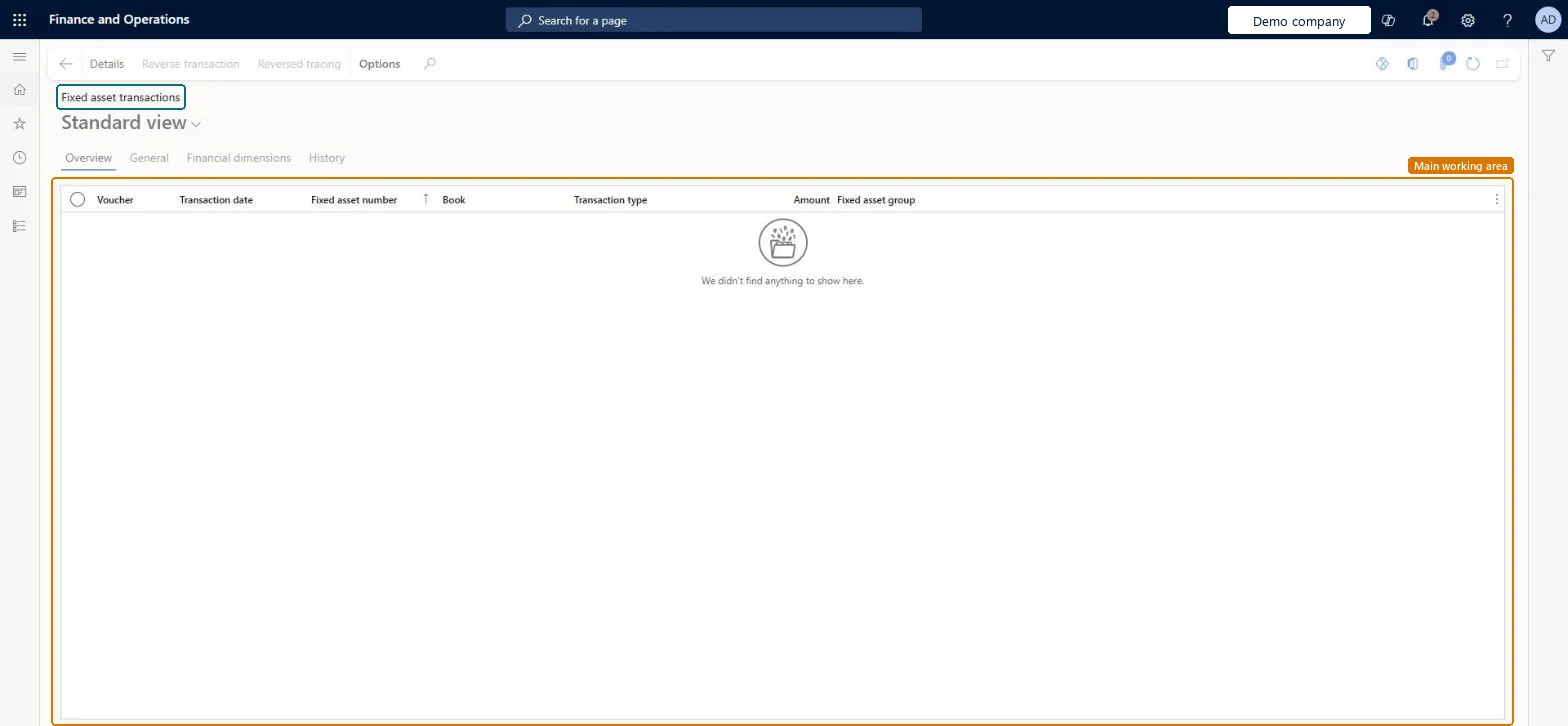
Table definitionAssetTrans columns and relations Microsoft data model
Everyone

8Sources