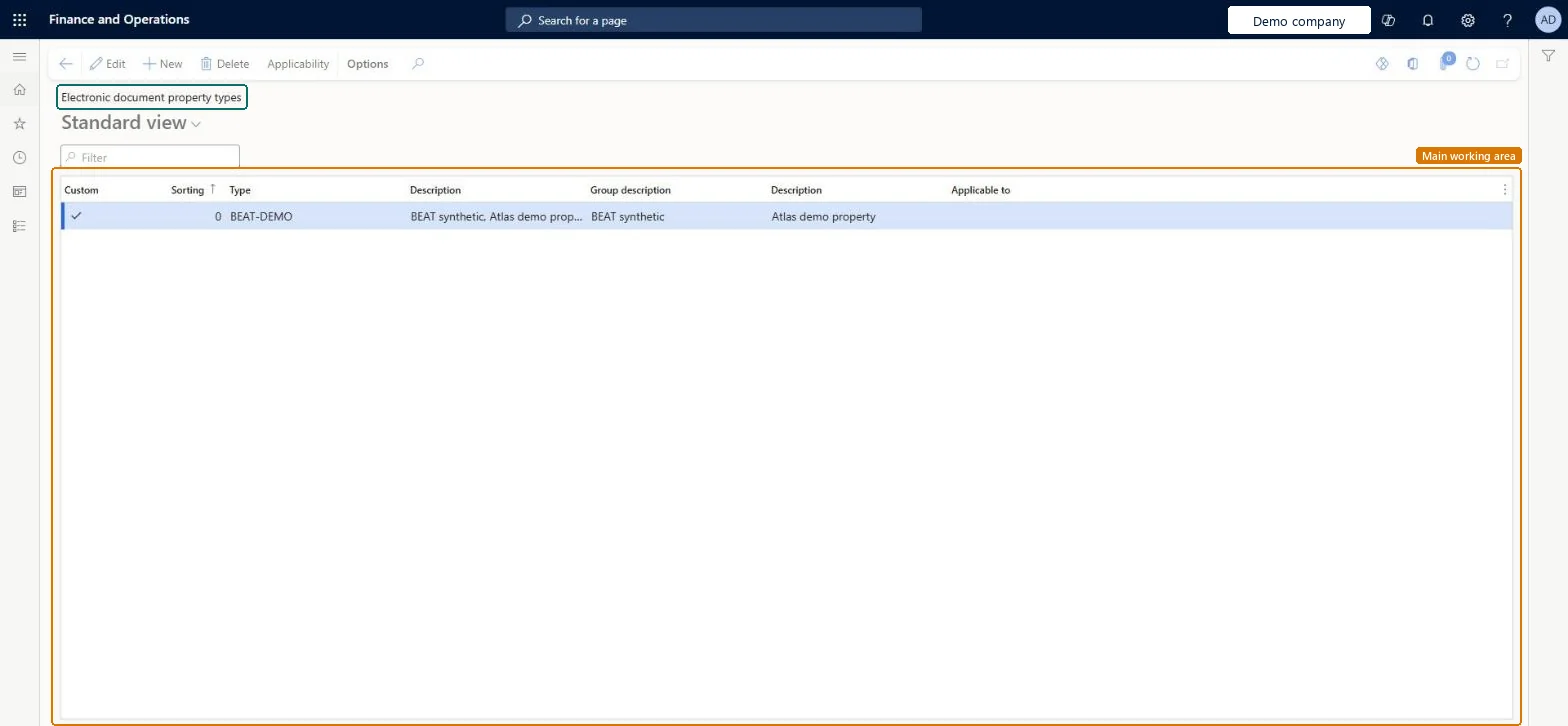
Setup step on the Electronic document property types page · Accounts receivable
Set up Electronic document property types
Defines named property types and the tables they apply to so that additional values can be captured on legal entities, customers, vendors or invoices and written into electronic invoice XML.
Accounts receivable clerk, Accounts receivable manager, Auditor and 12 more roles
Business process
Issue sales invoices
Menu item
EInvoicePropertyTypeTable
Main table
EInvoicePropertyTypeTable
Data entity
EInvoicePropertyTypeTableEntity
Setup steps
1 on this page
Show what matters for
SETUP GUIDEHow to set it up8 sections. Choose a role to highlight what matters to you.
Everyone
1What it is and why
What it is
A setup page where you define electronic document property types and the tables (such as Customers and Legal entities) that each type applies to.
What you do here
Use it to create properties whose values are entered per customer or legal entity and then output to blocks of the electronic invoice XML for different business cases.
Example
For Italian electronic invoices, a property type can hold the certified email address (PEC) of a private company or professional, or stamp duty details, so they are written to the XML file.
The page in Dynamics 365. page title tab to open what to set or check
About the examples: Examples and screenshots in this guide use BEAT, a demo company in a Dynamics 365 test environment. Use your own company's codes and values instead of copying them.
Step by step, with screenshots
Set up Electronic document property types1 screen
Defines named property types and the tables they apply to so that additional values can be captured on legal entities, customers, vendors or invoices and written into electronic invoice XML.
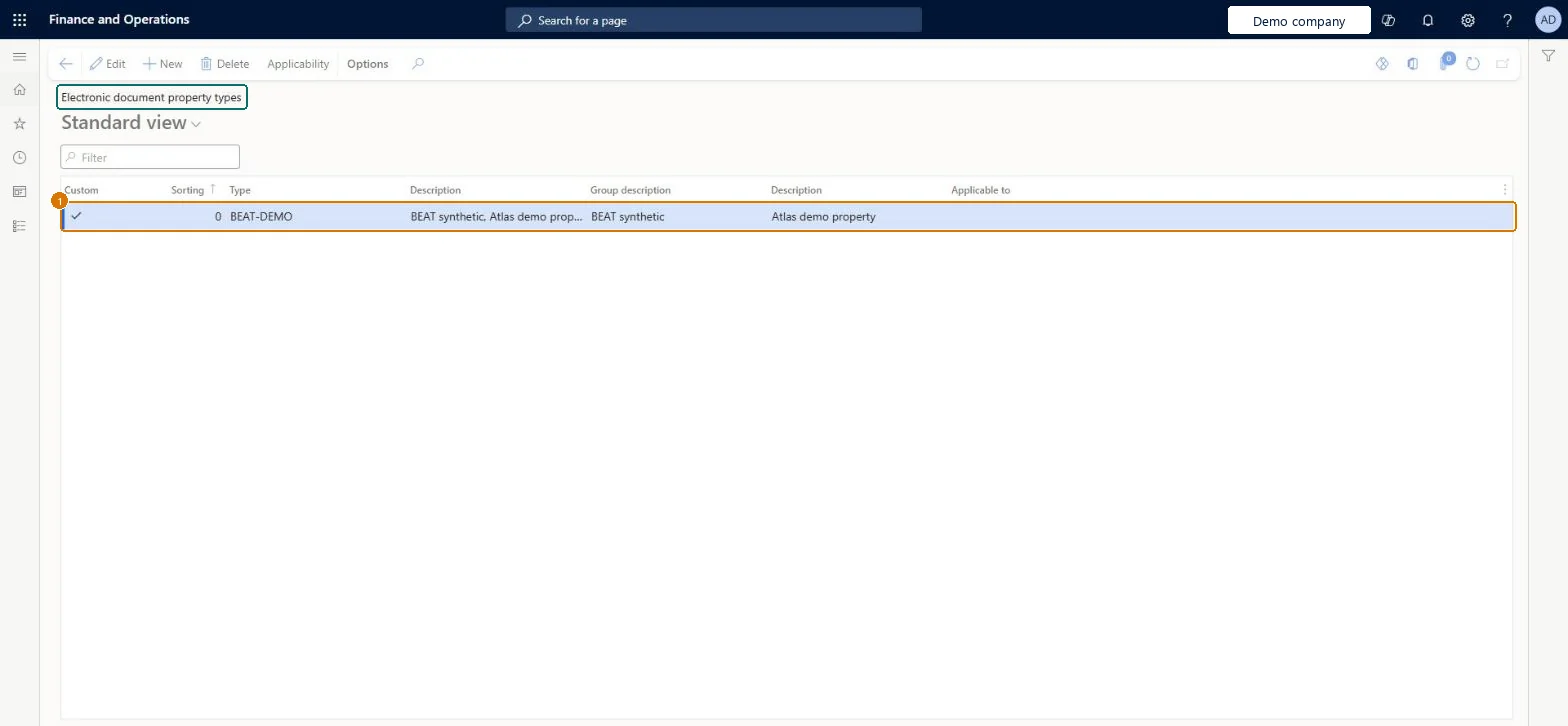
Screen 1
Create the electronic document property type
Go to Accounts receivable > Setup > Electronic document property types
Select New
Enter the sorting number, type and descriptions
Leave Applicable to blank
1Type
BEAT-DEMO
Sorting
0
Group description
Electronic document properties
Description
Property
Show the full screen page title tab to open what to set or check
Steps from Microsoft
Go to Accounts receivable > Setup > Electronic document property types and select New.
In the Type field, enter the property type code exactly as your e-invoicing setup needs it, for example FormatType.
Select Applicability to add the table the property applies to.
On the Electronic document property type applicability setup page, in the Table name field, select the table, such as Customers.
Save, and return to the Electronic document property types page.
Create the property types with the exact codes the Italian FatturaPA setup uses (for example VATnonEU and PEC on Customers, Bollo and BolloPay on Legal entities, DocumentType on the invoice journals) and set the table each one applies to.Each property type feeds a specific block of the XML file, and the electronic document property type must have the same code that Learn specifies for that business case.
Setting up the type but not entering its value on the customer or legal entity (Electronic document properties on the Action Pane). The XML block that needs it, such as PECDestinatario for private companies with a blank Authority office, is then empty.
Reversible: Types and values can be changed; they're read when the electronic invoice XML is generated, so files already created keep the old values.
If you change it later
In Belgium, schema codes set through electronic document property types take priority over the built-in default schema code. Microsoft Learn
Technical architect
6Technical
Menu item
EInvoicePropertyTypeTableChecked in Dynamics 365
Form
EInvoicePropertyTypeTableChecked in Dynamics 365
Table
EInvoicePropertyTypeTableKey field: RecIdChecked in Dynamics 365
Data entities
EInvoicePropertyTypeTableEntityElectronic document property types Microsoft data model
Who can open it
PrivilegesMaintain accounts receivable parameters CustParametersMaintainView accounts receivable parameters CustParametersViewDutiesEnable collections process CollectionLetterCollectionsProcessEnableEnable credit cards CreditCardCreditCardEnableEnable credit cards process CreditCardCreditCardsProcessEnableMaintain collections process automation setup CustAutomationSetupMaintainInquire into invoice and cash policies CustInvoiceInvoiceAndCashPoliciesInquirEnable invoice and cash process CustInvoiceInvoiceAndCashProcessEnableEnable shipping process InventShippingProcessEnableInquire into invoice and cash policies RentalCustInvInvoiceAndCashPolInquirEnable invoice and cash process RentalCustInvoiceInvAndCashProcEnableInquire into quotation to sales order policies RentalSalesQuotationToSlsOrdPoliciesInquireEnable quotation to sales order process RentalSalesQuotationToSlsOrdProcessEnableInquire into quotation to sales order policies SalesQuotationToSalesOrderPolInquireEnable quotation to sales order process SalesQuotationToSalesOrderProcessEnable15 security rolesAuditor AuditPolicyManagerCollections manager CollectionLetterCollectionsManagerAccounts receivable clerk CustInvoiceAccountsReceivableClerkAccounts receivable manager CustInvoiceAccountsReceivableManagerAccounting manager LedgerAccountingManagerAccounting supervisor LedgerAccountingSupervisorAccounts receivable centralized payments clerk PaymAccountsReceivableCentralPaymClerkAccounts receivable payments clerk PaymAccountsReceivablePaymentsClerkRental coordinator agent RentalCoordinatorAgentRental manager RentalManagerRental representative RentalRepresentativeRental sales manager RentalSalesManagerRetail service RetailServiceSales manager TradeSalesManagerWarehouse manager WMSWarehouseManagerChecked in Dynamics 365
Roles to set it up and use it
To set it up or change itRental manager RentalManagerAccounts receivable manager CustInvoiceAccountsReceivableManagerRental coordinator agent RentalCoordinatorAgentCollections manager CollectionLetterCollectionsManagerAccounting supervisor LedgerAccountingSupervisorTo use itAccounts receivable clerk CustInvoiceAccountsReceivableClerkAccounts receivable payments clerk PaymAccountsReceivablePaymentsClerkAccounts receivable centralized payments clerk PaymAccountsReceivableCentralPaymClerkAuditor AuditPolicyManagerRental representative RentalRepresentativeGive people one of these roles. On this system, 15 roles can open this page.Checked in Dynamics 365
Actions on the page
Options: Personalize, Page options, ShareChecked in Dynamics 365
Checked in a working Dynamics 365 system, version 10.0.49: the menu item, form, table and security, the page, the demo records and the values in the screenshots.
To cite this step: AR-SETUP-150, Set up Electronic document property types. Beyond ERP Atlas Hub, 2026-11-11. https://www.beyonderp.cloud/atlas/step/AR-SETUP-150