Accounts payable manager, Auditor, Accounting manager and 1 more role
Business process
Analyze accounts payable effectiveness in Dynamics 365 Finance
Menu item
VendReportInterval
Main table
StatRepInterval
Data entity
AgingPeriodDefinitionEntity
Setup steps
1 on this page
Show what matters for
SETUP GUIDEHow to set it up8 sections. Choose a role to highlight what matters to you.
Everyone
1What it is and why
What it is
A setup page for user-defined aging intervals for vendor accounts.
What you do here
Use this page to define the intervals that analyze the maturity distribution of vendor accounts.
Example
For example, a typical definition has periods such as Current, 31-60, 61-90 and Over 90 days, where Over 90 includes transactions dated more than 90 days before the aging date.
The page in Dynamics 365. page title tab to open what to set or check
About the examples: Examples and screenshots in this guide use BEAT, a demo company in a Dynamics 365 test environment. Use your own company's codes and values instead of copying them.
Step by step, with screenshots
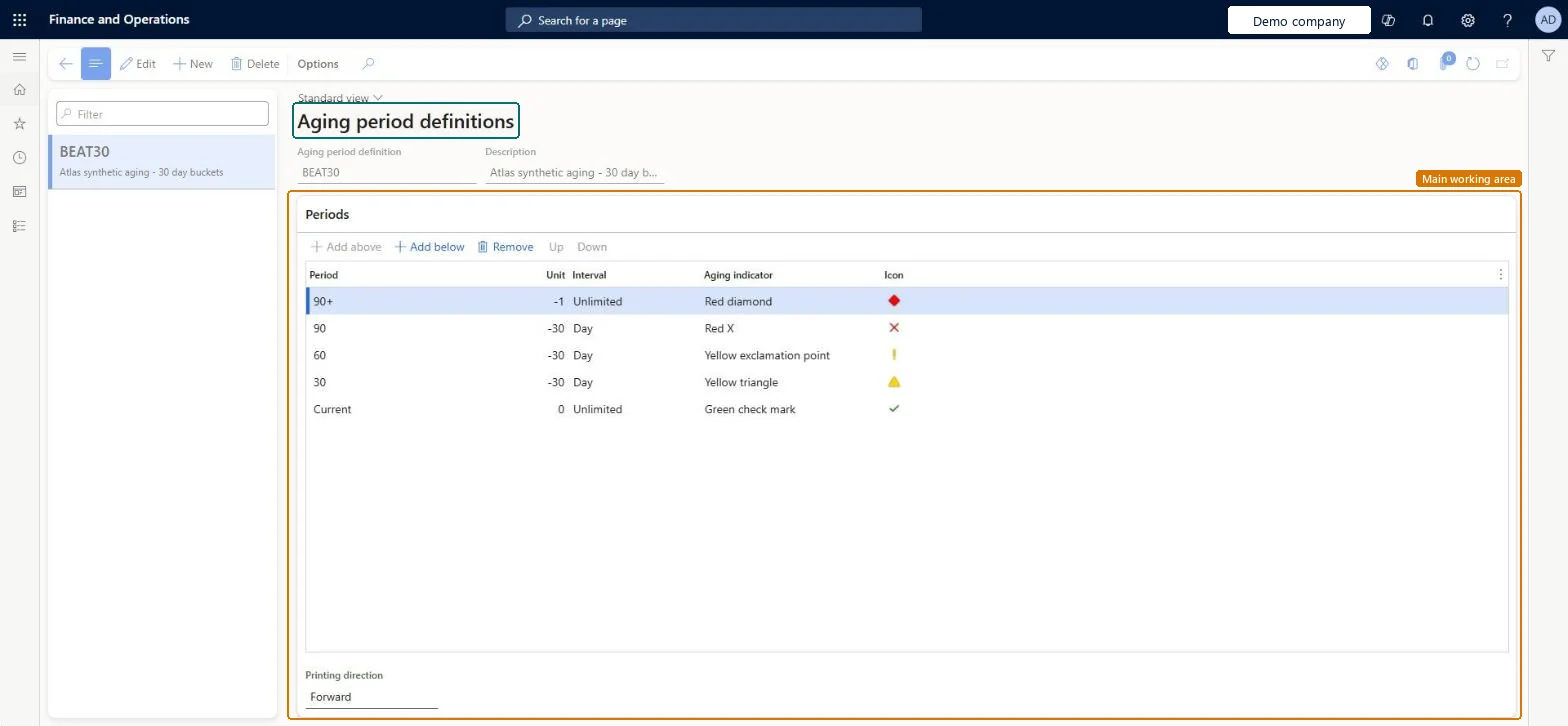
Set up Aging period definitions1 screen
Define the user-defined intervals that aging lists and reports use to analyze the maturity distribution of vendor balances.
Screen 1
Create the aging period definition
Go to Accounts payable > Setup > Aging period definitions
Select New and enter the definition and description
On the Periods FastTab, use Add below to add each period
Set Printing direction to Forward
1Aging period definition
BEAT30
Description
Aging - 30 day buckets
Period
90+ (Unit -1, Interval Unlimited)
Period
90 (Unit -30, Interval Day)
Period
60 (Unit -30, Interval Day)
Period
30 (Unit -30, Interval Day)
Period
Current (Unit 0, Interval Unlimited)
Printing direction
Forward
Show the full screen page title tab to open what to set or check
How to use it
Go to Accounts payable > Setup > Aging period definitions.
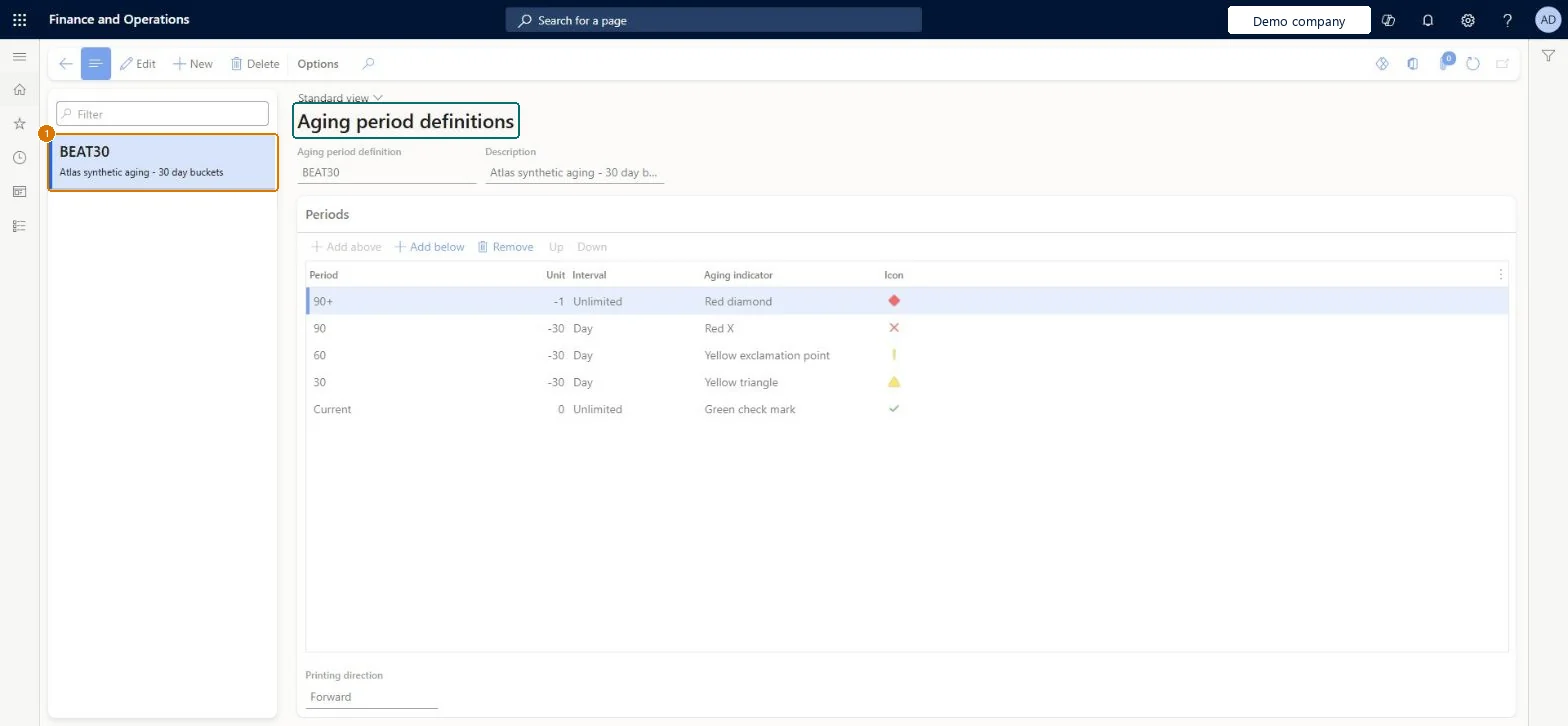
Select New to create a definition, or select one in the list on the left.
Enter the Aging period definition and the Description.
In the Periods section, select Add above or Add below to add a period, then fill in the Period, Unit, Interval, Aging indicator and Icon.
Use Up, Down or Remove to reorder or remove a period.
Choose the Printing direction.
Source: Checked in Dynamics 365
Fields on the page
Field
What it means
Example
Table column
Period
The column heading shown for each aging period on inquiries and reports.Microsoft Learn
90+ (Unit -1, Interval Unlimited)
Heading
Unit
A number for the length of the period: zero for the aging date, negative for the past, positive for the future.Microsoft Learn
Qty
Interval
The length of each unit, such as day, week, month or unlimited.Microsoft Learn
Six periods or fewer for any definition used on the printed Vendor aging reportAging period definitions with more than six periods (columns) can't be used on the printed Vendor aging report.
Building one detailed definition with many buckets and then finding it can't be selected for the printed report.
PrivilegesMaintain accounts payable aging period definitions VendReportIntervalMaintainView accounts payable aging period definitions VendReportIntervalViewDutiesInquire into invoice and payment policies VendInvoiceInvoicePaymentPoliciesInquirEnable invoice and payment process VendInvoiceInvoicePaymentProcessEnable4 security rolesAuditor AuditPolicyManagerAccounting manager LedgerAccountingManagerAccounting supervisor LedgerAccountingSupervisorAccounts payable manager VendInvoiceAccountsPayableManagerChecked in Dynamics 365
Roles to set it up and use it
To set it up or change itAccounts payable manager VendInvoiceAccountsPayableManagerAccounting supervisor LedgerAccountingSupervisorTo use itAccounting manager LedgerAccountingManagerAuditor AuditPolicyManagerGive people one of these roles. On this system, 4 roles can open this page.Checked in Dynamics 365
AgingPeriodDefinitionEntity (Aging period definitions): loaded for each company, in Microsoft's default template 120 - Accounts payable.Load order: Microsoft's default template 120 - Accounts payable loads Aging period definitions at execution unit 1, level 30, sequence 10. Lower levels load first, and entities at the same level load in sequence order.Load first: the default templates at lower levels (System setup to General ledger)Microsoft Learn
Checked in a working Dynamics 365 system, version 10.0.49: the menu item, form, table and security, the page, the demo records and the values in the screenshots.
To cite this step: AP-SETUP-060, Set up Aging period definitions. Beyond ERP Atlas Hub, 2026-11-11. https://www.beyonderp.cloud/atlas/step/AP-SETUP-060