About the examples: Examples and screenshots in this guide use BEAT, a demo company in a Dynamics 365 test environment. Use your own company's codes and values instead of copying them.
Steps from Microsoft
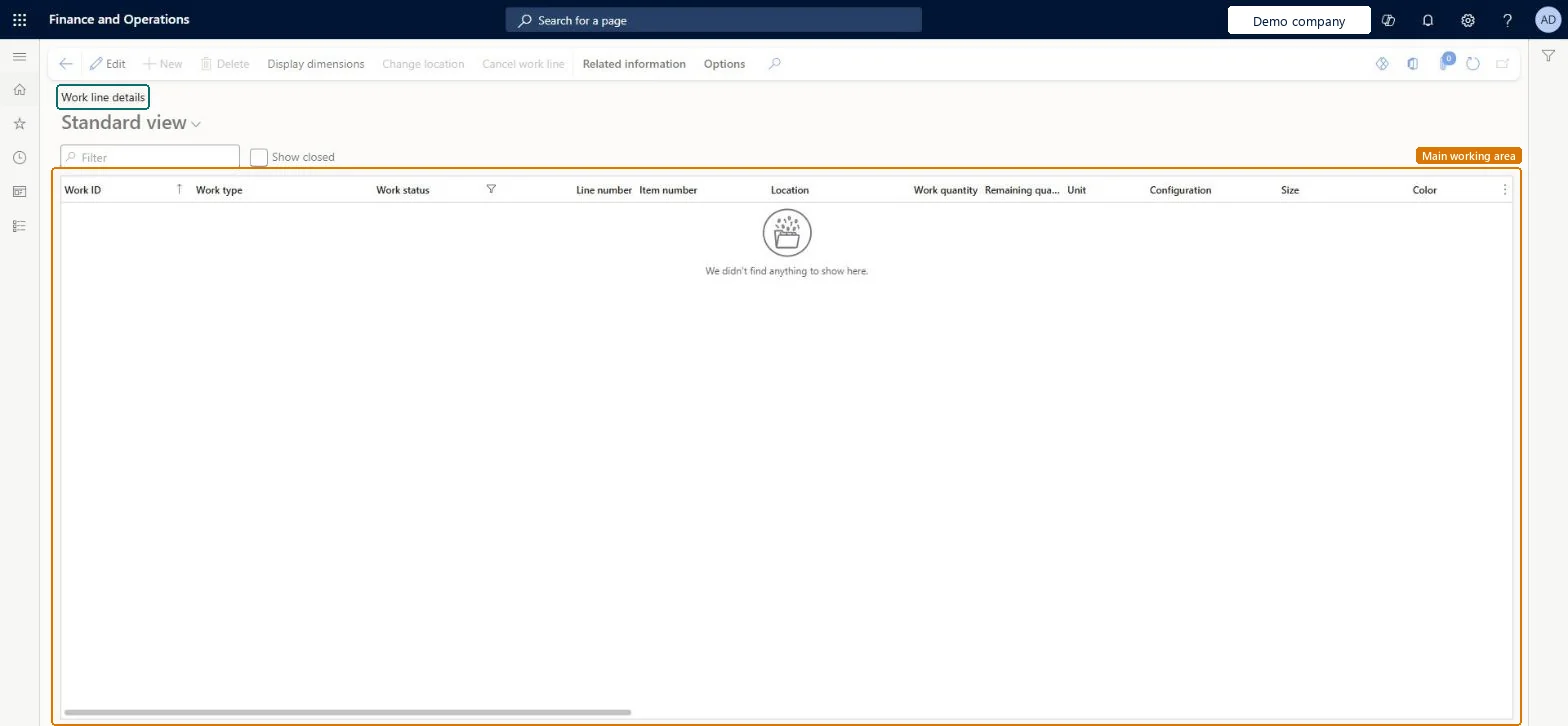
Go to Warehouse management > Work > Work line details.
Use the Filter field to search for lines that have a specific value for any available parameter.
Select the Show closed check box to show or hide closed lines.
Select Display dimensions to choose which dimension columns appear in the grid.
Select a work line, then select Change location to choose a new location for it.
Select a work line, then select Cancel work line to reduce its quantity partly or fully.
Load line for item %1 and shipment %2 has been updated to have zero quantity due to underdelivery setup allowing not to ship any quantities for this item.
On the load, open the Load lines FastTab and adjust the Underdelivery or Quantity field so it matches the picked work, or complete more picking work. Microsoft Learn
Test checklist
Release a reserved sales order and find its pick lines here; use Show closed to switch between open and all lines.
Select a pick line and Change location to a location with enough inventory; check the new location is saved.
Select Cancel work line and cancel part of the quantity; check Work quantity drops and Work status stays the same.
Reduce the matching load line quantity and check the load can be ship-confirmed after picking.
Cancel a full line on a test order and check Work status is Canceled while Work quantity still shows the original value.
Hard to reverse: Change location overrides the location directive and can be changed again while the line is open. Cancel work line on a pick line is not reversible: cancelling the full quantity sets Work status to Canceled; cancelling part reduces Work quantity, and you must also remove that quantity from the load line or the load can't be ship-confirmed unless under-delivery is set up. Microsoft Learn
If you change it later
If you cancel only part of the quantity of a work line, you must also remove the obsolete quantity from the load line, otherwise the load line cannot be ship-confirmed unless under-delivery is set up correctly. Microsoft Learn
Technical architect
5Technical
Menu item
WHSWorkLineDetailsChecked in Dynamics 365
Form
WHSWorkLineDetailsChecked in Dynamics 365
Table
WHSWorkLineShown as “WORK LINES” in Record infoKey field: WorkIdChecked in Dynamics 365
PrivilegesMaintain work lines WHSWorkLineDetailsMaintainView work lines WHSWorkLineDetailsViewDutiesInquire into quality control master InventQualityControlMasterInquireInquire into quality control progress InventQualityControlProgressInquireMaintain quality inspection InventQualityInspectionMaintainInquire into production orders ProdProductionOrderProgressInquireMaintain load planning WHSLoadPlanningMaintainMaintain warehouse planning WHSWarehousePlanningMaintainInquire into warehouse planning status WHSWarehousePlanningStatusInquire16 security rolesMaterials manager InventMaterialsManagerQuality control clerk InventQualityControlClerkQuality control manager InventQualityControlManagerReceiving clerk InventReceivingClerkShipping clerk InventShippingClerkShop supervisor JmgShopSupervisorProduction manager ProdProductionManagerProduction supervisor ProdProductionSupervisorProject manager ProjProjectManagerProduction planner ReqProductionPlannerTransportation coordinator TMSTransportationCoordinatorBuying agent TradeBuyingAgentPurchasing manager TradePurchasingManagerWarehouse planner WHSWarehousePlannerWarehouse manager WMSWarehouseManagerWarehouse worker WMSWarehouseWorkerChecked in Dynamics 365
Roles to set it up and use it
To set it up or change itWarehouse planner WHSWarehousePlannerTo use itWarehouse manager WMSWarehouseManagerProduction supervisor ProdProductionSupervisorWarehouse worker WMSWarehouseWorkerShipping clerk InventShippingClerkReceiving clerk InventReceivingClerkGive people one of these roles. On this system, 16 roles can open this page.Checked in Dynamics 365
Actions on the page
Related information: Related information(Action Pane without tabs): Display dimensions, Change location, Cancel work lineChecked in Dynamics 365