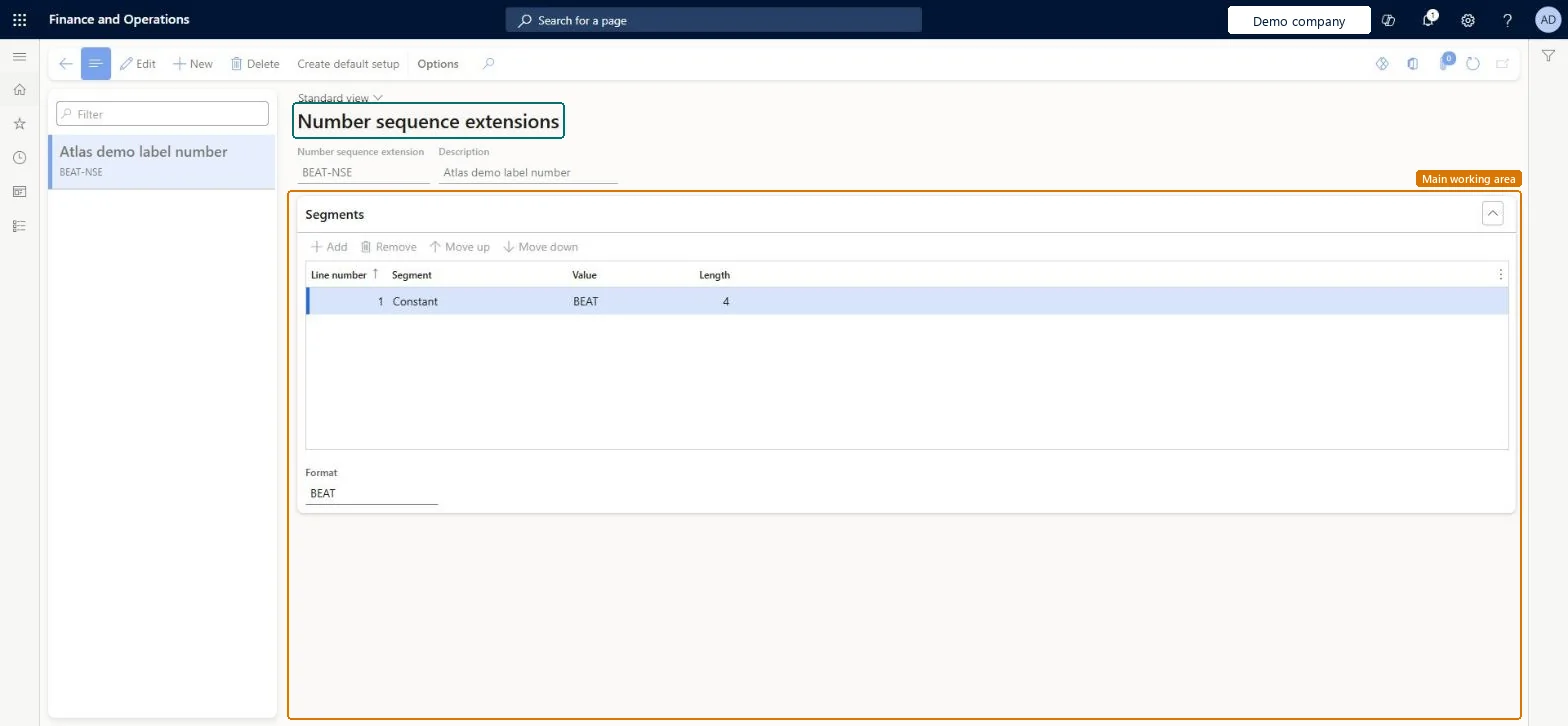
A setup page where you build number sequence formats from segments, for GS1-regulated IDs such as license plate IDs, container IDs, wave label IDs and bill of lading IDs.
Field Service Integration User, Production supervisor, Process engineer and 3 more roles
Business process
Manage warehouse operations
Menu item
WHSNumberSequenceExt
Main table
WHSNumberSequenceExt
Data entity
WHSNumberSequenceExtEntity
Setup steps
1 on this page
Show what matters for
PAGE GUIDEWhat the page does and how to use it8 sections. Choose a role to highlight what matters to you.
Everyone
1What it is and why
What it is
A setup page where you build number sequence formats from segments, for GS1-regulated IDs such as license plate IDs, container IDs, wave label IDs and bill of lading IDs.
What you do here
Use this page to define GS1-compliant number formats, including GS1 prefixes and check digits, for the IDs that the warehouse generates.
The page in Dynamics 365. page title tab to open what to set or check
About the examples: Examples and screenshots in this guide use BEAT, a demo company in a Dynamics 365 test environment. Use your own company's codes and values instead of copying them.
Setup steps on this page
Set up Number sequence extensions
Use this page to define GS1-compliant number formats, including GS1 prefixes and check digits, for the IDs that the warehouse generates.
Steps from Microsoft
Go to Warehouse management > Setup > Number sequence extensions.
On the Action Pane, select Create default setup for a GS1-compliant starting point, or select New to create your own sequence.
In the Number sequence extension field, enter a name, and in the Description field enter a description.
On the Segments FastTab, use the toolbar to add, delete and arrange segments, and assign a segment type in the Segment field of each row.
Check the example number in the Format field at the bottom of the Segments FastTab.
Sets the segment type for each row, which defines the purpose and content of that part of the number.Microsoft Learn
SegmentType
Format
Shows an example of the final number format built from the segments.Microsoft Learn
Test checklist
Set the GS1 company prefix on Warehouse management parameters.
Run Create default setup and check the BOL and SSCC sequences appear with the expected Format.
Select an SSCC-18 sequence for license plate IDs on the Number sequences tab of the parameters.
Generate a license plate (for example by receiving in the mobile app) and check the ID has the application identifier, the GS1 prefix and a final check digit.
Enter the GS1 company prefix first, run Create default setup, then select an SSCC-18 sequence for license plate and container IDs and the BOL sequence for bill of lading IDs on Warehouse management parametersCreate default setup builds a GS1-compliant BOL sequence and three SSCC sequences sized to your GS1 prefix; standard number sequences calculate no check digit and need the prefix kept up to date by hand.
Building a custom SSCC-18 format without sizing the Number sequence segment to 16 minus the length of the GS1 prefix, which breaks GS1 compliance. Also, until an extension is selected on the parameters, the IDs keep using the old rules.
Reversible: You can edit, add or remove extensions and change which one the parameters use. Only numbers generated afterwards follow the new format. Microsoft Learn
Technical architect
6Technical
Menu item
WHSNumberSequenceExtChecked in Dynamics 365
Form
WHSNumberSequenceExtChecked in Dynamics 365
Table
WHSNumberSequenceExtShown as “NUMBER SEQUENCE EXTENSIONS” in Record infoKey field: NumberSequenceExtIdChecked in Dynamics 365
Data entities
WHSNumberSequenceExtEntityNumber sequence extensions Checked in Dynamics 365
Who can open it
PrivilegesMaintain number sequence extensions WHSNumberSequenceExtMaintainView number sequence extensions WHSNumberSequenceExtViewDutiesInquire into warehouse operation master WMSWarehouseOperationMasterInquireMaintain warehouse operation master WMSWarehouseOperationMasterMaintain6 security rolesField Service Integration User FieldServiceIntegrationUserProduction supervisor ProdProductionSupervisorProcess engineer RouteProcessEngineerProcess engineering manager RouteProcessEngineeringManagerWarehouse planner WHSWarehousePlannerWarehouse manager WMSWarehouseManagerChecked in Dynamics 365
Roles to set it up and use it
To set it up or change itWarehouse manager WMSWarehouseManagerProcess engineer RouteProcessEngineerTo use itWarehouse planner WHSWarehousePlannerProduction supervisor ProdProductionSupervisorProcess engineering manager RouteProcessEngineeringManagerField Service Integration User FieldServiceIntegrationUserGive people one of these roles. On this system, 6 roles can open this page.Checked in Dynamics 365
Actions on the page
(Action Pane without tabs): Create default setupChecked in Dynamics 365