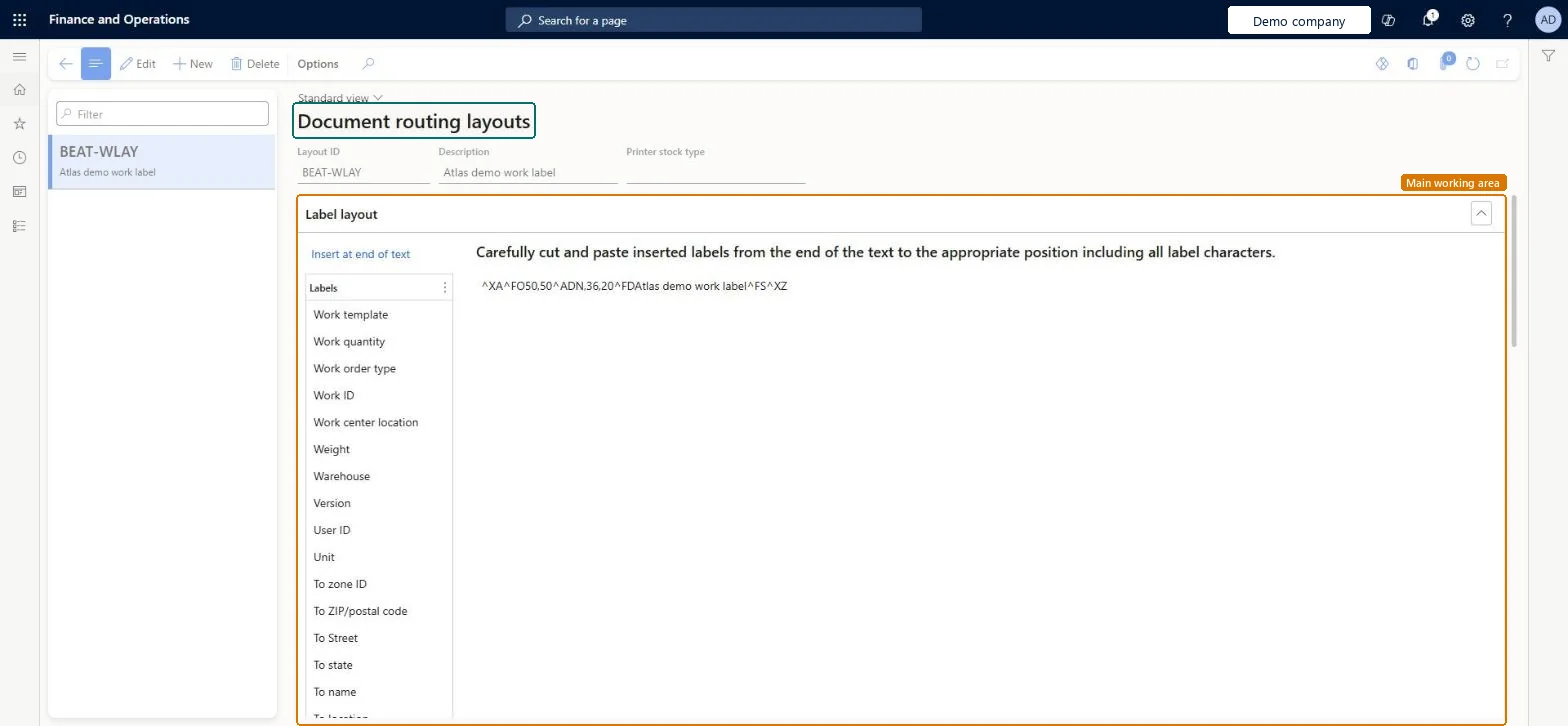
A setup page where you design document routing label layouts, each with a layout ID, a description and a printer stock type, using a text layout that can include data labels.
Field Service Integration User, Production supervisor, Process engineer and 3 more roles
Business process
Manage warehouse operations
Menu item
WHSDocumentRoutingLayout
Main table
WHSDocumentRoutingLayout
Data entity
WHSDocumentRoutingPrinterLayoutEntity
Setup steps
1 on this page
Show what matters for
PAGE GUIDEWhat the page does and how to use it8 sections. Choose a role to highlight what matters to you.
Everyone
1What it is and why
What it is
A setup page where you design document routing label layouts, each with a layout ID, a description and a printer stock type, using a text layout that can include data labels.
What you do here
Use this page to create layouts for license plate, container, custom and wave labels.
The page in Dynamics 365. page title tab to open what to set or check
About the examples: Examples and screenshots in this guide use BEAT, a demo company in a Dynamics 365 test environment. Use your own company's codes and values instead of copying them.
Setup steps on this page
Set up Document routing layouts
Use this page to create layouts for license plate, container, custom and wave labels.
How to use it
Go to Warehouse management > Setup > Document routing > Document routing layouts.
Select New to create a layout.
Enter the Layout ID, a Description and the Printer stock type.
In the Label layout section, select a label from the Labels list and select Insert at end of text.
Move the inserted label from the end of the text to the position you want, including all of its label characters.
Source: Checked in Dynamics 365
Test checklist
Create a layout with a $LicensePlateId$ field in the ZPL text.
Link it on a document routing record for the warehouse.
Receive goods with a menu item that prints a label.
Open Enquiries and reports > License plate labels and check the value that replaced $LicensePlateId$.
Use document routing layouts for simple ZPL labels; build new license plate labels on Label layout instead when you need related tables, repeating rows or an external label serviceDocument routing layouts give basic layout capabilities, while label layouts add header, row and footer elements and related data. Printing through an external label service requires label layouts.
Designing a license plate layout here while Use label layouts for license plate labels is Yes in Warehouse management parameters; license plates then print from Label layout, not from this page.
Reversible: Layouts are applied when a label prints; editing one changes the next labels only. Microsoft Learn
Technical architect
6Technical
Menu item
WHSDocumentRoutingLayoutChecked in Dynamics 365
Form
WHSDocumentRoutingLayoutChecked in Dynamics 365
Table
WHSDocumentRoutingLayoutShown as “DOCUMENT ROUTING LAYOUTS” in Record infoKey field: LayoutIdChecked in Dynamics 365
Data entities
WHSDocumentRoutingPrinterLayoutEntityDocument routing printer layouts Microsoft data model
Who can open it
PrivilegesMaintain document routing layouts WHSDocumentRoutingLayoutMaintainView document routing layouts WHSDocumentRoutingLayoutViewDutiesInquire into warehouse operation master WMSWarehouseOperationMasterInquireMaintain warehouse operation master WMSWarehouseOperationMasterMaintain6 security rolesField Service Integration User FieldServiceIntegrationUserProduction supervisor ProdProductionSupervisorProcess engineer RouteProcessEngineerProcess engineering manager RouteProcessEngineeringManagerWarehouse planner WHSWarehousePlannerWarehouse manager WMSWarehouseManagerChecked in Dynamics 365
Roles to set it up and use it
To set it up or change itWarehouse manager WMSWarehouseManagerProcess engineer RouteProcessEngineerTo use itWarehouse planner WHSWarehousePlannerProduction supervisor ProdProductionSupervisorProcess engineering manager RouteProcessEngineeringManagerField Service Integration User FieldServiceIntegrationUserGive people one of these roles. On this system, 6 roles can open this page.Checked in Dynamics 365
WHSDocumentRoutingPrinterLayoutEntity (Document routing printer layouts): loaded for each company, in Microsoft's default template 400 - Warehouse management.Load order: Microsoft's default template 400 - Warehouse management loads Document routing printer layouts at execution unit 1, level 30, sequence 10. Lower levels load first, and entities at the same level load in sequence order.Load first: the default templates at lower levels (System setup to General ledger)Microsoft Learn