Setup page · Tax
Accounts receivable parameters
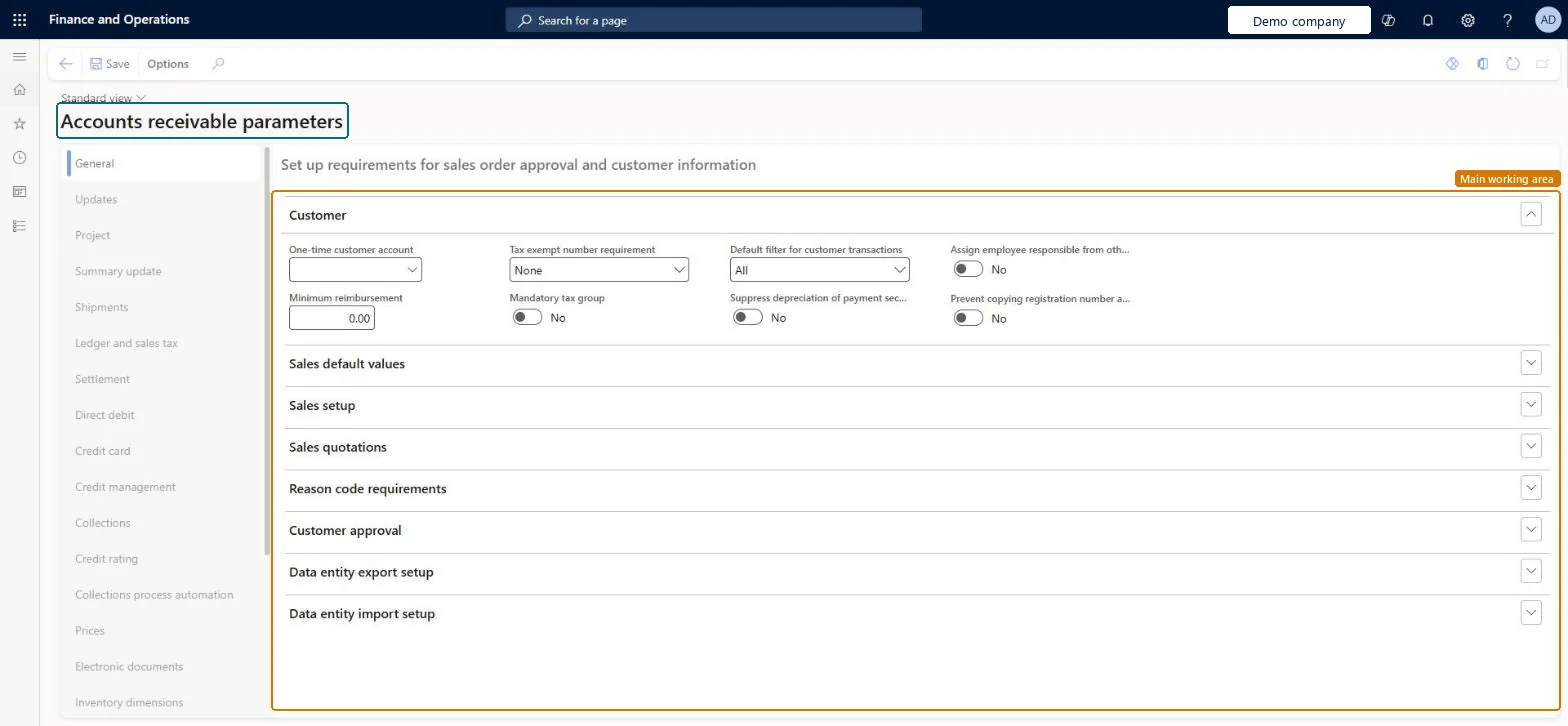
The parameters page for the Accounts receivable module.
- Used by
- Auditor, Collections manager, Accounts receivable clerk and 12 more roles
- Business process
- —
- Menu item
CustParameters- Main table
CustParameters- Data entity
CustomerParametersEntity- Setup steps
- —
Show what matters for
Everyone
1What it is and why
| What it is | The parameters page for the Accounts receivable module. |
|---|---|
| What you do here | Use it to set the module-wide parameters that control Accounts receivable (and Credit and collections) behavior. |
| Example | For example, on the General tab you turn on the Enable customer approvals option before you can use the customer workflow. |
Functional consultant · Solution architect
2Where it fits
| Business process | — |
|---|---|
| Menu path | Tax › Setup › Parameters › Accounts receivable parameters |
| Set up first | — |
| Used next by | — |
| Related pages | Accounts payable parameters Microsoft Learn ↗ |
End user · Functional consultant
3How to do it
Microsoft's steps
- Go to Tax > Setup > Parameters > Accounts receivable parameters.
- On the Ledger and sales tax tab, on the Payment FastTab, set Sales tax on prepayment journal voucher to Yes if tax is due on prepayments.
- In the Posting profile with prepayment journal voucher field, select the posting profile for customer prepayments.
- Close the page.
Source: Microsoft Learn ↗
Field guide
| Field | What it means | Worked example | Table column |
|---|---|---|---|
| Sales tax on prepayment journal voucher | Calculates sales tax on customer prepayment vouchers.Microsoft Learn ↗ | — | TaxOnPrepayment |
| Posting profile with prepayment journal voucher | The customer posting profile used when customer prepayments are posted.Microsoft Learn ↗ | — | PrepaymentPostingProfile |
| Posting profile | The default customer posting profile, filled in on the header of new documents.Microsoft Learn ↗ | — | PostingProfile |
| Exchange rate type source | Which exchange rate types foreign currency revaluation uses: Ledger, Specific or Group.Microsoft Learn ↗ | — | — |
Functional consultant
4Setup decisions
| Setup step | Recommended value and why | Decision · common mistake · test |
|---|---|---|
| — No setup is made on this page. | ||
Solution architect
5Design impact
| Shared or per company | Per company: each legal entity has its own records. Microsoft data model ↗ |
|---|---|
| Can it be undone | — |
| Feature or country | — |
| If you change it later | — |
Technical architect
6Technical
| Menu item | CustParameters Checked in Dynamics 365 |
|---|---|
| Form | CustParameters Checked in Dynamics 365 |
| Table | CustParametersShown as “Customer parameters” in Record infoChecked in Dynamics 365 |
| Data entities | CustomerParametersEntityCustomer parameters Microsoft data model ↗ |
| Who can open it | PrivilegesMaintain accounts receivable parameters CustParametersMaintainView accounts receivable parameters CustParametersViewDutiesEnable collections process CollectionLetterCollectionsProcessEnableEnable credit cards CreditCardCreditCardEnableEnable credit cards process CreditCardCreditCardsProcessEnableMaintain collections process automation setup CustAutomationSetupMaintainInquire into invoice and cash policies CustInvoiceInvoiceAndCashPoliciesInquirEnable invoice and cash process CustInvoiceInvoiceAndCashProcessEnableEnable shipping process InventShippingProcessEnableInquire into invoice and cash policies RentalCustInvInvoiceAndCashPolInquirEnable invoice and cash process RentalCustInvoiceInvAndCashProcEnableInquire into quotation to sales order policies RentalSalesQuotationToSlsOrdPoliciesInquireEnable quotation to sales order process RentalSalesQuotationToSlsOrdProcessEnableInquire into quotation to sales order policies SalesQuotationToSalesOrderPolInquireEnable quotation to sales order process SalesQuotationToSalesOrderProcessEnable15 security rolesAuditorAuditPolicyManagerCollections manager CollectionLetterCollectionsManagerAccounts receivable clerk CustInvoiceAccountsReceivableClerkAccounts receivable manager CustInvoiceAccountsReceivableManagerAccounting manager LedgerAccountingManagerAccounting supervisor LedgerAccountingSupervisorAccounts receivable centralized payments clerk PaymAccountsReceivableCentralPaymClerkAccounts receivable payments clerk PaymAccountsReceivablePaymentsClerkRental coordinator agent RentalCoordinatorAgentRental manager RentalManagerRental representative RentalRepresentativeRental sales manager RentalSalesManagerRetail service RetailServiceSales manager TradeSalesManagerWarehouse manager WMSWarehouseManager |
| Actions on the page | Options: Personalize, Page options, Edit, ShareChecked in Dynamics 365 |
Developer
7Developer
| Open it directly | https://<your-environment>/?mi=CustParameters |
|---|---|
| Integrate with | CustomerParametersEntity data entity Microsoft data model ↗ |
| Table definition | CustParameters columns and relations Microsoft data model ↗ |
Everyone
8Sources and checks
- learn.microsoft.com/dynamics365/finance/accounts-receivable/accounts-receivables-set-up-overview
- learn.microsoft.com/dynamics365/finance/accounts-receivable/customer-prepayments
- learn.microsoft.com/common-data-model/schema/core/operationscommon/tables/finance/accountsreceivable/parameter/custparameters
- learn.microsoft.com/dynamics365/finance/accounts-receivable/customer-posting-profiles
- learn.microsoft.com/dynamics365/finance/cash-bank-management/foreign-currency-revaluation-accounts-payable-accounts-receivable
- learn.microsoft.com/dynamics365/finance/accounts-payable/prepayments-invoices-vs-prepayments
- Checked in a working Dynamics 365 system, version 10.0.49: the menu item, form, table and security, the page.