Setup page · Tax
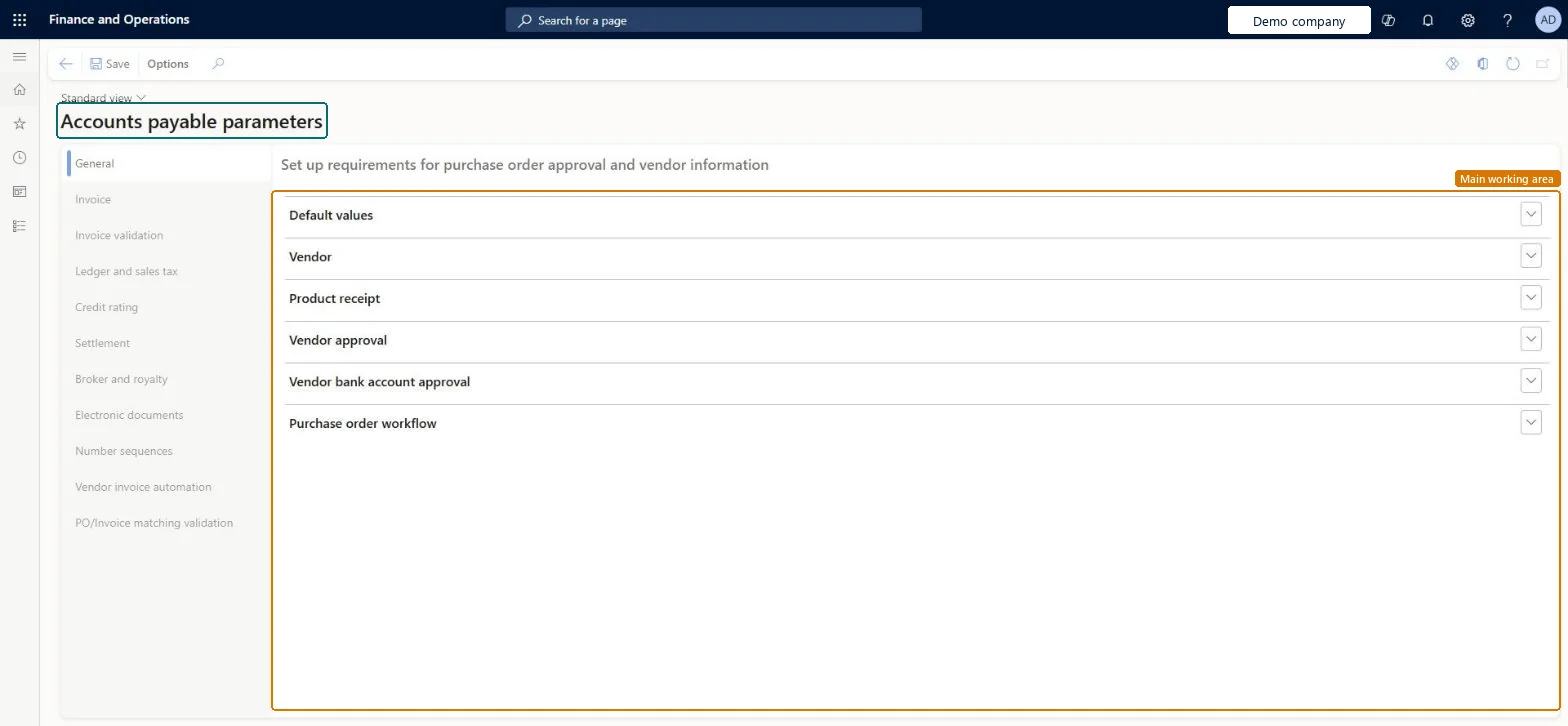
Accounts payable parameters
The main setup page for Accounts payable in each legal entity.
- Used by
- Accounts payable manager, Auditor, Accounting manager and 2 more roles
- Business process
- —
- Menu item
VendParameters- Main table
PurchParameters- Data entity
PurchProcurementDocumentDefaultsEntity- Setup steps
- —
Show what matters for
Everyone
1What it is and why
| What it is | The main setup page for Accounts payable in each legal entity. |
|---|---|
| What you do here | Used to set default settings that apply when no more specific setting exists, parameters for various Accounts payable functionality, and the Accounts payable number sequences. |
| Example | For example, a company that wants accrued costs recorded when goods are received, before the vendor invoice arrives, selects the Post product receipts to ledger option on this page. |
Functional consultant · Solution architect
2Where it fits
| Business process | — |
|---|---|
| Menu path | Tax › Setup › Parameters › Accounts payable parameters |
| Set up first | — |
| Used next by | — |
| Related pages | Accounts receivable parameters Microsoft Learn ↗ |
End user · Functional consultant
3How to do it
Microsoft's steps
- Go to Tax > Setup > Parameters > Accounts payable parameters.
- On the Ledger and sales tax tab, open the Adjust invoice posting date automatically field.
- Select No change, or one of the options that move the posting date to the system date or to the next open period.
- If you chose an option other than No change, set Adjust invoice posting date to next year's open period to Block with error or Allowed with warning.
Source: Microsoft Learn ↗
Field guide
| Field | What it means | Worked example | Table column |
|---|---|---|---|
| Adjust invoice posting date automatically | Whether the posting date of vendor invoices is moved automatically when its period is closed or on hold.Microsoft Learn ↗ | — | — |
| Keep sales tax adjustments for PO invoices | Blocks posting of purchase order invoices whose sales tax lines don't come from the intersection of the tax groups.Microsoft Learn ↗ | — | — |
| Posting profile for payment journal with prepayment | The posting profile used for payments that are flagged as prepayments.Microsoft Learn ↗ | — | — |
| Exchange rate type source | Which exchange rate types foreign currency revaluation uses: Ledger, Specific or Group.Microsoft Learn ↗ | — | — |
| Post invoice with discrepancies | When set to Require approval, invoices with matching variances, such as sales tax differences, need approval.Microsoft Learn ↗ | — | — |
Functional consultant
4Setup decisions
| Setup step | Recommended value and why | Decision · common mistake · test |
|---|---|---|
| — No setup is made on this page. | ||
Solution architect
5Design impact
| Shared or per company | Per company: each legal entity has its own records. Microsoft data model ↗ |
|---|---|
| Can it be undone | — |
| Feature or country | — |
| If you change it later | — |
Technical architect
6Technical
| Menu item | VendParameters Checked in Dynamics 365 |
|---|---|
| Form | VendParameters Checked in Dynamics 365 |
| Table | PurchParametersShown as “Purchase parameters” in Record infoChecked in Dynamics 365 |
| Data entities | PurchProcurementDocumentDefaultsEntityProcurement type document default values Microsoft data model ↗PurchProcurementDocumentEntryPolicyEntityProcurement type document entry policies Microsoft data model ↗PurchProcurementDocumentProcessingPolicyEntityProcurement type document processing policies Microsoft data model ↗ |
| Who can open it | PrivilegesMaintain accounts payable parameters VendParametersMaintainView accounts payable parameters VendParametersViewDutiesEnable purchasing process ProcPurchasingProcessEnableInquire into purchase order to invoice policies PurchOrderToInvoicePoliciesInquireEnable purchase order to invoice process PurchOrderToInvoiceProcessEnableInquire into invoice and payment policies VendInvoiceInvoicePaymentPoliciesInquirEnable invoice and payment process VendInvoiceInvoicePaymentProcessEnable5 security rolesAuditorAuditPolicyManagerAccounting manager LedgerAccountingManagerAccounting supervisor LedgerAccountingSupervisorPurchasing manager TradePurchasingManagerAccounts payable manager VendInvoiceAccountsPayableManager |
| Actions on the page | — |
Developer
7Developer
| Open it directly | https://<your-environment>/?mi=VendParameters |
|---|---|
| Integrate with | PurchProcurementDocumentDefaultsEntity data entity Microsoft data model ↗ |
| Table definition | PurchParameters columns and relations Microsoft data model ↗ |
Everyone
8Sources and checks
- learn.microsoft.com/dynamics365/finance/accounts-payable/accounts-payable-overview
- learn.microsoft.com/dynamics365/finance/accounts-payable/vendor-invoice-dates
- learn.microsoft.com/common-data-model/schema/core/operationscommon/tables/supplychain/procurementandsourcing/parameter/purchparameters
- learn.microsoft.com/dynamics365/finance/general-ledger/resolve-sales-tax-differences-purchase-orders-invoices
- learn.microsoft.com/dynamics365/finance/accounts-payable/prepayments-invoices-vs-prepayments
- learn.microsoft.com/dynamics365/finance/cash-bank-management/foreign-currency-revaluation-accounts-payable-accounts-receivable
- Checked in a working Dynamics 365 system, version 10.0.49: the menu item, form, table and security, the page.