Retail operations manager, Retail service, Information technology manager
Business process
Administer system features
Menu item
OperationalInsightsMenuDisplay
Main table
OperationalInsightsParameters
Setup steps
1 on this page
Show what matters for
PAGE GUIDEWhat the page does and how to use it8 sections. Choose a role to highlight what matters to you.
Everyone
1What it is and why
What it is
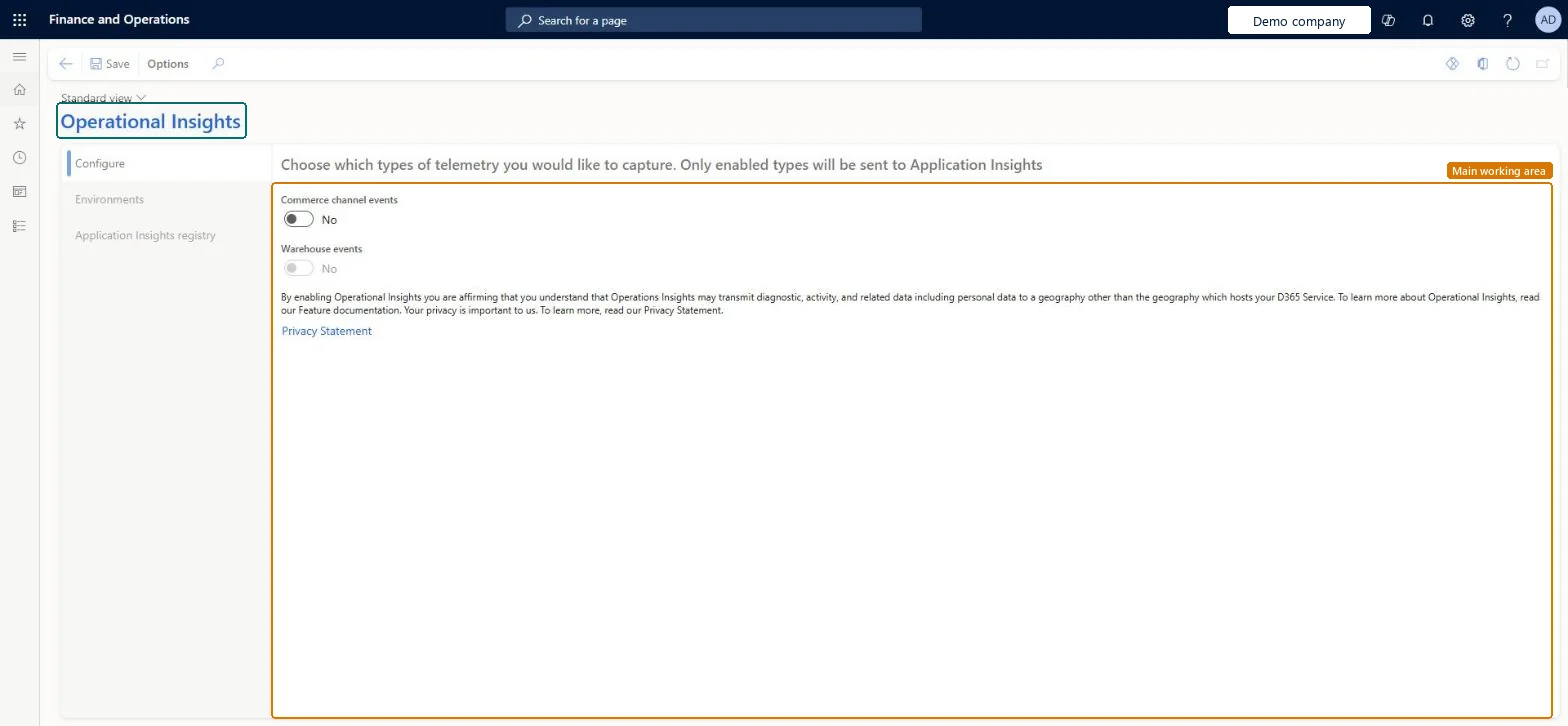
A setup page where you send diagnostic events from Commerce Scale Unit and point of sale devices to your own Application Insights account.
What you do here
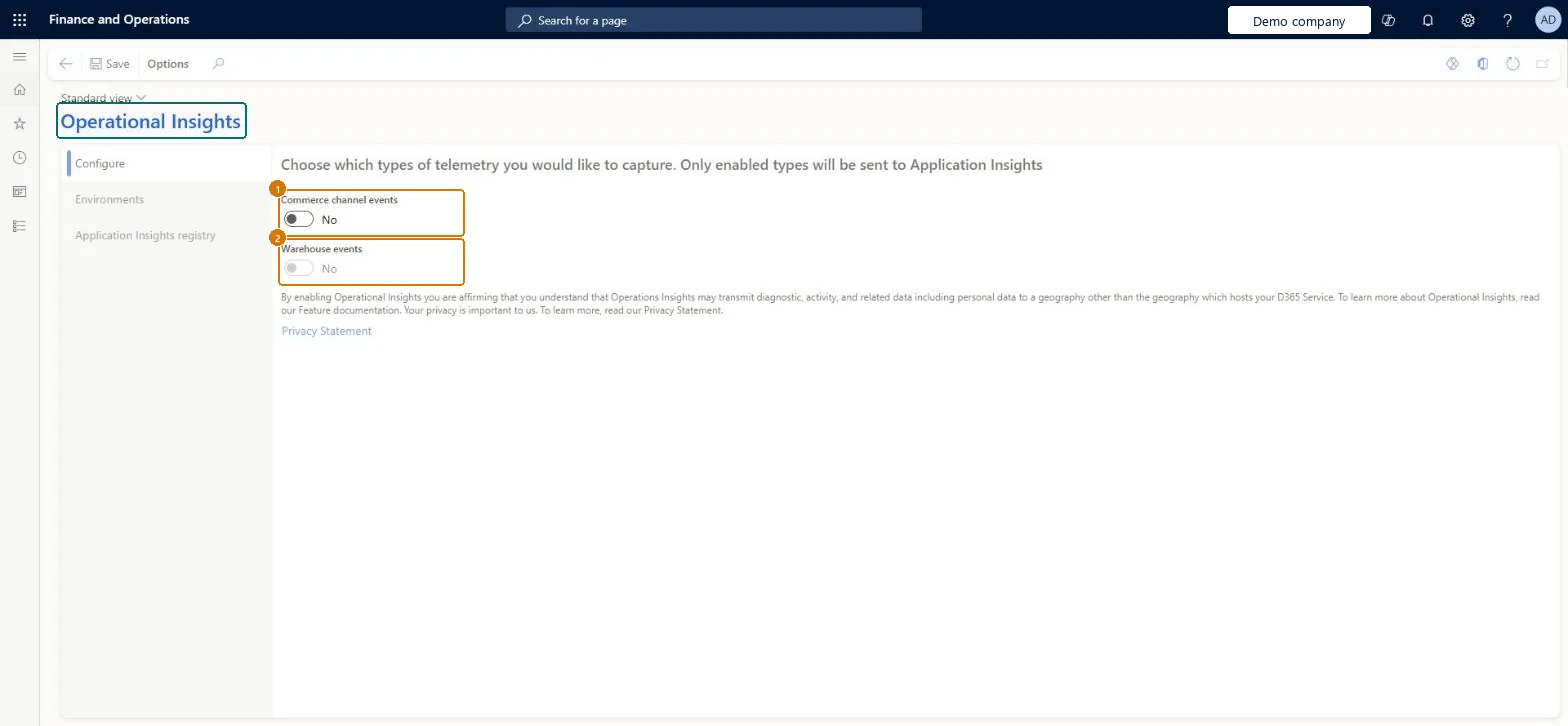
Use this page to turn Commerce channel events on or off per environment to help troubleshoot or debug.
Example
For example, BEAT sends Commerce channel events from its sandbox to one Application Insights account and production events to a separate one, entering the LCS environment ID of each environment so a database copy doesn't send events to the wrong account.
The page in Dynamics 365. page title tab to open what to set or check
About the examples: Examples and screenshots in this guide use BEAT, a demo company in a Dynamics 365 test environment. Use your own company's codes and values instead of copying them.
Step by step, with screenshots
Set up Operational Insights1 screen
Use this page to turn Commerce channel events on or off per environment to help troubleshoot or debug.
Screen 1
Review the Operational Insights settings
Go to System administration > Setup > Operational Insights
In Feature management, turn on the Operational Insights feature
On the Configure tab, turn on Commerce channel events
On the Environments and Application Insights registry tabs, enter where the telemetry goes
Select Save
Run the CDX Job 1110 job, and then restart each Commerce Scale Unit
Show the full screen page title tab to open what to set or check
Steps from Microsoft
In the Feature management workspace, enable the Operational Insights feature.
Go to System administration > Setup > Operational Insights.
On the Configure tab, set Commerce channel events to Yes.
On the Environments tab, enter the LCS Environment ID and Environment mode for each environment.
On the Application Insights registry tab, enter the Instrumentation Key and Environment Mode.
Run the CDX Job 1110 job, and then restart each Commerce Scale Unit.
Separate Application Insights accounts for production, sandbox and development, with the LCS Environment ID and Environment mode entered for every environmentLearn recommends separate accounts for data privacy, and entering environment IDs stops events from going to the wrong environment after a database copy.
On this system the page opens for Information technology manager, Retail service and Retail operations manager. Retail and IT administrators set it up. Operational Insights must be turned on in Feature management first.
Set per environment: each environment gets its own LCS environment ID, environment mode and Application Insights instrumentation key. Microsoft Learn
Can it be undone
Reversible: Set Commerce channel events to No, run CDX job 1110 and restart each CSU. Microsoft Learn
If you change it later
To stop events, set Commerce channel events to No and run the CDX job; turning off the feature alone isn't enough. Microsoft Learn
Technical architect
6Technical
Menu item
OperationalInsightsMenuDisplayChecked in Dynamics 365
Form
OperationalInsightsProvisioningFormChecked in Dynamics 365
Table
OperationalInsightsParametersShown as “Table containing parameter selections for Operational Insights” in Record infoChecked in Dynamics 365
Who can open it
PrivilegesMaintain Operational Insights provisioning OperationalInsightsAdminDutiesMaintain Retail Channel Reports RetailChannelReportMaintainMaintain system settings SysServerSettingsMaintain3 security rolesRetail operations manager RetailOperationsManagerRetail service RetailServiceInformation technology manager SysServerITManagerChecked in Dynamics 365
Roles to set it up and use it
To set it up or change itInformation technology manager SysServerITManagerRetail service RetailServiceRetail operations manager RetailOperationsManagerGive people one of these roles. On this system, 3 roles can open this page.Checked in Dynamics 365
Actions on the page
Options: Personalize, Page options, Edit, ShareChecked in Dynamics 365
Load order: Operational Insights has no data entity in Data management, so it can't be loaded from a file or a configuration template. Enter the environment IDs and instrumentation keys by hand in each environment, because they differ per environment.Checked in Dynamics 365
Checked in a working Dynamics 365 system, version 10.0.49: the menu item, form, table and security, the page, the demo records and the values in the screenshots.