BeyondERP.Newsletter
Menu

Setup page · System administration

Business events catalog

A setup page that lists the business events available in the environment, with filters by category, business event ID and name.

Used by
Business events viewer
Business process
Administer system features
Menu item
BusinessEventsWorkspace
Data entity
None for this page's own settings
Setup steps
1 on this page
Show what matters for
PAGE GUIDEWhat the page does and how to use it8 sections. Choose a role to highlight what matters to you.
Everyone

1What it is and why

What it isA setup page that lists the business events available in the environment, with filters by category, business event ID and name.
What you do hereUse this page to find the business events an integration needs, download their payload schema, and activate them for endpoints.
ExampleFor example, confirming a purchase order or approving a purchase requisition can raise a business event that an external system reacts to.
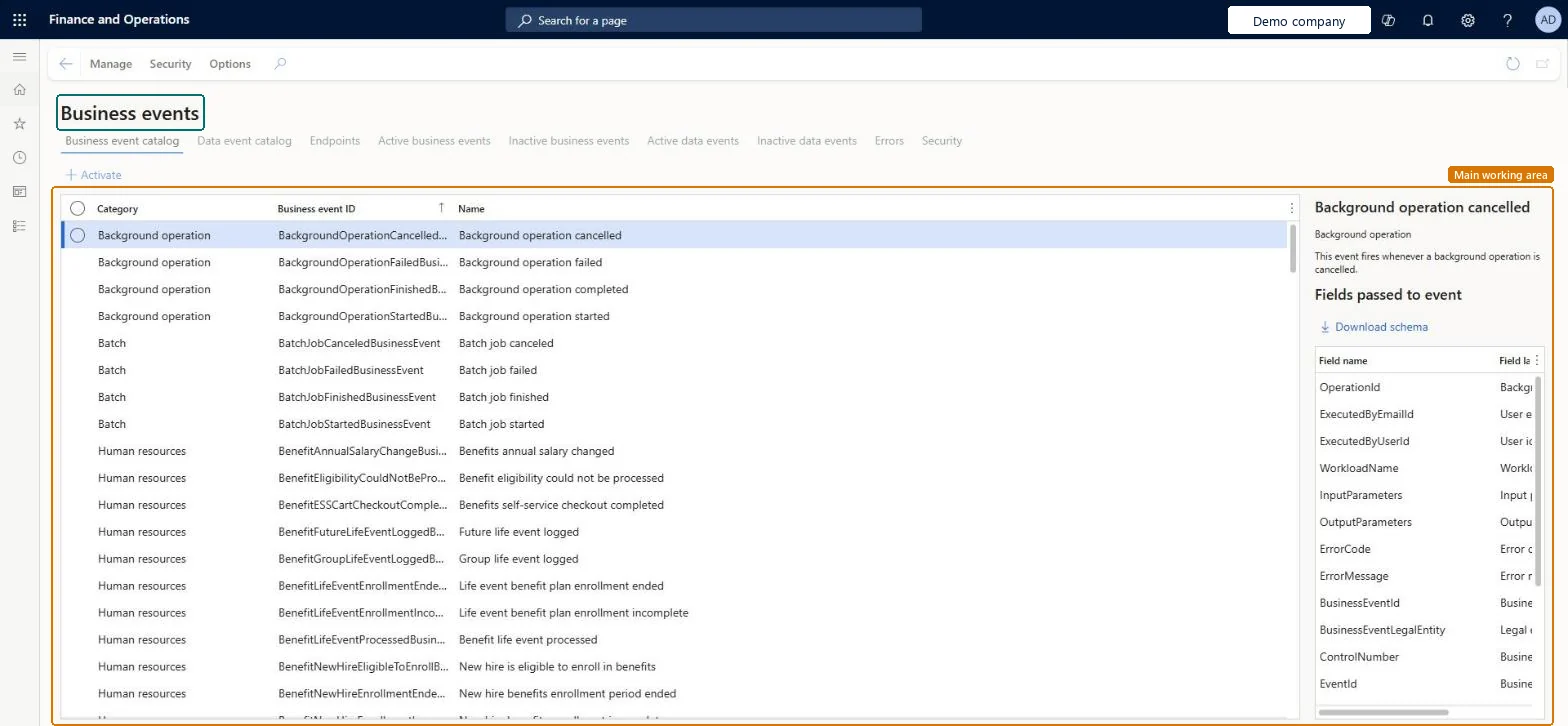
Business events catalog page in Dynamics 365
The page in Dynamics 365. page title tab to open what to set or check
Functional consultant · Solution architect

2Where it fits

Business processAdminister system features
Menu pathSystem administration › Setup › Business events › Business events catalog
Set up firstBusiness event endpoints Microsoft Learn
Used next byBusiness events parameters Microsoft Learn
Related pagesBusiness events parameters Microsoft Learn Change based alerts Microsoft Learn
End user · Functional consultant

3How to do it

About the examples: Examples and screenshots in this guide use BEAT, a demo company in a Dynamics 365 test environment. Use your own company's codes and values instead of copying them.

Step by step, with screenshots

Set up Business events catalog1 screen

Use this page to find the business events an integration needs, download their payload schema, and activate them for endpoints.

  1. Screen 1

    Find a business event

    Go to System administration > Setup > Business events > Business events catalog

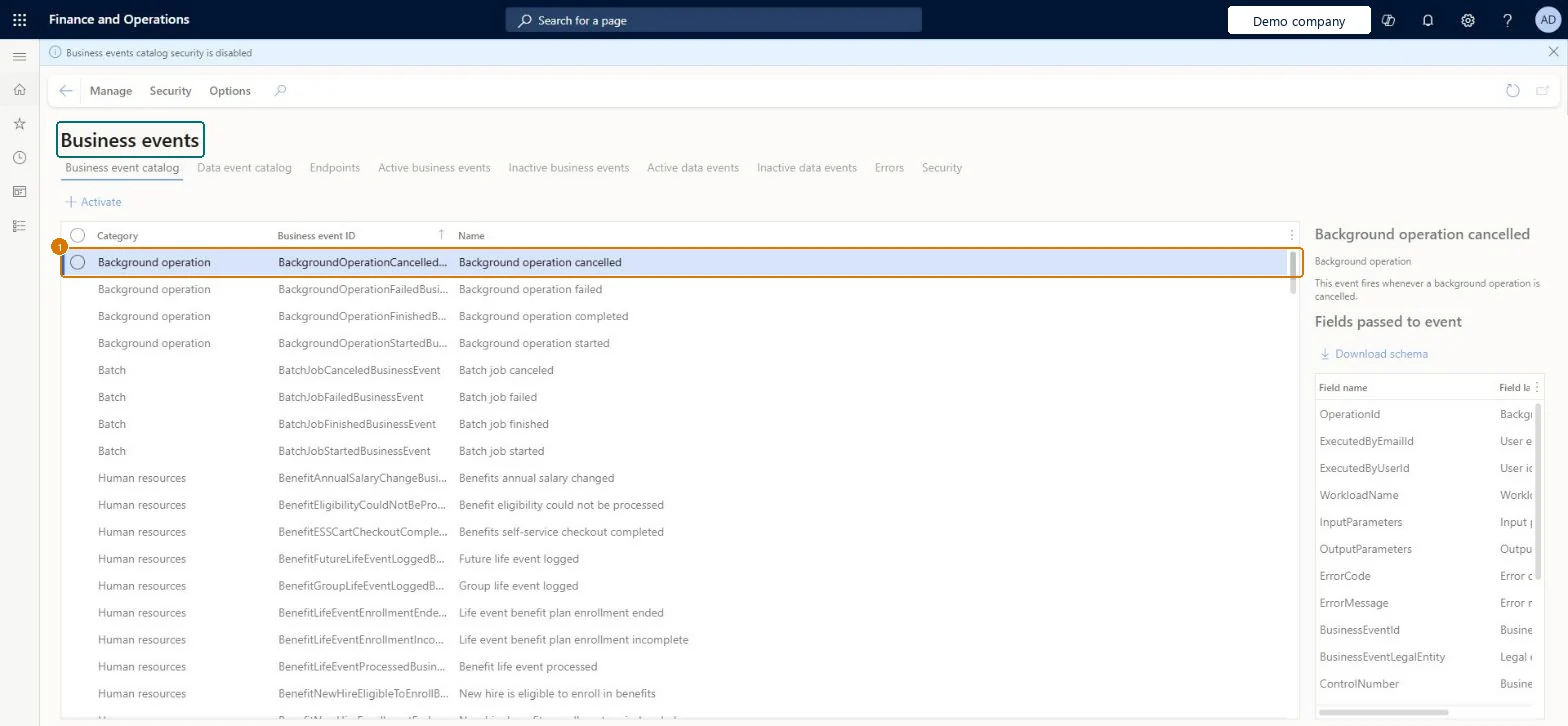
    1. On the Business event catalog tab, find the event you need by its category or name
    2. Select the event to see the fields it passes, and select Download schema to get the payload schema
    3. Select Activate, then choose the legal entity (leaving Legal entity blank activates the event in every legal entity)
    4. Assign the endpoint to the event
    5. Check the Active events tab for the activated event
    Find a business event (zoomed on the outlined fields)
    Show the full screenFind a business event
    page title tab to open what to set or check

Steps from Microsoft

  1. Go to System administration > Setup > Business events > Business events catalog.
  2. Filter by category, business event ID or name to find the events.
  3. Select one or more business events, and then select Activate.
  4. Select a legal entity, or leave Legal entity blank to activate in all legal entities.
  5. Assign an endpoint to the events.
  6. Check the Active events tab for the activated events.

Source: Microsoft Learn

Fields on the page

FieldWhat it means
CategoryShows the source of the event, such as Workflow or the module name.Microsoft Learn
Download schemaDownloads the JSON schema of the event payload for integration developers.Microsoft Learn
Legal entityLeave blank to activate the event in all legal entities.Microsoft Learn
Active eventsLists the activated events, where you can also deactivate them.Microsoft Learn
ErrorsLists delivery errors for all business events.Microsoft Learn
ResendTries again to send an event that failed.Microsoft Learn
Rebuild business events catalogRefreshes the list of events in the catalog.Microsoft Learn

Common errors and fixes

MessageWhat to do
Events sent to an endpoint start failingCheck the endpoint's application secret: when it expires, events through that endpoint fail until the secret is updated. Then use Resend on the Errors tab. Microsoft Learn

Test checklist

  1. Create an endpoint on the Endpoints tab.
  2. Select a business event, select Activate, choose the legal entity and the endpoint.
  3. Run the business process that raises the event and check that the endpoint receives the payload.
  4. Break the endpoint, raise the event again, then fix it and use Resend on the Errors tab.

Source: Microsoft Learn

Functional consultant

4Setup decisions

Setup stepRecommended value and whyDecision, common mistake and test
Set up Business events catalogActivate only the events an integration needs, in the specific legal entities that need them, each linked to an endpoint; deactivate rather than delete when you pause themOutbound processing runs only for activated events. Leaving Legal entity blank activates an event in all legal entities, and deactivating instead of deleting keeps the error history.In which legal entities should an event be active?Not tracking the endpoint's application secret: when it expires, events sent through that endpoint fail until the secret is updated. Record the expiry in SecretExpiryDate.Test: Activated event reaches its endpoint

Feature management and licence

Feature to turn onBusiness events catalog security (Optional)
Licence or add-inOn this system the page opens for Business events viewer. The optional Business events catalog security feature limits which roles see which events in the catalog.

Microsoft Learn

Solution architect

5Design impact

Shared or per companyActivation is per legal entity: each activation names one legal entity, or leaves Legal entity blank to cover all legal entities. Microsoft Learn
Can it be undoneReversible: Deactivate an event to stop outbound processing and keep its error history; failed events can be sent again with Resend. Microsoft Learn
If you change it laterDeactivated events are no longer sent, but their error history is kept until you delete them. Microsoft Learn
Technical architect

6Technical

Menu itemBusinessEventsWorkspace Checked in Dynamics 365
FormBusinessEventsWorkspace Checked in Dynamics 365
Data entitiesBusinessEventsEndpointEntityV2Business events endpoint (only the endpoints on the Endpoints tab; the catalog itself is built by the system)
Who can open itPrivileges BusinessEventsCatalogViewDutiesBusiness events viewer BusinessEventsSecurityDutyView
1 security roleBusiness events viewer BusinessEventsViewer
Checked in Dynamics 365
Roles to set it up and use itTo use itBusiness events viewer BusinessEventsViewerGive people one of these roles. On this system, 1 role can open this page.Checked in Dynamics 365
Actions on the pageManageSecurity: Catalog securityOptions: Personalize, Page options, ShareChecked in Dynamics 365
Developer

7Developer

Open it by URLhttps://<your-environment>/?mi=BusinessEventsWorkspace
Data migrationBusinessEventsEndpointEntityV2 (Business events endpoint): shared; loads the endpoints only.Load order: Business events endpoint isn't in Microsoft's default configuration templates. Load the endpoints first, then activate the events and link them to the endpoints in each environment.Load first: Endpoint targets and their secrets set up outside the systemChecked in Dynamics 365
Everyone

8Sources