PAGE GUIDEWhat the page does and how to use it8 sections. Choose a role to highlight what matters to you.
Everyone
1What it is and why
What it is
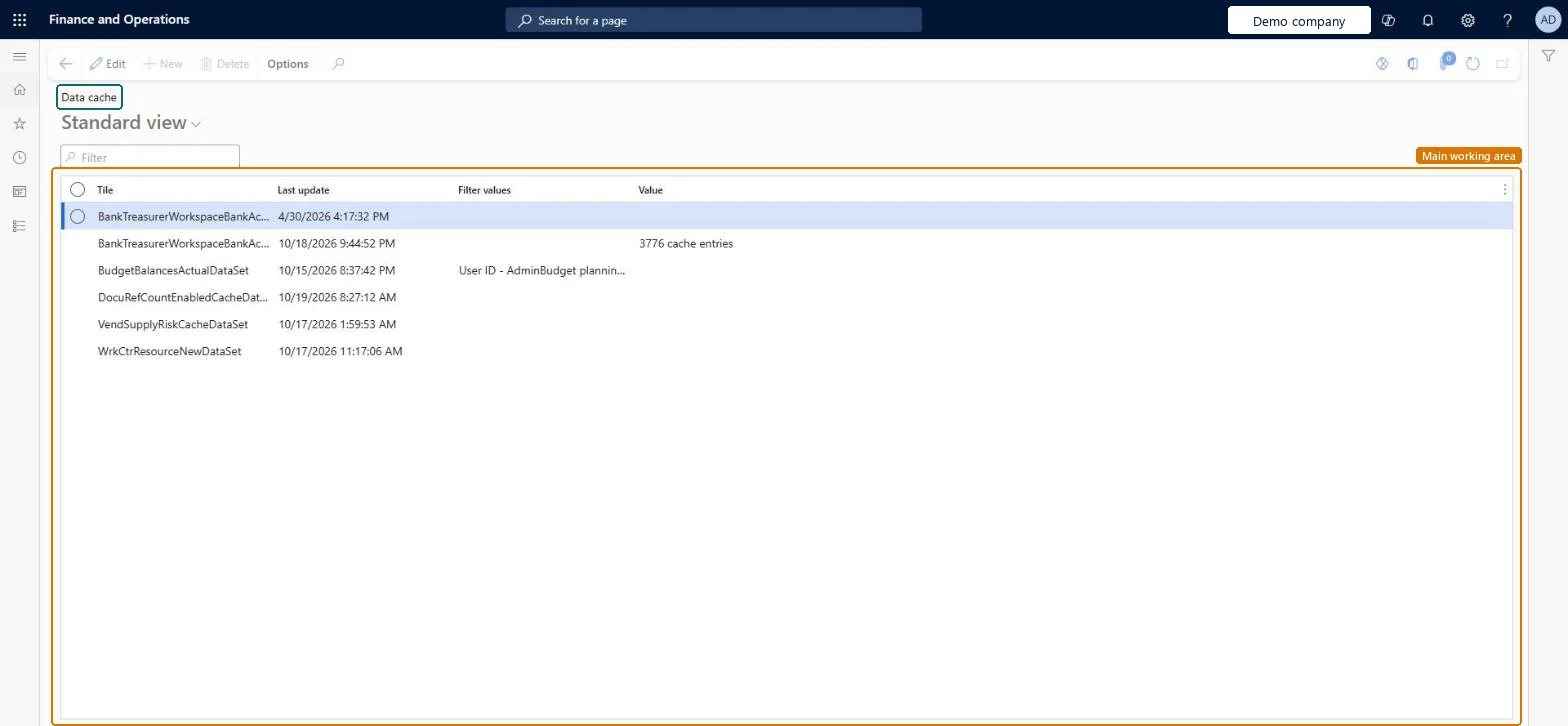
An inquiry page that lists the data sets held in the data cache, with the time each was last updated, its filter values and its value.
What you do here
Use this page to see when each data set in the data cache was last updated and the filter values it was cached with.
Example
For example, a workspace list built on a slow query is cached as a data set, and when users say the list misses a record created a few minutes ago, Last update here shows that the cache hasn't refreshed yet.
The page in Dynamics 365. page title tab to open what to set or check
About the examples: Examples and screenshots in this guide use BEAT, a demo company in a Dynamics 365 test environment. Use your own company's codes and values instead of copying them.
Setup steps on this page
Check how fresh the list cache is
Use this page to see when each cached list was last refreshed and which value it holds.
Steps from Microsoft
Go to System administration > Inquiries > Data cache > Data set cache.
Use the Filter box to find the list you are checking.
Read Last update to see when the cached value was refreshed, and Filter values to see which filter it was cached for.
Compare Value with what the workspace shows; to change how often entries refresh, open Data set cache configuration.
When the cached entry was last refreshed.Checked in Dynamics 365
Today at 09:40
Filter values
The filter values the entry was cached for, such as a workspace filter.Checked in Dynamics 365
Value
The cached result that the workspace shows.Checked in Dynamics 365
Common errors and fixes
Message
What to do
A workspace shows an out-of-date list
The value comes from the cache and is refreshed only at the cache's refresh frequency. Check Last update here, and shorten the refresh frequency on Data set cache configuration only where the query is fast enough. Microsoft Learn
Test checklist
Open a workspace that uses the cache and note the value it shows.
Open Data set cache and find the matching entry.
Check that Value matches the workspace and that Last update is within the refresh frequency.
Change the underlying data, wait for the refresh frequency to pass, and check that Last update and Value change.
Check Last update and Filter values of the list's data set before you report a workspace list as wrongWorkspace data comes from a cache that is refreshed at a set frequency, so a value can be older than the source data by up to that interval.
On this system the page opens for Information technology manager. Administrators use it to check how fresh workspace data is. No Feature management feature needs to be turned on for this page.
Reading the cache changes nothing. How often entries are refreshed is set by the cache's refresh frequency, which administrators can change at run time on the cache configuration pages. Microsoft Learn
Technical architect
6Technical
Menu item
SysDataSetCacheChecked in Dynamics 365
Form
SysDataCacheChecked in Dynamics 365
Table
SysDataCacheContextTableShown as “Cache context” in Record infoChecked in Dynamics 365
Who can open it
PrivilegesData cache inquiry SysDataCacheInquiryDutiesMaintain system settings SysServerSettingsMaintain1 security roleInformation technology manager SysServerITManagerChecked in Dynamics 365
Roles to set it up and use it
To use itInformation technology manager SysServerITManagerGive people one of these roles. On this system, 1 role can open this page.Checked in Dynamics 365
Actions on the page
Options: Personalize, Page options, ShareChecked in Dynamics 365
Developer
7Developer
Open it by URL
https://<your-environment>/?mi=SysDataSetCache
Data migration
Load order: Data set cache has no data entity in Data management, so it can't be loaded from a file or a configuration template. The cache is rebuilt by the system from the source data in each environment, so there is nothing to move.Checked in Dynamics 365