About the examples: Examples and screenshots in this guide use BEAT, a demo company in a Dynamics 365 test environment. Use your own company's codes and values instead of copying them.
When to run it
When to run it
When many subscriptions must be paused, for example during a service interruption or a customer dispute, or resumed afterwards.
How often
On demand, when a group of billing schedules must be put on hold or released.
What the output shows
Billing schedules with status On hold, and with Adjust schedule Yes the lines after the hold date removed and the last period prorated daily (for example 1 to 9 February). After a removal the billing resumes from the Resumption date.
Pause billing for many contracts with the right effect on their lines.
Steps from Microsoft
Go to Subscription billing > Recurring contract billing > Periodic tasks > Mass hold processing.
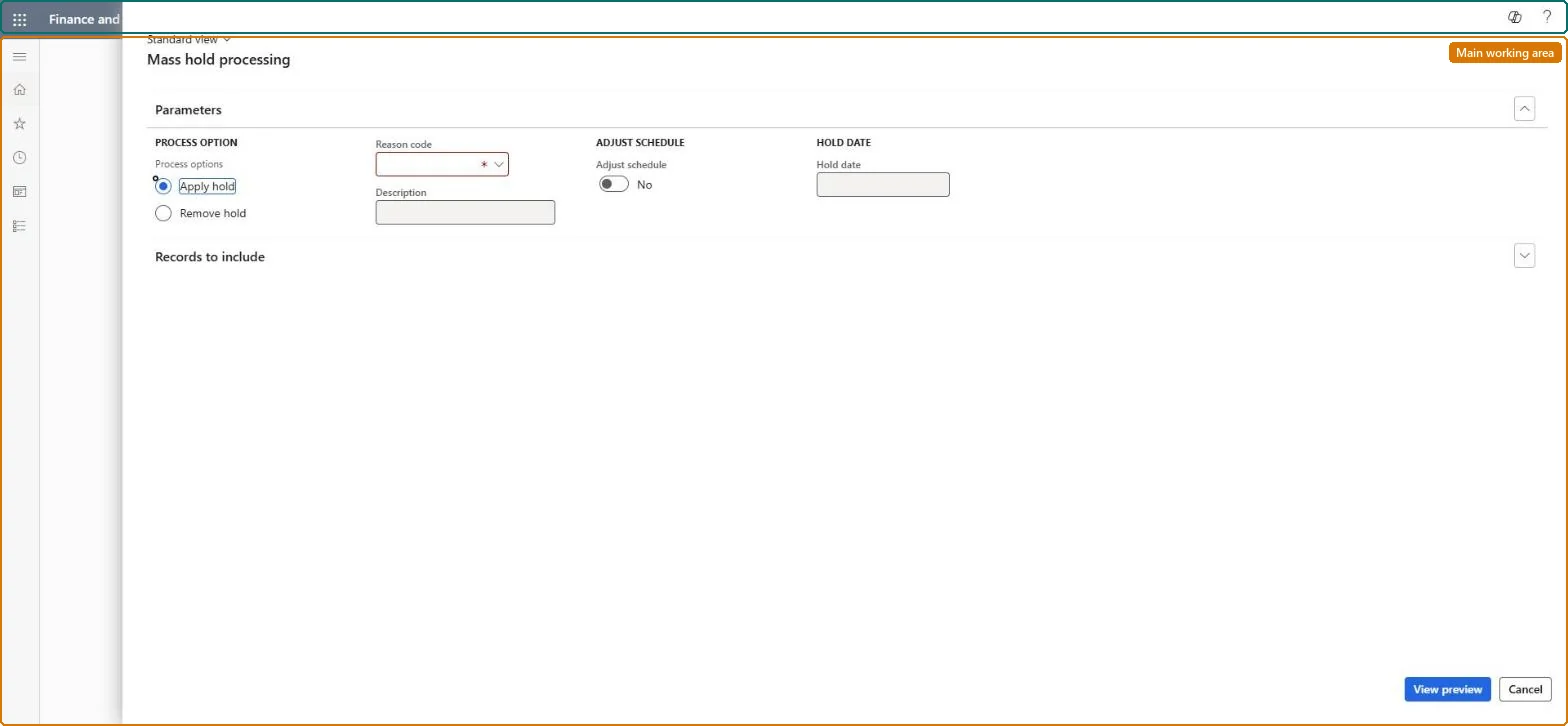
Set Process option to Apply hold or Remove hold and select a Reason code.
For Apply hold, set Adjust schedule: Yes removes billing schedule lines after the Hold date you enter; No only changes the status to On hold. For Remove hold, enter the Remove date, Resumption date and Deferral date.
Filter the billing schedules on Records to include, select View preview, mark schedules to leave out and select Remove, then select OK.
Open All billing schedules and confirm that the status is On hold, or active again after a removal.
The deferral date used for all deferrable lines when a hold is removed.Microsoft Learn
Common errors and fixes
Message
What to do
A user can't remove a hold
Removing a hold needs a user group with Allow remove hold. Set it in Remove hold user group override on Recurring contract billing parameters and add the user to the group. Microsoft Learn
Terminate isn't available for a billing schedule
Only Active billing schedules and lines can be terminated. Remove the hold first, then terminate. Microsoft Learn
Test checklist
The selected billing schedules have status On hold.
With Adjust schedule Yes, no lines remain after the Hold date.
After Remove hold, the billing periods restart on the Remove date.
Adjust schedule = Yes with a hold date when the service stops, so lines after the hold date are removed and the period is prorated; No when only a status flag is needed.With Yes a 200.00 February line held on 10 February becomes 1 to 9 February at 64.29 and later lines are removed; No changes only the status.
Subscription billing (Must be on)Recurring contract billing (Must be on)
Licence or add-in
Turn off the Revenue recognition feature first: Subscription billing can't be used while it is on. Then, in Feature management, turn on Subscription billing and after it Recurring contract billing. Revenue recognition was deprecated in January 2024 and replaced by Subscription billing. Subscription billing managers run this task.
Yes, with Remove hold: Run Remove hold to resume billing; the removed lines are recreated from the Remove date. Removing holds needs the Remove hold user group override on Recurring contract billing parameters. Microsoft Learn
If you change it later
Applying a hold sets the billing schedules to On hold, and with Adjust schedule set to Yes it removes the billing schedule lines after the hold date. Microsoft Learn
Technical architect
6Technical
Menu item
SubBillMassHoldProcessingChecked in Dynamics 365
Form
SubBillMassHoldProcessingChecked in Dynamics 365
Roles to set it up and use it
To use itSubscription billing manager SubBillBillingMaintainSubscription billing allocation, deferral, and billing manager SubBillMaintainGive people one of these roles. On this system, 2 roles can run this page.Checked in Dynamics 365
Load order: Mass hold processing has no data entity in Data management, so there is nothing to load from a file or a configuration template. To bring holds over, load the billing schedules and place holds with the Subscription billing schedule line place hold entity or this task.Microsoft Learn