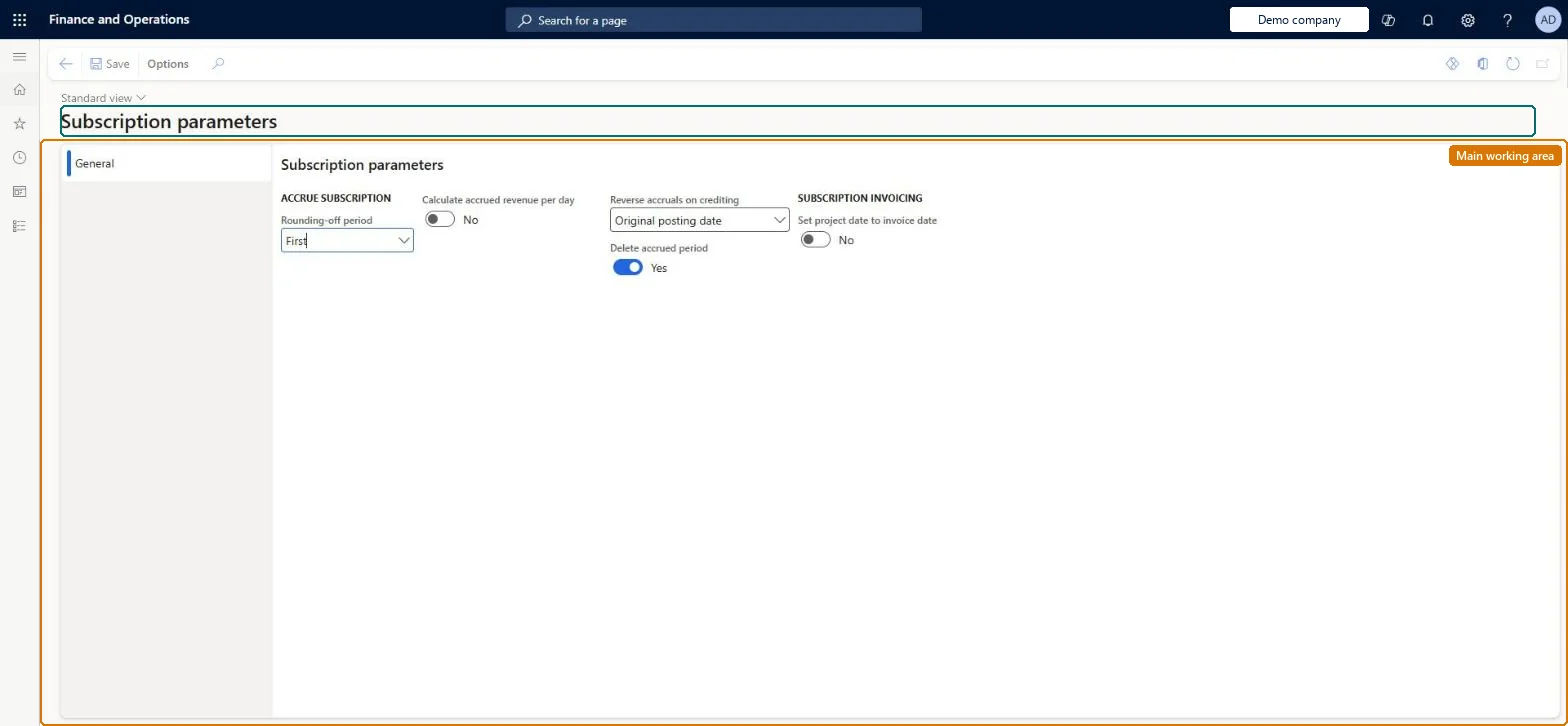
A setup page where you define how revenue on service subscriptions is accrued, rounded, reversed when a fee is credited, and how fee transactions are dated at invoicing.
PAGE GUIDEWhat the page does and how to use it8 sections. Choose a role to highlight what matters to you.
Everyone
1What it is and why
What it is
A setup page where you define how revenue on service subscriptions is accrued, rounded, reversed when a fee is credited, and how fee transactions are dated at invoicing.
What you do here
Use this page to decide whether accrued subscription revenue is calculated per day, which accrual period absorbs rounding, how accruals are reversed on credit notes, whether accrued periods are deleted, and whether the project date is replaced by the invoice date.
Example
For example, if a subscription fee is credited, the Reverse accruals on crediting setting decides whether accrued revenue is reversed manually, on the credit note date, or on the original posting date.
The page in Dynamics 365. page title tab to open what to set or check
About the examples: Examples and screenshots in this guide use BEAT, a demo company in a Dynamics 365 test environment. Use your own company's codes and values instead of copying them.
Setup steps on this page
Set up Subscription parameters
Use this page to decide whether accrued subscription revenue is calculated per day, which accrual period absorbs rounding, how accruals are reversed on credit notes, whether accrued periods are deleted, and whether the project date is replaced by the invoice date.
How to use it
Go to Service management > Setup > Subscription parameters.
Under Accrue subscription, choose the Rounding-off period (First), set Calculate accrued revenue per day, choose Reverse accruals on crediting (Original posting date) and set Delete accrued period.
Under Subscription invoicing, set Set project date to invoice date.
Select Save.
Source: Checked in Dynamics 365
Fields on the page
Field
What it means
Table column
Rounding-off period
Whether the first or the last accrual period receives the rounding difference of the accrued amounts.Microsoft Learn
SubRoundOffAccrued
Calculate accrued revenue per day
Accrues revenue by the number of days in each period instead of equal amounts per period.Microsoft Learn
SubCalcPerDayAccrued
Reverse accruals on crediting
The method (Manual, Invoice date or Original posting date) used to reverse accrued revenue when a subscription fee is credited.Microsoft Learn
SubReverseAccruedOnCredit
Delete accrued period
Removes the accrual periods once the last period's accrued revenue has been posted.Microsoft Learn
SubDeleteAccrued
Set project date to invoice date
Replaces the project date on the fee transaction with the invoice date when the fee is invoiced.Microsoft Learn
InvoiceToProjectDate
Test checklist
Set up WIP - subscription and Accrued revenue - subscription in Project ledger posting setup, and Accrue revenue on the subscription group.
Invoice a subscription fee and run Accrue subscription revenue for the period.
Select the fee for credit note and create the credit note.
Check the accrual is reversed on the date the reversal method defines (or must be reversed manually first when set to Manual).
Setting Reverse accruals on crediting to Manual without telling users: each accrued revenue transaction must then be reversed one by one before a credit note proposal is created.
Solution architect
5Design impact
Can it be undone
Reversible: Change the reversal method at any time; it affects how accruals are reversed on credit notes created afterwards. Microsoft Learn
If you change it later
Changing the reversal method changes on which date reversed accruals are posted when a fee is credited; with Original posting date, amounts from closed ledger periods are posted on the credit note date instead. Microsoft Learn
Technical architect
6Technical
Menu item
SMASubscriptionParametersChecked in Dynamics 365
Form
SMASubscriptionParametersChecked in Dynamics 365
Table
SMAParametersSubscriptionShown as “SUBSCRIPTION PARAMETERS” in Record infoChecked in Dynamics 365
PrivilegesMaintain subscription parameters SMASubscriptionParametersMaintainView subscription parameters SMASubscriptionParametersViewDutiesInquire into service subscription policies SMAServiceSubscriptionPoliciesInquireEnable service subscription process SMAServiceSubscriptionProcessEnable1 security roleService delivery manager SMAServiceDeliveryManagerChecked in Dynamics 365
Roles to set it up and use it
To set it up or change itService delivery manager SMAServiceDeliveryManagerGive people one of these roles. On this system, 1 role can open this page.Checked in Dynamics 365