Customer service manager, Customer service representative, Sales representative
Business process
Manage trade allowances
Menu item
MCRCustCategoryHierarchy
Main table
MCRCustCategoryHierarchy
Setup steps
1 on this page
Show what matters for
PAGE GUIDEWhat the page does and how to use it8 sections. Choose a role to highlight what matters to you.
Everyone
1What it is and why
What it is
A setup page where you build customer category hierarchies that group customers with similar characteristics for trade allowances.
What you do here
Use this page to group customers so they can be added to funds, trade allowance agreements and templates.
Example
For example, BEAT builds hierarchy BEAT by region with parent category Regions and subcategories North, South and Export, and adds its 60 trade customers, so a fund for North can be given to all northern customers at once.
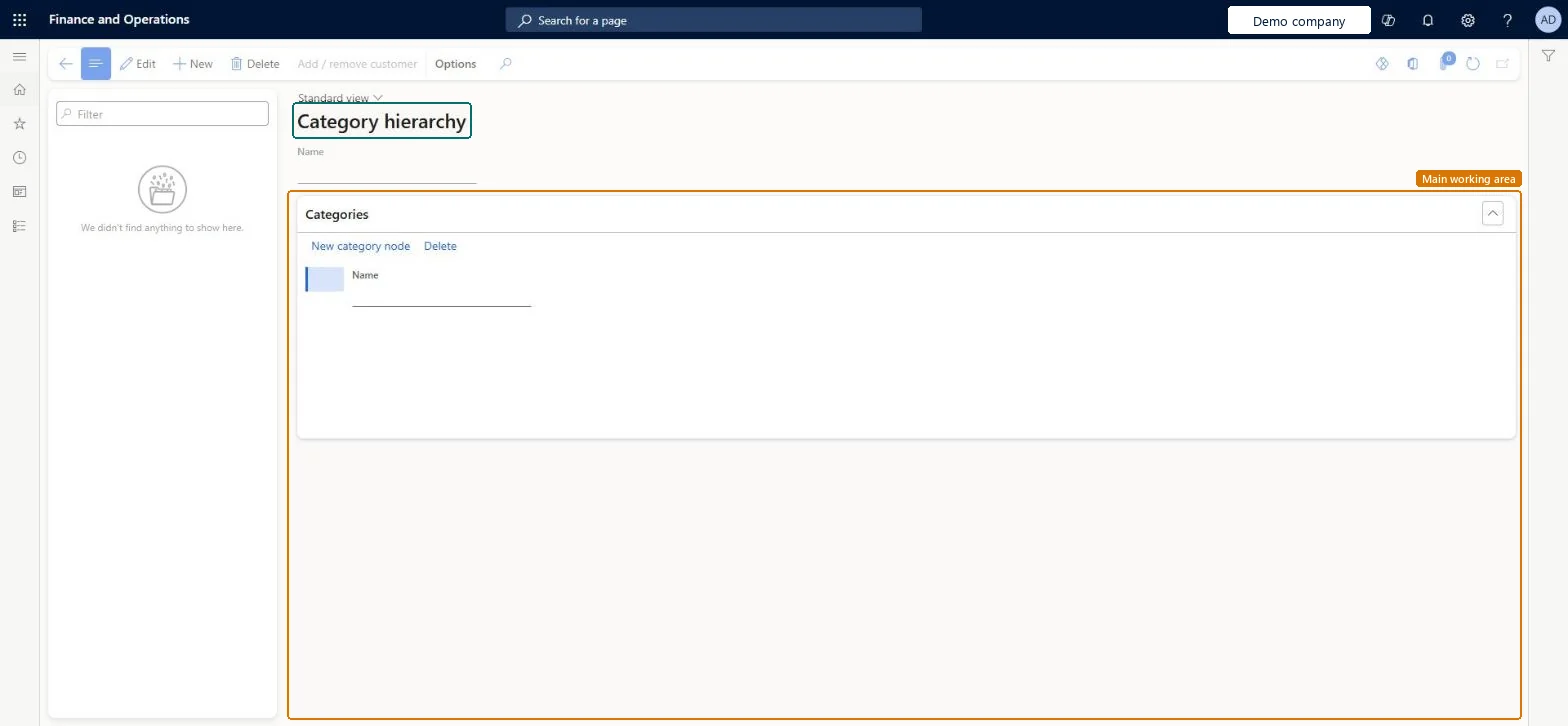
The page in Dynamics 365. page title tab to open what to set or check
About the examples: Examples and screenshots in this guide use BEAT, a demo company in a Dynamics 365 test environment. Use your own company's codes and values instead of copying them.
Setup steps on this page
Build customer category hierarchies for trade allowances
Use this page to group customers so they can be added to funds, trade allowance agreements and templates.
Steps from Microsoft
Go to Sales and marketing > Trade allowances > Customer category hierarchy.
Select New and enter a name for the hierarchy.
On the Categories FastTab, select the category node and enter the name of the parent category.
Select New category node and enter the name of each subcategory.
Select Add / remove customer.
Select a category, and on the Customers FastTab select New.
Build the hierarchy on the lines the funds and promotions are planned on (for example region or line of business), and add every trade customer before funds are set up.Before a customer can be added to a fund, a trade allowance agreement or a template, the customer must be in a customer category hierarchy.
Reversible: Categories can be added and customers added or removed with Add / remove customer at any time; funds and agreements that already list customers keep them. Microsoft Learn
If you change it later
Customers can be added to a fund, a trade allowance agreement or a trade allowance template only through these hierarchies; the Customers FastTab of funds and agreements shows them as predefined hierarchies. Microsoft Learn
Technical architect
6Technical
Menu item
MCRCustCategoryHierarchyChecked in Dynamics 365
Form
MCRCustCategoryHierarchyChecked in Dynamics 365
Table
MCRCustCategoryHierarchyShown as “Customer category hierarchy” in Record infoChecked in Dynamics 365
Who can open it
PrivilegesMaintain customer category hierarchy MCRCustCategoryHierarchyMaintainDutiesMaintain customer service MCRCustomerServiceMaintain3 security rolesCustomer service manager TradeCustomerServiceManagerCustomer service representative TradeCustomerServiceRepresentativeSales representative TradeSalesRepresentativeChecked in Dynamics 365
Roles to set it up and use it
To set it up or change itSales representative TradeSalesRepresentativeCustomer service representative TradeCustomerServiceRepresentativeCustomer service manager TradeCustomerServiceManagerGive people one of these roles. On this system, 3 roles can open this page.Checked in Dynamics 365
Actions on the page
Options: Personalize, Page options, ShareChecked in Dynamics 365
Load order: Customer category hierarchy has no data entity in Data management: none is listed for this page in the live Data management list, and no entity's CDM definition is backed by its table. Build the hierarchies and add the customers on the page in each legal entity.Checked in Dynamics 365