Materials manager, Quality control manager, Shipping clerk and 1 more role
Business process
Process outbound goods
Menu item
WMSBillOfLading
Main table
WMSBillOfLading
Setup steps
1 on this page
Show what matters for
PAGE GUIDEWhat the page does and how to use it8 sections. Choose a role to highlight what matters to you.
Everyone
1What it is and why
What it is
A page where you create and maintain bills of lading, the shipping documents that record a shipment between the company and the carrier.
What you do here
Use this page to create a bill of lading manually, or review one that was generated, and to maintain its shipment, order reference, warehouse, freight and address details before printing it.
Example
For example, load LD-000210 with two shipments for BEAT-000123 is shipped; with the master bill of lading option on, two bills of lading and one master are created, and the clerk corrects the freight counted to 14 before printing.
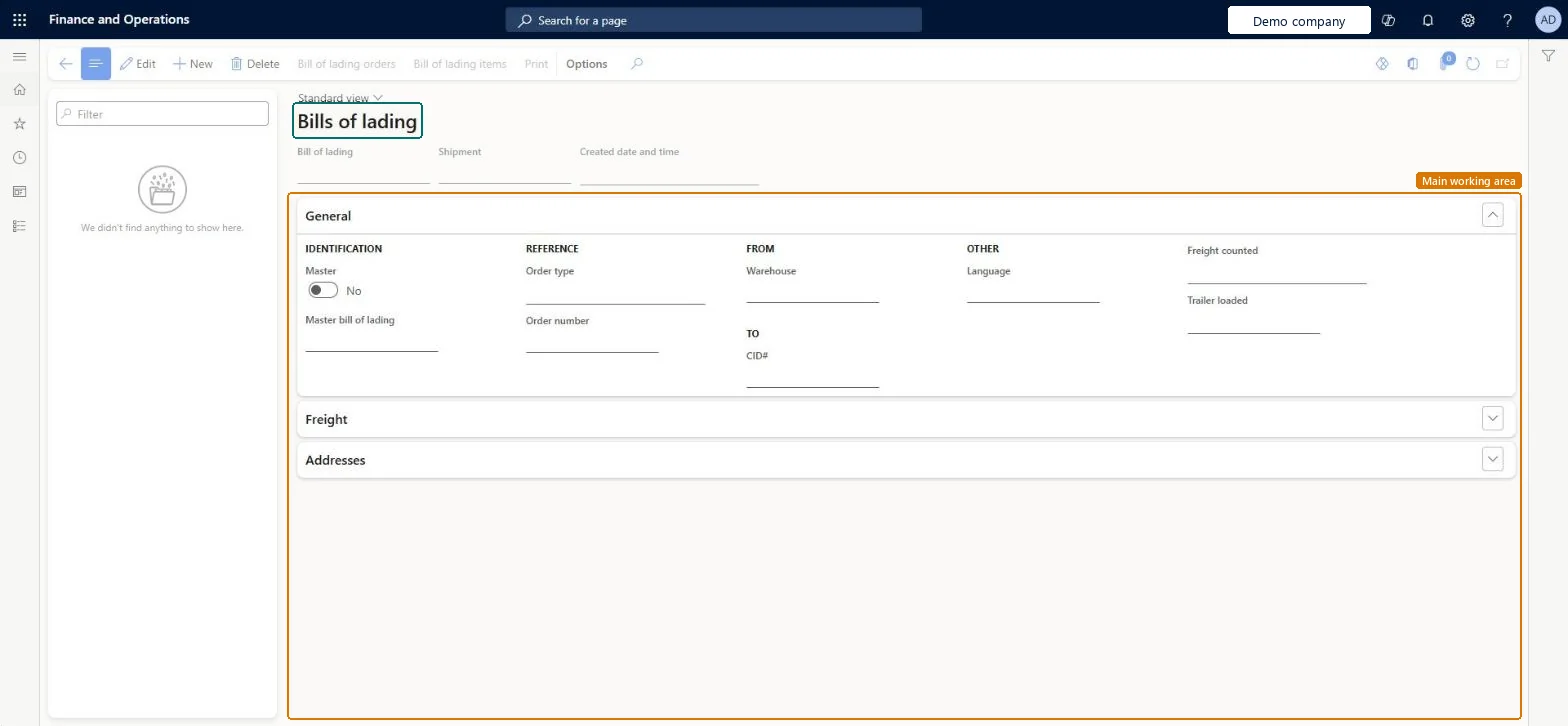
The page in Dynamics 365. page title tab to open what to set or check
About the examples: Examples and screenshots in this guide use BEAT, a demo company in a Dynamics 365 test environment. Use your own company's codes and values instead of copying them.
Setup steps on this page
Create and maintain bills of lading
Prepare the carrier document for each shipment.
Steps from Microsoft
Go to Sales and marketing > Sales orders > Order shipping > Bill of lading.
Select a bill of lading generated from the load, or select New to create one manually.
In the General section, check Master bill of lading, Order type, Order number and Warehouse.
Open Freight and Addresses to complete the freight and address details.
Select Print and hand the document to the carrier.
The master document created when a load has more than one shipment and the master option is on.Microsoft Learn
MBOL-000045
Order number
The order the bill of lading belongs to.Checked in Dynamics 365
SO-001234
Common errors and fixes
Message
What to do
No master bill of lading is created for a load with several shipments.
Set Create a master bill of lading when there's more than one shipment on a load to Yes in Transportation management parameters and generate again. Microsoft Learn
Test checklist
Set Create a master bill of lading when there's more than one shipment on a load to Yes in Transportation management parameters.
Ship an outbound load with two shipments so the load status is Shipped.
Generate the bill of lading from the Outbound load planning workbench.
Check one bill of lading per shipment plus a master bill of lading are created, then change a field on the Bill of lading page and print it.
Generate bills of lading from shipped loads and use a master bill of lading for loads with several shipments.The master groups the shipments of one load for the carrier.
New records on this page take their Master bill of lading from the WMSBillOfLadingId reference; BEAT uses number sequence Sale_55. Checked in Dynamics 365
Feature management and licence
Licence or add-in
On the live system, Shipping clerk, Warehouse manager and Materials manager use this page.
Reversible: After a bill of lading is created, manually or from a load planning workbench, you can still change it on this page before printing. Microsoft Learn
If you change it later
Changes on this page change the printed document; the shipment and load aren't changed. Microsoft Learn
Technical architect
6Technical
Menu item
WMSBillOfLadingChecked in Dynamics 365
Form
WMSBillOfLadingChecked in Dynamics 365
Table
WMSBillOfLadingShown as “Bill of lading” in Record infoKey field: billOfLadingId, shipmentId, masterBOL, masterBOLIdChecked in Dynamics 365
Who can open it
PrivilegesMaintain bill of lading WMSBillOfLadingMaintainView bill of lading WMSBillOfLadingViewDutiesMaintain shipping operations InventShippingOperationMaintainInquire into shipping progress InventShippingProgressInquire4 security rolesMaterials manager InventMaterialsManagerQuality control manager InventQualityControlManagerShipping clerk InventShippingClerkWarehouse manager WMSWarehouseManagerChecked in Dynamics 365
Roles to set it up and use it
To set it up or change itShipping clerk InventShippingClerkTo use itWarehouse manager WMSWarehouseManagerMaterials manager InventMaterialsManagerQuality control manager InventQualityControlManagerGive people one of these roles. On this system, 4 roles can open this page.Checked in Dynamics 365
Actions on the page
Options: Personalize, Page options, ShareChecked in Dynamics 365
Developer
7Developer
Open it by URL
https://<your-environment>/?mi=WMSBillOfLading
Data migration
Load order: Bill of lading has no data entity in Data management. No entity in the Common Data Model is built on its table (WMSBillOfLading); bills of lading are created from shipped loads.Checked in Dynamics 365