Record credit or debit card payments on call center orders in Dynamics 365 Commerce
Menu item
MCRReleaseAndAuthFutureOrders
Show what matters for
PAGE GUIDEWhat the page does and how to use it7 sections. Choose a role to highlight what matters to you.
Everyone
1What it is and why
What it is
A batch job that reauthorizes payment authorization tokens that are close to expiring.
What you do here
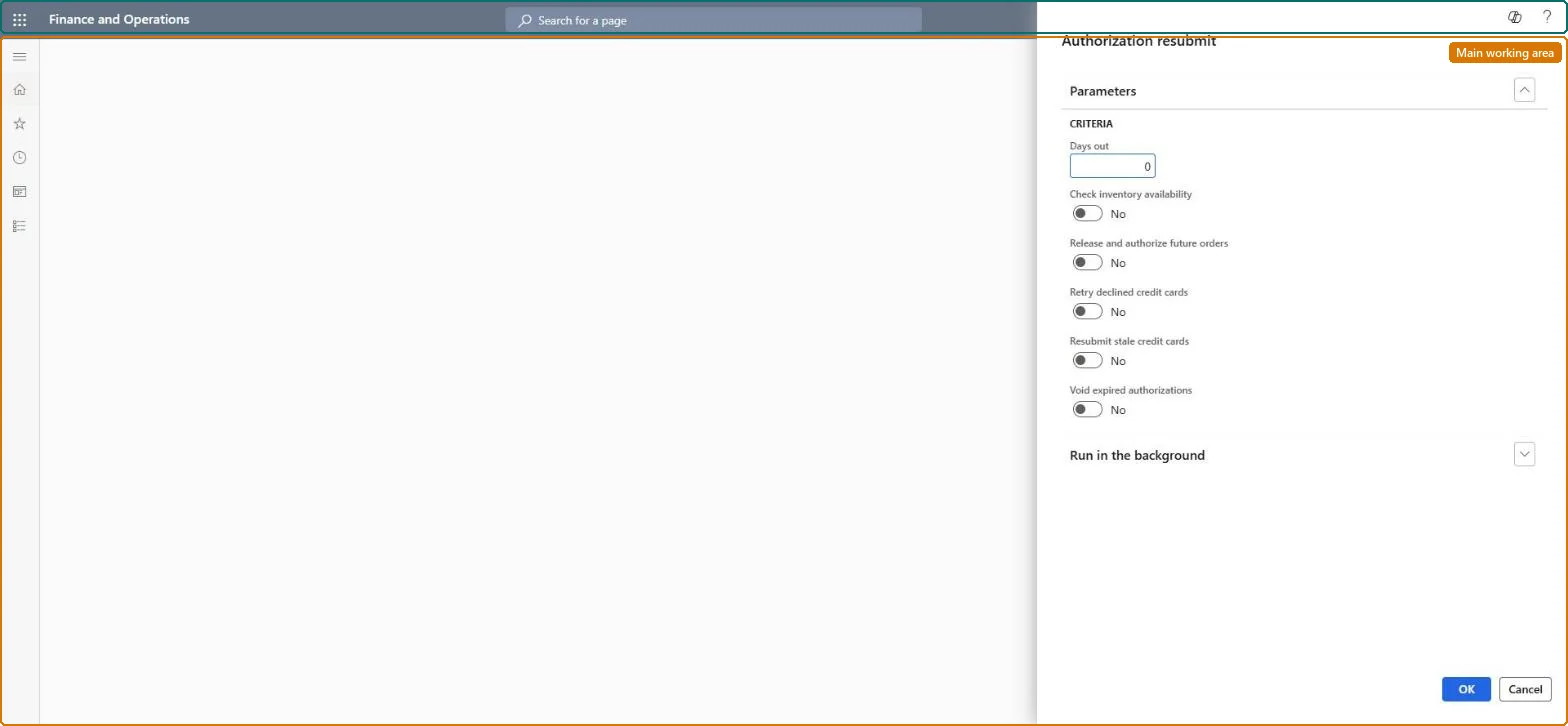
Use this page to schedule recurring reauthorization of card payments, optionally releasing and authorizing future-dated orders and resubmitting stale card authorizations.
Example
For example, orders with a future shipping date are held, and the job removes the hold and authorizes the amount as the shipping date approaches.
The page in Dynamics 365. page title tab to open what to set or check
About the examples: Examples and screenshots in this guide use BEAT, a demo company in a Dynamics 365 test environment. Use your own company's codes and values instead of copying them.
When to run it
When to run it
When orders are shipped long after they are placed, so card authorization tokens expire before invoicing, or when future-dated orders must be authorized as their shipping date approaches.
How often
At a recurring cadence that matches your authorization expiry settings.
Batch settings
Batch processing can't be turned off. Schedule it with a recurrence that runs before authorizations reach Number of days before expired.
What the output shows
Reauthorized card payments on orders close to expiry or shipping, future orders released from their do-not-process hold, and, depending on the switches, retried, resubmitted or voided authorizations. Orders still Declined in Authorization management need a new card or customer contact.
Go to Retail and Commerce > Retail and Commerce IT > Payments > Authorization resubmit.
In Days out, enter how many days before the shipping date an order is reauthorized; this works in addition to the Number of days before expired parameter.
Turn on Release and authorize future orders to remove do-not-process holds from future-dated orders and authorize them as the shipping date approaches. Leave Check inventory availability off: it's a legacy parameter that's no longer supported.
Turn on Retry declined credit cards, Resubmit stale credit cards or Void expired authorizations only if your business wants declined cards retried, expired authorizations resubmitted, or expired authorizations voided.
Batch processing is always Yes for this job; set the recurring cadence under Recurrence.
Afterwards, check Authorization management (Call centers > Call center credit cards) with Status Declined for orders that still need a new authorization.
No: Authorizations that are requested, resubmitted or voided are processed by the payment connector and stay in place. Choose the switches carefully before scheduling. Microsoft Learn
If you change it later
Turning on Resubmit stale credit cards sends expired authorizations back for authorization, which a business may not want. Microsoft Learn
Technical architect
5Technical
Menu item
MCRReleaseAndAuthFutureOrdersChecked in Dynamics 365
Form
DialogChecked in Dynamics 365
Roles to set it up and use it
To use itSales clerk TradeSalesClerkGive people one of these roles. On this system, 1 role can run this page.Checked in Dynamics 365