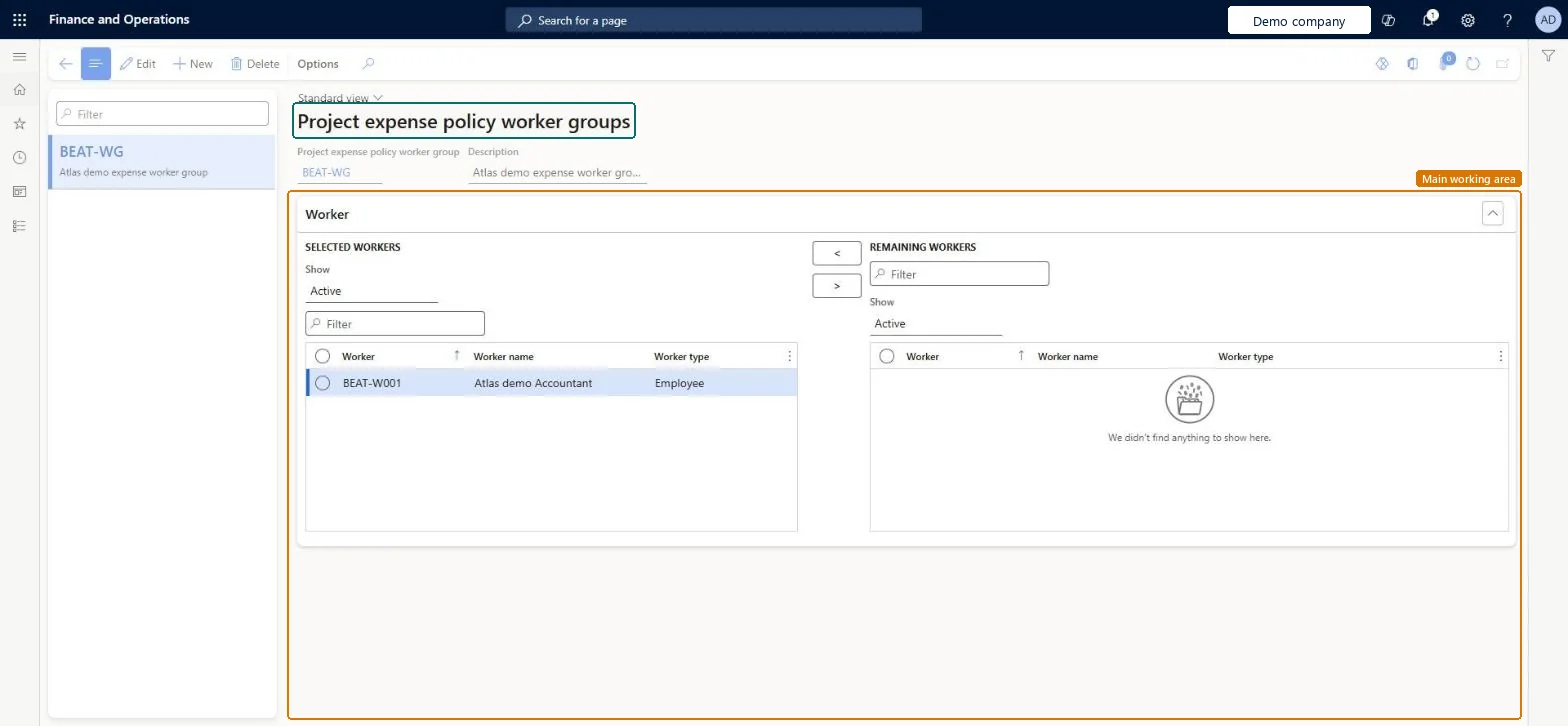
A setup page where you build named groups of workers, such as field engineers, so that a project expense policy can cover the whole group instead of one worker at a time.
PAGE GUIDEWhat the page does and how to use it8 sections. Choose a role to highlight what matters to you.
Everyone
1What it is and why
What it is
A setup page where you build named groups of workers, such as field engineers, so that a project expense policy can cover the whole group instead of one worker at a time.
What you do here
Use this page to keep the worker groups that project expense policies refer to, and to move workers in and out of a group as teams change.
Example
For example, BEAT creates the group FIELD with its 12 field engineers, so that one project expense policy on PRJ-0042 covers all of them; a new engineer is moved from Remaining workers to Selected workers.
The page in Dynamics 365. page title tab to open what to set or check
About the examples: Examples and screenshots in this guide use BEAT, a demo company in a Dynamics 365 test environment. Use your own company's codes and values instead of copying them.
Step by step, with screenshots
Set up Project expense policy worker groups1 screen
Screen 1
Create a project expense policy worker group
Go to Project management and accounting > Setup > Policies > Project expense policy worker groups
Select New
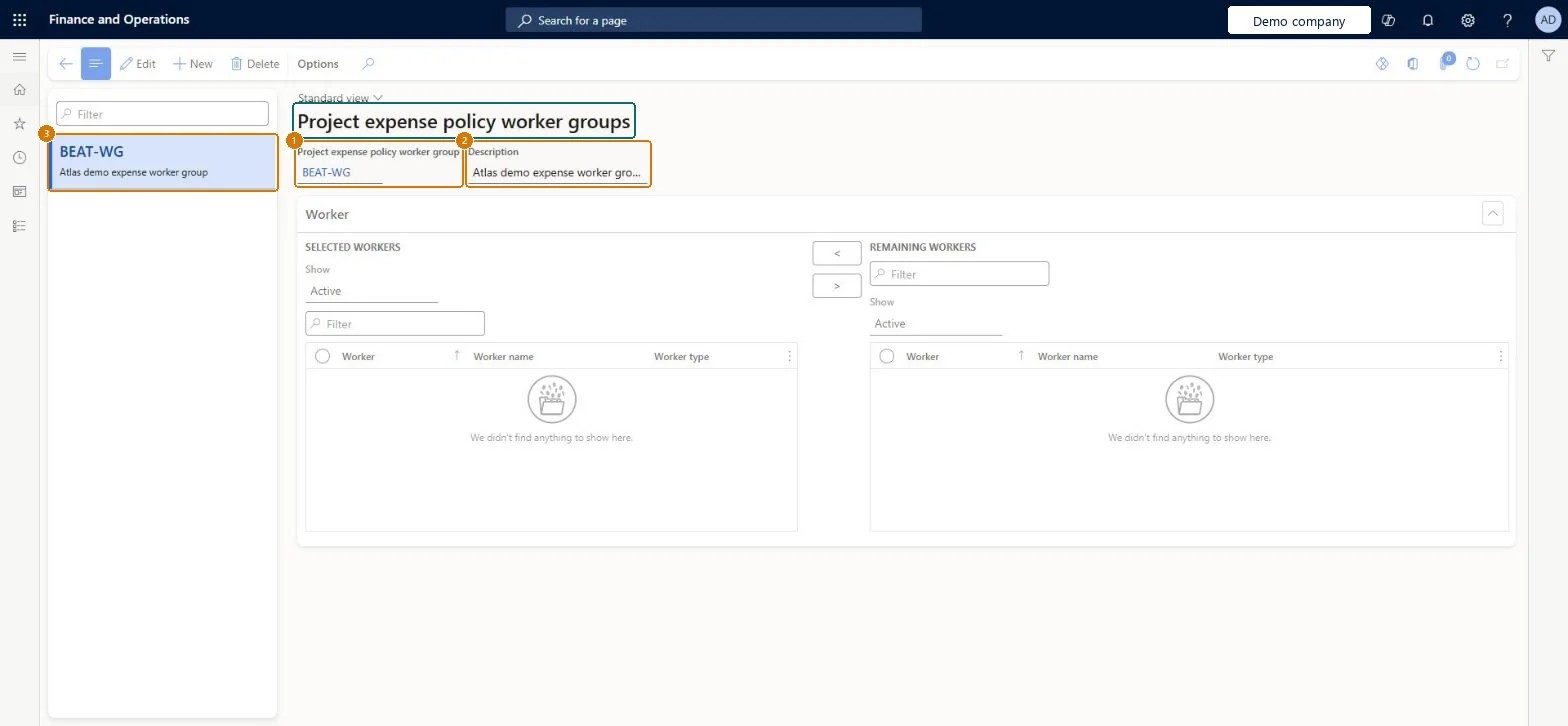
Enter the worker group code and description
Select Save
Move workers from Remaining workers to Selected workers when the group is used
1Project expense policy worker group
BEAT-WG
2Description
Expense worker group
Show the full screen page title tab to open what to set or check
Steps from Microsoft
Go to Project management and accounting > Setup > Policies > Project expense policy worker groups.
Select New and enter the group ID and a Description, such as FIELD and Field engineers.
Under Remaining workers, select each worker and select the arrow to move them to Selected workers.
Save, then select the group in the worker group field of a project expense policy.
One group per team that shares expense terms (for example field engineers), kept up to date when people join or leaveA group lets one project expense policy cover a whole team, so the policy doesn't need a row per worker.
Policies that name the group apply to whoever is in the group at the time an expense is checked, so moving a worker changes which policies apply to their next expenses. Microsoft data model
Technical architect
6Technical
Menu item
ProjExpPolicyGroupsChecked in Dynamics 365
Form
ProjExpPolicyGroupsChecked in Dynamics 365
Table
ProjExpPolicyGroupsShown as “Project expense policy worker groups” in Record infoChecked in Dynamics 365
Data entities
TrvProjectExpensePolicyGroupEntityProject expense policy worker groups Microsoft data model
Who can open it
PrivilegesMaintain expense policies ProjExpPoliciesMaintainView expense policies ProjExpPoliciesViewDutiesInquire into expense management policies TrvTravelAndExpensePoliciesInquireEnable expense management process TrvTravelAndExpenseProcessEnable2 security rolesAuditor AuditPolicyManagerExpense administrator ExpenseAdministratorChecked in Dynamics 365
Roles to set it up and use it
To set it up or change itExpense administrator ExpenseAdministratorTo use itAuditor AuditPolicyManagerGive people one of these roles. On this system, 2 roles can open this page.Checked in Dynamics 365
Actions on the page
Options: Personalize, Page options, ShareChecked in Dynamics 365
TrvProjectExpensePolicyGroupEntity (Project expense policy worker groups): loaded for each company, in Microsoft's default template 650 - Project accounting.Load order: Microsoft's default template 650 - Project accounting loads Project expense policy worker groups at execution unit 1, level 650, sequence 10. Lower levels load first, and entities at the same level load in sequence order.Load first: the default templates at lower levels (System setup to Expense management)Microsoft Learn
Checked in a working Dynamics 365 system, version 10.0.49: the menu item, form, table and security, the page, the demo records and the values in the screenshots.