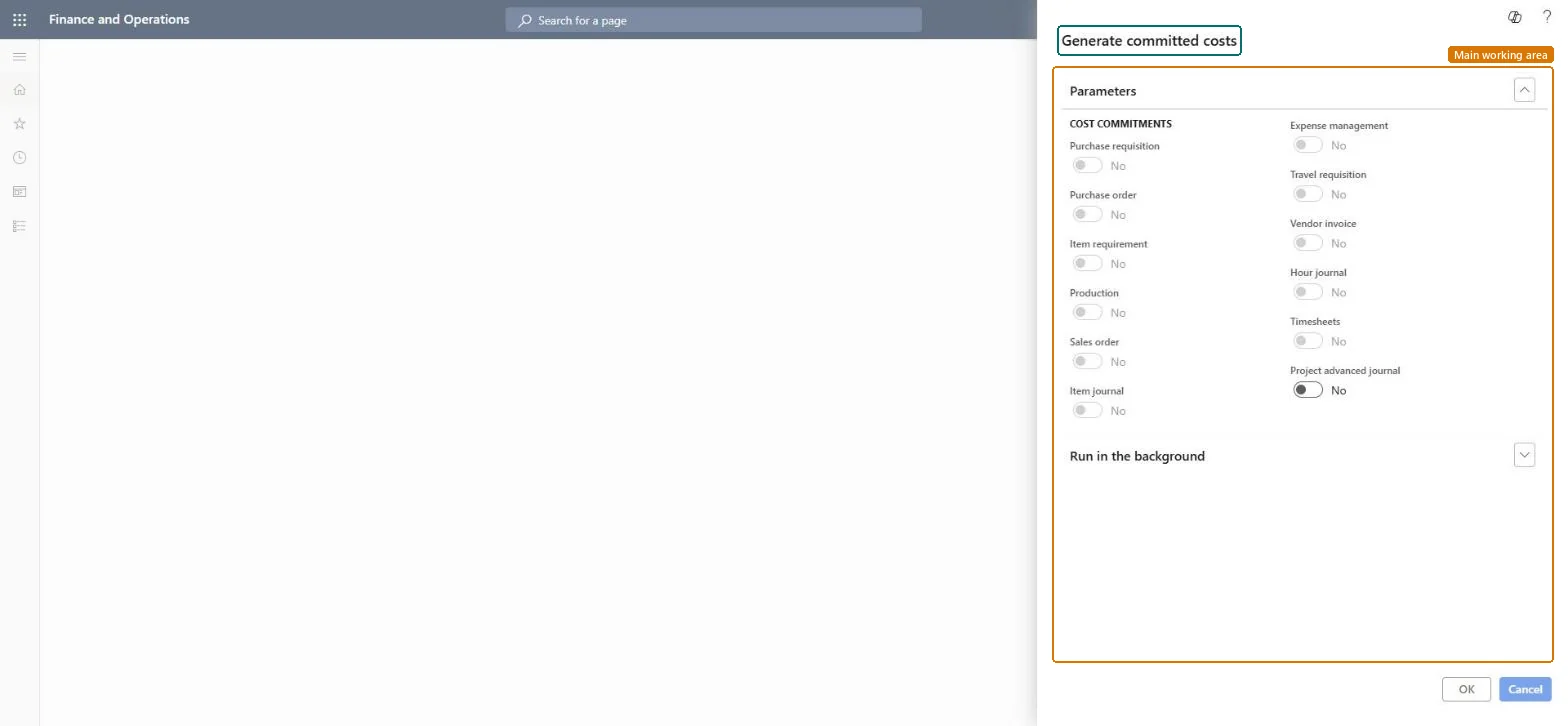
A periodic job that generates project committed cost records for the cost commitment sources you select, such as project advanced journals. The dialog lists 12 sources; sources that aren't available in the company are shown but can't be selected.
Project management and accountingPeriodicCommitted costs
action:ProjCreateCommittedCost
Business process
Manage project financials
Menu item
action:ProjCreateCommittedCost
Main table
CostControlTransCommittedCost
Setup steps
1 on this page
Show what matters for
PAGE GUIDEWhat the page does and how to use it8 sections. Choose a role to highlight what matters to you.
Everyone
1What it is and why
What it is
A periodic job that generates project committed cost records for the cost commitment sources you select, such as project advanced journals. The dialog lists 12 sources; sources that aren't available in the company are shown but can't be selected.
What you do here
Use it when committed costs must be built or rebuilt for a source, so the Committed costs inquiry and the project's Cost control view show what the company has committed to spend.
Example
BEAT starts tracking commitments from project advanced journals in November 2026. The project accountant runs the job with Project advanced journal turned on, and PRJ-0042's Cost control view then shows 12,480.00 of committed cost next to 96,300.00 of actual cost.
The page in Dynamics 365. page title tab to open what to set or check
About the examples: Examples and screenshots in this guide use BEAT, a demo company in a Dynamics 365 test environment. Use your own company's codes and values instead of copying them.
When to run it
When to run it
When committed cost tracking is set up for a source, or when committed costs must be rebuilt for it.
How often
On demand; not part of the normal month-end routine.
Batch settings
Run it in the background as a batch job when many documents are processed.
What the output shows
Committed cost records for the selected sources, shown on the Committed costs inquiry and in the project's Cost control view.
Go to Project management and accounting > Periodic > Committed costs > Generate committed costs.
Note the committed cost total of a sample project on its Cost control view before the run, so you can compare.
Under Cost commitments, turn on the sources to generate; sources shown unavailable can't be chosen in this run.
Run the job in the background outside office hours if many documents are open.
Open Inquiries and reports > Committed costs inquiries > Committed costs for the sample project and compare the committed amount with the open documents.
Generates committed costs from project advanced journals. In the live dialog it was the only source that could be changed.Checked in Dynamics 365
Yes
Purchase requisition
Cost commitment source for purchase requisitions; shown unavailable in the live dialog.Checked in Dynamics 365
No
Purchase order
Cost commitment source for purchase orders; shown unavailable in the live dialog.Checked in Dynamics 365
No
Vendor invoice
Cost commitment source for vendor invoices; shown unavailable in the live dialog.Checked in Dynamics 365
No
Hour journal
Cost commitment source for hour journals; shown unavailable in the live dialog.Checked in Dynamics 365
No
Timesheets
Cost commitment source for timesheets; shown unavailable in the live dialog.Checked in Dynamics 365
No
Common errors and fixes
Message
What to do
A source can't be turned on in the dialog.
The source is shown unavailable in this company. Only the available sources can be generated in this run; check the cost commitment settings on the Cost control tab of the parameters. Microsoft Learn
Test checklist
Note PRJ-0042's committed cost on Cost control before the run (for example 0.00).
Run the job with Project advanced journal on.
Open the Committed costs inquiry filtered on PRJ-0042: the lines match the open project advanced journal lines (for example 12,480.00).
Check Cost control shows the same committed total.
Run it once per newly enabled source, after noting the committed totals of a sample project.The before-and-after totals show whether records were added or replaced.
On the live system, Project manager and Project accountant use this page.
Checked in Dynamics 365
Solution architect
5Design impact
Shared or per company
Per company: committed cost records (table CostControlTransCommittedCost) carry the legal entity they belong to. Microsoft data model
Can it be undone
No: The job has no undo, and it isn't shown whether existing committed cost records for the source are replaced. Note the committed totals of a sample project before the run and compare afterwards. Microsoft Learn
If you change it later
Creates committed cost records, which change the committed cost and total cost on the project's Cost control view and in the committed cost reports. Microsoft Learn
Technical architect
6Technical
Menu item
action:ProjCreateCommittedCostChecked in Dynamics 365
Form
DialogChecked in Dynamics 365
Table
CostControlTransCommittedCostShown as “Committed cost updates” in Record infoChecked in Dynamics 365
Roles to set it up and use it
To use itProject manager ProjProjectManagerProject accountant ProjProjectAccountantGive people one of these roles. On this system, 2 roles can run this page.Checked in Dynamics 365
Load order: Generate committed costs has no data entity in Data management, and the committed cost table has no entity either. Migrate the open source documents and run this job in the target system to build the commitments.Microsoft data model