BeyondERP.Newsletter
Menu

Report page · Project management and accounting

Project transactions report

A report that lists project transactions for a project date range by invoice status: nonchargeable, chargeable or invoiced. The report design is ProjListTransProj.

Business process
Manage project financials
Menu item
output:ProjListTransProject
Setup steps
1 on this page
Show what matters for
PAGE GUIDEWhat the page does and how to use it8 sections. Choose a role to highlight what matters to you.
Everyone

1What it is and why

What it isA report that lists project transactions for a project date range by invoice status: nonchargeable, chargeable or invoiced. The report design is ProjListTransProj.
What you do hereUse it to answer 'what was charged to the project in this period, and what is still waiting to be invoiced?' before invoice proposals or a project close.
ExampleOn 31 October the BEAT project accountant runs the report from 1 to 31 October with only Chargeable on and finds 12.50 hours worth 1,875.00 EUR on PRJ-0042 that are not yet on an invoice proposal.
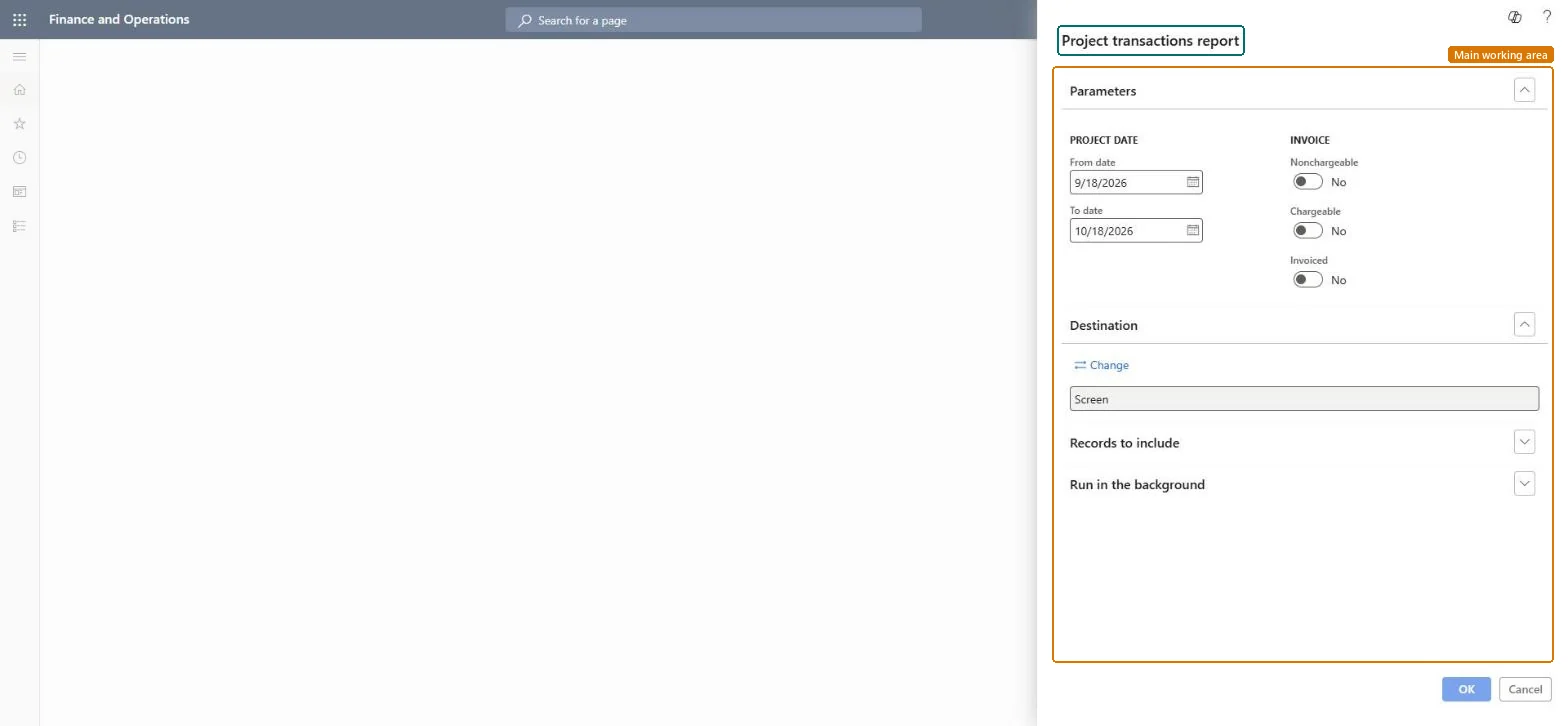
Project transactions report page in Dynamics 365
The page in Dynamics 365. page title tab to open what to set or check
Functional consultant · Solution architect

2Where it fits

Business processManage project financials
Menu pathProject management and accounting › Inquiries and reports › Project transactions report
Set up firstPosted project transactions Microsoft Learn
Used next byCreate project invoice proposals Microsoft Learn
Related pagesProject invoice proposals Microsoft Learn
End user · Functional consultant

3How to do it

About the examples: Examples and screenshots in this guide use BEAT, a demo company in a Dynamics 365 test environment. Use your own company's codes and values instead of copying them.

When to run it

When to run itBefore you create invoice proposals for a period, and before closing a project.
How oftenMonthly, at invoicing time.
What the output showsTransactions per project with type, date, amount and invoice status. The report design is ProjListTransProj.

Source: Microsoft Learn

Setup steps on this page

List what is still to be invoiced

Find chargeable transactions that are not on an invoice yet.

Steps from Microsoft

  1. Go to Project management and accounting > Inquiries and reports > Project transactions report.
  2. Set the Project date range to the invoicing period.
  3. Turn on Chargeable only to see what still has to be billed; add Invoiced to compare with what the customer already received.
  4. Filter on the project under Records to include and read the chargeable lines; create an invoice proposal for any that should be billed now.

Source: Microsoft Learn

Fields on the page

FieldWhat it meansExample
InvoiceWhich transactions to include: nonchargeable, chargeable or already invoiced.Microsoft Learn
Project IDThe projects to include on the report.Microsoft Learn
Project date - From date / To dateThe range of project dates to report on; the dialog suggests the last month.Checked in Dynamics 3651 October to 31 October
NonchargeableLists transactions whose line property makes them nonchargeable.Microsoft Learn No
ChargeableLists chargeable transactions that are not invoiced yet.Microsoft Learn Yes
InvoicedLists transactions already on a posted project invoice.Microsoft Learn No

Common errors and fixes

MessageWhat to do
The report is empty although hours were posted.Turn on at least one of Nonchargeable, Chargeable or Invoiced, and check that the project date range covers the transactions. Checked in Dynamics 365
Hours on a Time project never show as chargeable.Time projects record hours only for utilization; they aren't invoiced. Report them with Nonchargeable. Microsoft Learn

Test checklist

  1. Post a chargeable hour line of 2.00 hours on PRJ-0042.
  2. Run the report for that date with only Chargeable on.
  3. Invoice the line and run the report with Invoiced on.
  4. Check that the line moves from the first list to the second.

Source: Microsoft Learn

Functional consultant

4Setup decisions

Setup stepRecommended value and whyDecision, common mistake and test
List what is still to be invoicedSet the project date range to the invoicing period and turn on Chargeable only.Chargeable lines are the invoice backlog; mixing in invoiced or nonchargeable lines hides it.How is the invoice backlog checked each month?Reading a nonchargeable line as missed revenue; its line property says it is never billed.Test: Chargeable lines leave the report once invoiced

Feature management and licence

Licence or add-inOn the live system, Project manager, Project supervisor, Project accountant, Project assistant and Chief executive officer run this report. Feature management controls whether this report skips the reporting framework's transaction scope (ProjSSRSSkipReportTransactionFeature), which helps large runs.

Microsoft Learn

Solution architect

5Design impact

Shared or per companyPer company: posted transactions belong to the legal entity of the project. Microsoft data model
Can it be undoneReversible: The report changes no data. Microsoft Learn
If you change it laterA transaction moves from Chargeable to Invoiced when its invoice is posted; an adjustment reverses the original line and adds a new one, so both can appear in the range. Microsoft Learn
Technical architect

6Technical

Menu itemoutput:ProjListTransProject Checked in Dynamics 365
FormSysOperationTemplateForm Checked in Dynamics 365
Roles to set it up and use itTo use itProject manager ProjProjectManagerProject supervisor ProjProjectSupervisorProject accountant ProjProjectAccountantChief executive officer CompanyChiefExecutiveOfficerProject assistant ProjProjectClerkGive people one of these roles. On this system, 6 roles can run this page.Checked in Dynamics 365
Developer

7Developer

Open it by URLhttps://<your-environment>/?mi=output:ProjListTransProject
Data migrationLoad order: The Project transactions report has no data entity in Data management: it reads posted project transactions. Open balances from a former system are loaded as beginning balance journals, which update only the project subledger.Microsoft Learn
Everyone

8Sources