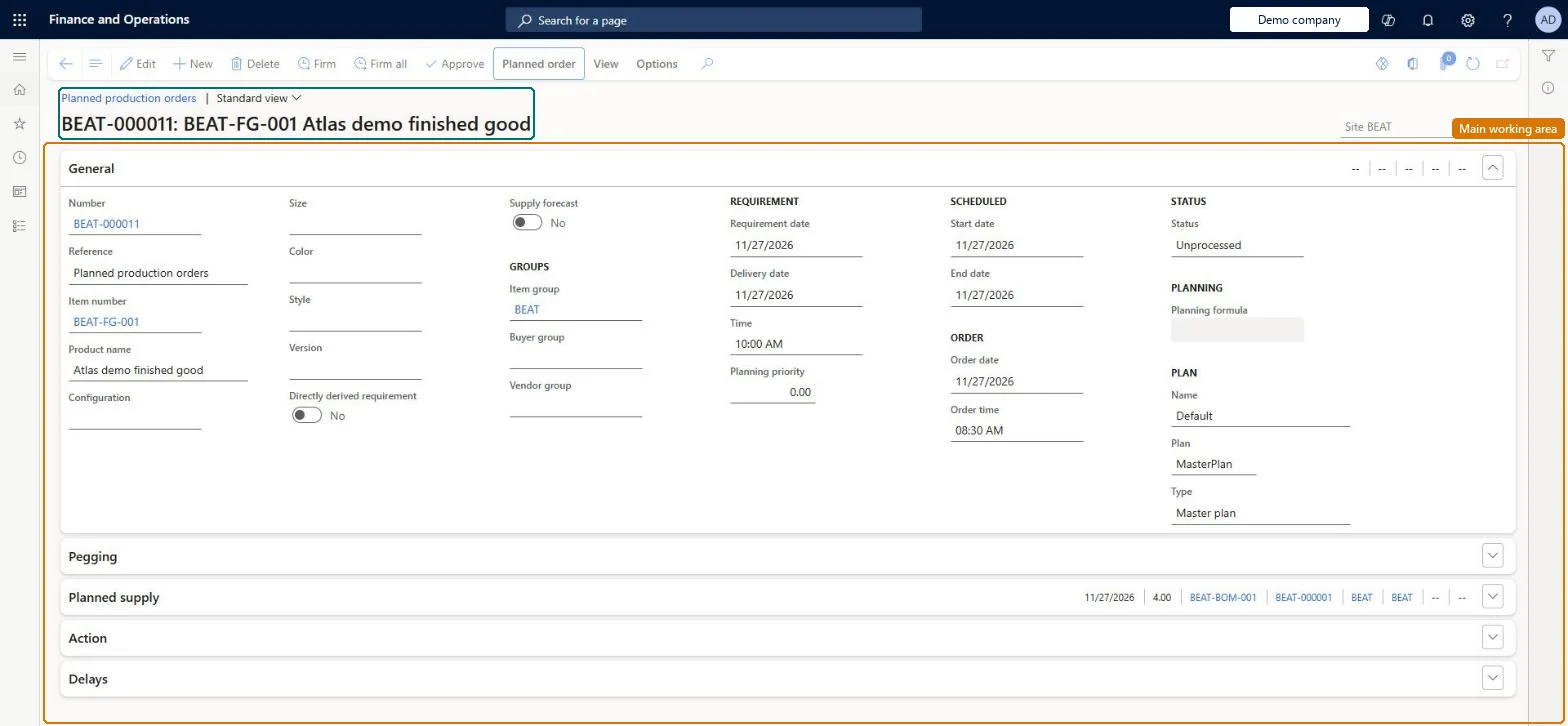
A list of the planned production orders that master planning generated to cover demand, where a planner can approve, change or firm them into real production orders.
Materials manager, Production manager, Production supervisor and 2 more roles
Business process
Firm planned production or batch orders in Dynamics 365 Supply Chain Management
Menu item
ReqPOGridViewProduction
Main table
ReqPO
Data entity
ReqDynamicPlanProductionOrderScheduleEntity
Show what matters for
PAGE GUIDEWhat the page does and how to use it7 sections. Choose a role to highlight what matters to you.
Everyone
1What it is and why
What it is
A list of the planned production orders that master planning generated to cover demand, where a planner can approve, change or firm them into real production orders.
What you do here
Use this page to review planned production orders, set their status to Approved or Completed, and firm the ones you want so that real production orders are created.
Example
For example, after a planning run a planner firms all planned production orders due this week so that they appear on the All production orders list.
The page in Dynamics 365. page title tab to open what to set or check
About the examples: Examples and screenshots in this guide use BEAT, a demo company in a Dynamics 365 test environment. Use your own company's codes and values instead of copying them.
Steps from Microsoft
Go to Production control > Production orders > Planned production orders.
Select the planned production orders you want to turn into real orders.
Select Firm to firm the selected orders, or Firm all to firm every order in the current filter.
If many orders are selected, set Parallelize firming and Number of threads as needed.
Manual changes to a planned order are not reflected in the rest of the plan until master planning runs again; approve the order and rerun planning to see the effect on material requirements. Microsoft Learn
Technical architect
5Technical
Menu item
ReqPOGridViewProductionChecked in Dynamics 365
Form
ReqTransPoChecked in Dynamics 365
Table
ReqPOShown as “PLANNED ORDER” in Record infoKey field: RefIdChecked in Dynamics 365
Data entities
ReqDynamicPlanProductionOrderScheduleEntityPlanned production orders schedule Microsoft data model
Who can open it
PrivilegesMaintain planned production order details ReqTransPoProdDetailsMaintainView planned production order details ReqTransPoProdDetailsViewDutiesInquire into planned orders ReqPlannedOrderProgressInquireMaintain planned orders ReqPlannedOrdersMaintain5 security rolesMaterials manager InventMaterialsManagerProduction manager ProdProductionManagerProduction supervisor ProdProductionSupervisorProduction planner ReqProductionPlannerPurchasing manager TradePurchasingManagerChecked in Dynamics 365
Roles to set it up and use it
To set it up or change itProduction planner ReqProductionPlannerTo use itProduction supervisor ProdProductionSupervisorProduction manager ProdProductionManagerMaterials manager InventMaterialsManagerPurchasing manager TradePurchasingManagerGive people one of these roles. On this system, 5 roles can open this page.Checked in Dynamics 365
Actions on the page
Planned orderView: Display, Related information, View, Requirements(Action Pane without tabs): Firm, Firm all, ApproveChecked in Dynamics 365